 |
VR-Forces 5.0.2 Developer's Guide
|


All Classes Namespaces Files Functions Variables Typedefs Enumerations Enumerator Properties Friends Macros Groups Pages
|
VR-Forces 5.0.2 Developer's Guide
|
When you call loadScenario(), your remote controller application does the following:
The figure illustrates the load scenario process for multiple back-ends and shows that back-ends may load scenario files at different rates.
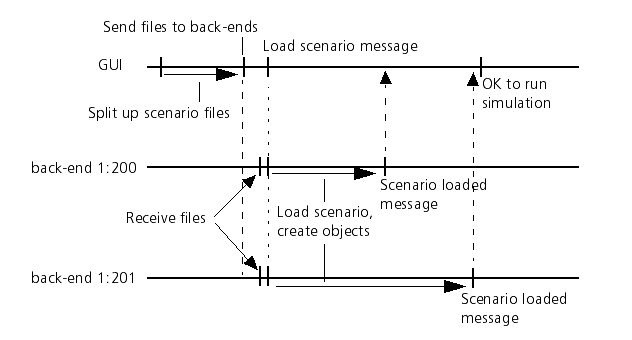
To find out when the various back-ends have completed loading the scenario and initializing, you can register for callbacks through the DtVrfRemoteController. You can use add/removeBackendLoadedCallback() to register or unregister callbacks that you would like to have executed each time a remote VR-Forces application has indicated that it has finished loading the scenario. Or, you can use add/removeScenarioLoadedCallback() for callbacks that you want to have called only when the scenario has been completely loaded by all participating back-ends.
The loadScenario() member function takes two optional arguments that indicate what you want to happen if all back-ends called for by the Object Map File are not available. The DtVrfController knows (through its DtVrfBackendListener) the simulation addresses of all VR-Forces applications that are currently running. By default, partial loads are allowed, meaning that loadScenario() will ignore missing back-ends, and just ask those applications that are available to load their portions of the scenario. If a value of false is passed as the allowPartial argument, then loadScenario() will fail (returning false without asking any back-ends to load anything) unless all expected simulation engines are present. If partial loads are allowed, and if a non-NULL DtList pointer is passed as the missingBackends argument, the DtList will be filled with pointers to the DtSimulationAddresses of the missing applications.