 |
VR-Forces 5.0.2 Developer's Guide
|


All Classes Namespaces Files Functions Variables Typedefs Enumerations Enumerator Properties Friends Macros Groups Pages
|
VR-Forces 5.0.2 Developer's Guide
|
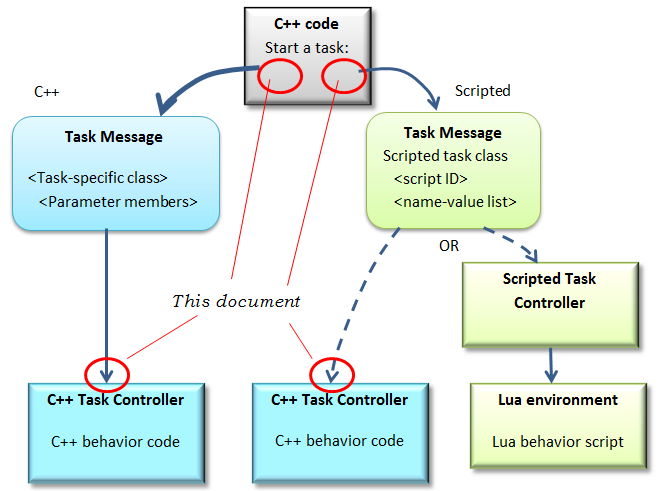
VR-Forces has two forms of tasks, two means of specifying task identities and parameters, and two ways of programming task behavior. We will call these the C++ and scripted forms. This section describes how to write C++ code to issue either C++ or scripted task messages to start a task, and how to write C++ code in a C++ task controller to process C++ or scripted task messages.
Tasks in the C++ form are identified by different C++ classes (subclasses of DtSimTask). These classes include members which define the parameters of the task. C++ task behavior is programmed in a controller component that registers to handle messages containing a specific task class.
The scripted task form is an alternative mechanism for both specifying and programming the tasks. Scripted tasks all use the DtScriptedTaskTask class. The task identity is defined in the myScriptId member. The task parameters are represented as a list of name-value pairs. Scripted task behavior can be programmed in a C++ controller or in a script environment.
Because behavior for tasks identified in a Scripted Task class can be programmed in either C++ or Lua (a scripting language), there is some ambiguity in terminology when referring to "scripted tasks." The term "task" could refer to the identifying task message or the code that implements the behavior, and the two can use different forms. In this document we will try to avoid confusion by specifying task messages or task behavior code when talking about a particular task form.
The relationship between the elements described above is illustrated in the following figure:
This document does not cover how to start or process tasks in Lua scripts; see instead the Lua API documentation. Briefly, either form of task is started by calling vrf:startSubtask() (or a similar function), and parameters of either form of task are handled by accessing entries in the taskParameters table.
C++ tasks are started from within C++ code by creating a task class of the appropriate type, filling in task parameters using class member functions, and sending the task as a message. The following is an example of creating a move-to task:
The final line makes this task a subtask, which is usually appropriate when the code that is issuing the task is in a task controller. If this is to be a top-level task, then the subtask member would be set false.
After the task is created, it is sent to the simulation object as a message. The following are several common ways to send the task message for different situations.
If the VR-Forces front end is starting the task, it will typically use the remote control interface. In a task dialog derived from DtBaseTaskSetDialogInterface, a wrapper function can be used to send the task like this:
See the addSet example for similar code with a set command.
Single and multi-task controllers have a function sendSubtask(DtSimTask& task). This starts a subtask on the same simulation object. This function doesn't send a message, but creates a task message and directly calls taskManager->executeTask with the task message.
The multiTaskController has a sendTask(DtSimTask& task,... ) function. This function sends a task message to a given simulation object. The function returns a subtask ID with which to track the task. The function declaration is as follows:
It might be appropriate to use this function to send tasks from a unit to its subordinates, or from a simulation object to the passengers embarked on it.
Unlike the multiTaskController, the singleTaskController does not have a sendTask() function. However, tasks can be sent from single task controllers or other C++ code modules by replicating the necessary setup steps. The setup involves creating a DtTaskMessage to wrap the task. For example:
Note that several existing controllers written years ago have members identifying the simulation object radio, and so send tasks using a radio interface like this:
This function simply calls the communication interface sendSimInternalMessage function.
A C++ controller component that implements task behavior must include code to do the following:
Examples of registering and defining a callback function for tasks are provided in the addTask example.
To access the parameter values, the processing function gets the appropriate task class from the message and uses its access member functions. For example, the target selection controller gets the auto-select-weapon flag and the target simulation object ID this way:
As with C++ tasks, tasks that use scripted task messages are started by creating a task structure, specifying parameter values, and sending the task. The task structure is sent as a message exactly the same way a C++ task message is sent. For scripted tasks, however, the task class is always DtScriptedTaskTask, and parameter values are specified by creating and adding DtRw variables to the task. Here is an example of specifying several types of parameters in a task:
A complete list of the parameter types that are possible for the overloaded setValue function can be found in vrfTasks/scriptedTaskTask.h.
For parameter types that are not included in the overloaded versions of setValue, an RW variable must be created explicitly. For example:
The task parameters above have names "p1_selection," "p2_time," and so on. The type names embedded in these names reflect the parameter types that can be selected in the scripted task dialog manager in the front end. These parameters would be accessed in a Lua script as taskParameters.p1_selection, taskParameters.p2_time, and so on.
Scripted task messages are sent exactly the same way C++ task messages are sent.
As with handling C++ task messages, a controller that handles scripted task messages must register to handle the message and define a callback function.
When a C++ controller receives a task message containing a scripted task, the task parameters cannot simply be taken from the task class members. Instead, the list of name-value pairs in the scripted task has to be searched for the expected variable names. The variables() function provides the variable bindings in the task structure, and looking up a variable in these bindings returns a pointer to a DtReaderWriter that holds the parameter value. The following is an example of accessing parameter values in a message processing function:
When scripted tasks are created in the scripted task manager in the front-end, default values can be supplied to the parameters. To access these default values, the script is looked up in the scripted task manager, which returns another set of variable bindings containing default values. A utility function in propertyUtils.h makes the code concise. The following is an example of using default values: