 |
VR-Forces 5.0.3 Developer's Guide
|


All Classes Namespaces Files Functions Variables Typedefs Enumerations Enumerator Properties Friends Macros Groups Pages
|
VR-Forces 5.0.3 Developer's Guide
|
You might want VR-Forces to invoke a callback whenever some amount of time has passed, but not necessarily every frame.
VR-Forces uses timers for this purpose. Through the DtCgf's DtSimulationServices you can get a pointer to a DtScheduler that you can use to schedule events. Events are scheduled by elapsed simulation time.
The Scheduler manages instances of DtTimer objects, and its use is optional. A DtTimer is given a time to fire, a callback function to call when it fires, and a pointer to user data that will be provided to the callback. You can tick the timer directly each simulation frame, or place the timer on the Scheduler.
The Scheduler maintains a list of DtTimers given to it. The Scheduler ticks its timers when it is ticked. The timers are listed in the order they will fire. It is your responsibility to remove timers from the Scheduler once they have fired.
You can designate a DtTimer as recurring (DtRecurringTimer) or periodic (DtPeriodicTimer). Recurring and periodic timers are rescheduled by the scheduler after they fire.
Recurring timers are timers that, after firing, are rescheduled to fire at a specified time after the actual firing time. Periodic timers are timers that, after firing, are rescheduled to fire at a specified time after the last time the timer was scheduled to fire. The figure illustrates the difference.
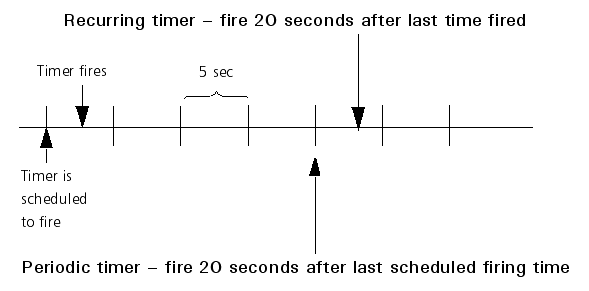
If a timer fires at exactly the time that it is supposed to, the two types of timers are equivalent. However, timers can only fire when the scheduler is ticked. Since the scheduler is ticked once per frame, there is a potential error of +/- the current frame time between the scheduled time of fire and the actual time of fire. The two different types of timers provide two different ways of dealing with this error.