|
DI-Guy Lua AI SDK
|
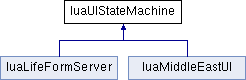
A class for building interactive UI tools. More...
Public Member Functions | |
Standard Infrastructure | |
| init_package () | |
| this function is called at time 0 More... | |
| reset_package () | |
| this function is called at reset More... | |
| update_package () | |
| draw_package () | |
| an active draw function, set self.draw_ui to start seeing something More... | |
State Management | |
| begin_state (_name) | |
| Convenience function for storing the current state in the object. More... | |
| state_manager (sender, message_type, message, params) | |
| This is the main entry point from C++ into the lua framework. More... | |
Message Handling | |
| sleep (duration) | |
| This is a simple sleep function. More... | |
| wait_for_multichoice (...) | |
| This is a wait function that will wait indefinately and only wake up when one of a few specific messages are recieved. More... | |
| wait_for_message (message_to_wait_for) | |
| a function that waits for an explicit message More... | |
UI Functions | |
| show_ui_message (message) | |
| Puts a message up on screen with a label. More... | |
| hide_ui_message () | |
| get_user_selected_point (_options) | |
| sets up the ui for point selection More... | |
| get_user_selected_character (_options) | |
| sets up the ui for point selection More... | |
A class for building interactive UI tools.
TODO: add character selection
| luaUIStateMachine::begin_state | ( | _name | ) |
Convenience function for storing the current state in the object.
Example:
| _name | name of current state |
| luaUIStateMachine::draw_package | ( | ) |
an active draw function, set self.draw_ui to start seeing something
| luaUIStateMachine::get_user_selected_character | ( | _options | ) |
sets up the ui for point selection
Takes an options table. Optional parameters are:
| options["message"] | what to place in text label; defaults to "Select character with mouse" |
| options["pause_scenario"] | whether the scenario should be paused during click retrieval; set to true or 1 |
| luaUIStateMachine::get_user_selected_point | ( | _options | ) |
sets up the ui for point selection
| luaUIStateMachine::hide_ui_message | ( | ) |
| luaUIStateMachine::init_package | ( | ) |
this function is called at time 0
| luaUIStateMachine::reset_package | ( | ) |
this function is called at reset
| luaUIStateMachine::show_ui_message | ( | message | ) |
Puts a message up on screen with a label.
| luaUIStateMachine::sleep | ( | duration | ) |
This is a simple sleep function.
It will put the object to sleep until a message is received or for duration seconds. Frequently messages are mouse events see get_user_selected_point() for how to make a state machine use the user interface.
| duration | if nil object will sleep infinately long, otherwise will automatically wake up, note update_package() is responsible for waking the object |
| luaUIStateMachine::state_manager | ( | sender | , |
| message_type | , | ||
| message | , | ||
| params | |||
| ) |
This is the main entry point from C++ into the lua framework.
Whenever the state machine receives a message, this function is called to resume the underlying coroutine microthread.
This function should not be overloaded.
| luaUIStateMachine::update_package | ( | ) |
| luaUIStateMachine::wait_for_message | ( | message_to_wait_for | ) |
a function that waits for an explicit message
| luaUIStateMachine::wait_for_multichoice | ( | ... | ) |
This is a wait function that will wait indefinately and only wake up when one of a few specific messages are recieved.
 1.8.3.1
