 |
DI-Guy SDK Documentation
13.1
|
|
DI-Guy SDK Documentation
13.1
|
The diguyScenario and diguyCharacter classes are the two most powerful classes in DI-Guy.
Most of your development will center on working with these two classes. The following sections describe some of the key functions and concepts of each class.
The following sections describe important types of functions in the diguyScenario class.
The update() and draw() functions are key functions used in even the simplest DI-Guy application.
The update() function advances time forward to time t and new position and joint values are calculated for all the characters. No rendering happens in update().
On immediate mode rendering systems, rendering is performed in the draw() function. The draw function calls two sub-functions, draw_pass1(), which draws the opaque objects in the scene, and draw_pass2(), which draws the transparent objects. You can call the subfunctions directly if you need that level of control.
Functions are provided for enabling and disabling culling of characters that are outside the view frustum. Characters are surrounded by bounding spheres.
If you save a scenario created with DI-Guy Scenario, it creates a .dss file. You can use the load() function to load a diguyScenario from the .dss file.
The reset() function rewinds the scenario back to the start time (t-in) and resets a number of features such as signals. Reset is almost always the preferred way to restart a scenario, as opposed to just setting t to zero.
Use get_t() if you want to know what time the scenario thinks it is. Accessor functions such as get/set_tout(), get/set_playback_loop(), and get_tick_dt() allow users to set and get various values associated with time control of a DI-Guy scenario.
The concept of associating a clock time-of-day to t-in is available in DI-Guy and can be accessed through the tin_time_of_day family of functions.
The following functions improve loading performance.
These functions let you avoid problems at runtime that can occur if new character data is loaded when a character or gesture is called for the first time. These functions load the data during startup, when delay is less important.
You can also improve performance when updating DI-Guy. You can use a multi-threaded control API in diguyApp. For details, please see diguyApp:set_num_threads(). The get/set_ticks_can_be_dropped() and get/set_max_ticks_behind_till_dropped() functions let you tune scenarios that have trouble running in real time. For more information about improving performance, please see 4 - Maximizing DI-Guy Performance.
The diguyScenario class has functions that let you get the following information about DI-Guy characters and their capabilities:
When a number of items are available, there are functions for getting those items by index.
Perhaps the most important function of the diguyScenario class is to act as a container for DI-Guy characters.
Path shapes are the splines that underlie paths in DI-Guy. The diguyScenario class has functions for creating, indexing, copying, and destroying path shapes. Once a path shape has been defined, DI-Guy characters can follow them. The path shapes are in turn composed of waypoints, which can also be manipulated through the diguyScenario interface.
Signals are useful as a means to call event handlers. You can create and destroy signals, retrieve the number of signals, retrieve a signal using its index, or retrieve a signal using its name. All of the signals can be reset using reset_signals().
You can create and destroy sounds, retrieve the number of sounds, retrieve a sound using its index, or retrieve a sound using its name. All sounds can be reset using stop_all_sounds().
\note Sounds are not played directly. They are used as templates for sound instances. Please see diguyCharacter::play_sound() and diguyCharacter::create_sound_instance() for more details.
Groups are subsets of the characters belonging to the scenario. They can be very useful as a way to organize characters. For example, when networking, combatants are classified as belonging to groups net_friendly, net_opposing, or net_neutral. You can create and destroy groups, retrieve the number of groups, retrieve a group using its index, or retrieve a group using its name.
Sensor regions are user-definable cubic regions that sense when characters enter and leave them, and also know how many characters are in them. You can retrieve the number of sensor regions and retrieve a sensor region using its index. Sensor regions can have callbacks associated with them for when characters enter or leave.
DI-Guy AI supports arbitrarily shaped regions.
Scene objects are stationary objects (usually terrains) to which waypoints can be ground clamped.
You can create and destroy scene objects, retrieve the number of scene objects, retrieve a scene object using its index, or retrieve a scene object using its name. Scene objects can be enabled or disabled (that is, rendered).
Views are windows in which rendering occurs. You can find a view by name, retrieve the primary view, or retrieve a secondary view by index.
Each view has a camera associated with it that defines how the 3D scene is viewed in the window. Multiple camera settings can be contained in a scenario, and the camera can be set to the values in any of those camera settings. Functions are available to query the number of camera settings, or get a camera setting by index or name. The function load_camera_settings() sets the primary view’s camera parameters from the specified camera setting.
There is also a set of functions for setting or querying the relationship of script events to the camera.
diguyScenario has functions for managing fog and light settings, including querying the number of settings, retrieving a setting by index or name, and manipulating the values of the settings. These functions are relevant only if you want to program while running inside of DI-Guy Scenario.
Information popups are boxes with text that appear when running a scenario inside of DI-Guy Scenario. An API is available to manage the popups.
You can declare user variables that are attached to the diguyScenario class. An API is available to manage the variables, including declaring, setting, naming, finding, and using the variables.
You can create, delete, and manage the facial expressions associated with Expressive Faces software.
You can use the add_callback() function to have a function called when any of the following scenario-level events occur. Some of the events are specific to DI-Guy Scenario.
For additional callbacks see diguyScenario.h.
The function add_default_character_callback() lets you assign particular character level callbacks to all subsequent characters added to the scenario. Similarly, set_default_character_altitude_function() lets you assign a particular altitude function to any character subsequently added to the scenario. There are similar methods for assigning callbacks to paths, sensor regions, signals, views, cameras, fog, and lights.
DI-Guy event handlers are similar to callbacks, but have a name with which they can be referenced. map_event_handler_to_callback_id() maps an event handler function to a particular callback ID. The API provides functions for registering various event handlers tied to signals, sensor regions, character events, and scenario events.
You can save and load history for after action review of your scenario. Call set_history_type() to DIGUY_HISTORY_TYPE_COMPLETE, since this is a DI-Guy SDK application. When playing back scenarios, other calls made to DI-Guy API functions may be ignored, unless you are at a point in the scenario for which no data had been recorded.
DI-Guy supports levels-of-detail for graphics (where characters are drawn with various numbers of polygons), motion (where characters can limit which joints are updated), and shaders. Activation, ranges, and other methods of parameterizing the LODs are available in the API.
The basic concept of meta-actions is that you should be able to query a character for his "closest action" without knowing exactly what actions or their names are available by describing the direction-of-travel, speed, posture, and variant of the action he would like to use. For example, you might ask for a moving forward motion that goes four MPH in an upright posture. For a soldier, the "jog" action might be returned, while for the female_pedestrian, perhaps "powerwalk" would be returned. Variant can mean different things, for example, "funky" versus "stiff" might be a way of differentiating between two different types of walking.
The following sections describe important types of functions in the diguyCharacter class.
Rendering is performed in the draw() function on immediate mode rendering machines. The draw function calls two sub-functions, draw_pass1(), which draws the opaque objects in the scene, and draw_pass2(), which draws the transparent objects. You can call the subfunctions directly if you need that level of control.
get/set_appearance() and get/set_current_appearance() let you get and set a character's appearance. Current appearance (as returned by get_current_appearance()) may be different than the base appearance. This base appearance is the starting appearance of the character before any calls to set_current_appearance() have been made. This means that if the scenario is reset, the appearance will revert to the base appearance.
\note DI-Guy currently prohibits changing the appearance of a character to a new appearance associated with a different actor once a scenario is underway. This is due to DI-Guy methods for reducing foot slippage. It is therefore important to use set_appearance() before advancing time. Choose an appearance associated with the actor with whom all anticipated future appearances are also associated.
Use of shader LODs can improve performance. Use the get/set_graphics_lod() and get/set_shader_lod() functions.
Characters can be culled in or out of the scene. You can set or view a character’s bounding radius with get/set_bounding_radius() and get/set_default_bounding_radius(). DI-Guy Character Viewer can also display them. Please see the culling examples for how to use these functions inside your application.
Normally "Z" is up for a character, but occasionally you may want to alter the up vector. A good example would be a vehicle like an airplane banking as it made a turn. Use the get/set_up_vector() to access this value.
The following function support animation blend tree functionality:
For more information about animation blend trees, please see 3.1.1.1 Animation Blend Trees. For more information about these functions, see the Animation Blend Tree Parameters section in diguyCharacter.h.
set/unset_parent() allows you to parent a character to another character. Characters move relative to the parent character, not global space.
get/set_user_data(). Lets you attach your own classes or structures to a DI-Guy character and access them.
Call play_3d_sound() to have your character play a sound that "follows" your character. play_sound() plays an "ambient" (positionless) sound.
A sound instance is, roughly speaking, a playing copy of a sound. A single sound can be layered on top of itself many times. Each of these layers is a sound instance. For example, a single gunshot sound might be used for every soldier's gun. Since these guns might be fired nearly simultaneously, each gun, when it fires, has its own instance of the gunshot sound. Any time a sound is played, a sound instance is being used. Generally, these sound instances are managed internally to DI-Guy and you need not worry about them if you use only play_sound() or play_3d_sound(). But if you need finer control over sound, you will have to work with sound instances.
Sound instances are generally most useful for longer sounds, such as the engine sound of a vehicle. With such sounds, you may want to play them for a shorter time than their natural duration. You need to be able to stop them before they play out naturally. You also might want to repeat a relatively short sound so that it will fill up a desired amount of time. You can do both of these things with sound instances.
Please see the SDK reference for details on using sound instances.
Use is_within_distance_n_of_character() to query whether any other characters are near your character. is_within_distance_n_of_member_of_group() queries whether any characters that belong to a particular group are near your character.
Other functions for detecting characters include:
For details, see diguyCharacter.h.
Use the add_callback() function to have a function called in response to character-level events. Please refer to the SDK Reference Manual for a list of callbacks. Types of callbacks include upon create, upon destroy, and pre and post weapon fire.
map_event_handler_to_callback_id() maps an event handler function to a particular callback ID. DI-Guy event handlers are similar to callbacks, but have a name with which they can be referenced. The API has functions for registering various event handlers tied to signals, sensor regions, character events, and scenario events.
Characters can aim, gaze, or point by being directly commanded or by reaching a bead on the path they are traveling.
Aim, gaze, and point have many functions for specifying how to aim, gaze, and point, whether it is at a point in space, a local direction, or at another character or link. Functions are also available for determining the status or duration of the aim, gaze, or point, and to terminate these actions. Query functions allow you to determine a character’s particular ability to aim, gaze, and point.
A smaller API is available for nodding and head shaking for default, non-animated heads. The Expressive Faces module offers dynamic facial animation.
While a character is in path position mode, its altitude (position in Z direction) is most often determined by the path. Characters in free position mode often need their altitude to be determined by another method. This can be done by setting the position manually (using the set_position()) call, or semi−automatically by registering an altitude function. An altitude function is a callback function that gets called once per character update. Based on the character's updated X and Y position, the callback can calculate and return an appropriate Z position. This is commonly done using some type of graphics intersection testing.
DI-Guy characters that have weapons can fire them. The SDK has functions for determining the muzzle flash and sound to play when firing. Use set_weapon_fires_live_rounds() to determine whether the character might hit or kill other characters. The kill zone has a near, far, and weapon spread that is programmable.
Characters can fire a weapon using the fire_weapon() or fire_weapon_n_times() function.
By default, when a character get’s shot, it dies. However, you can use the CALLBACK_ID_IMPACT and CALLBACK_ID_CROWD_MEMBER_IMPACT callbacks to override this behavior and create custom damage models. These callbacks are called when a character has been hit. diguyCharacter::get_last_impact_record() contains a pointer to the impact information. If a character has this callback the standard behavior (killing the character) is skipped and the system assumes the end user has handled the impact.
The diguyImpact class contains detailed information for the result of a weapon fire. Consult this class for more information for supporting advanced weapon effects.
A gesture is a motion a character can do that temporarily overrides a subset of the character's joints. Gestures are designed to supplement the stock set of character motions. Most gestures are available to all characters.
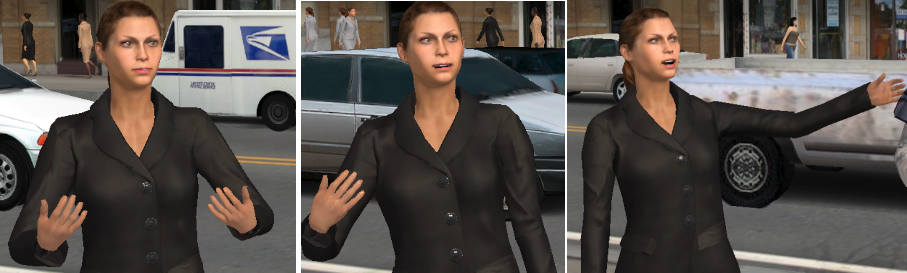
DI-Guy Scenario has an interactive mode that allows gestures to be easily previewed, right click on any character and do show Gesture Previewer. For more information about gestures, please see 3.1.5 Gestures.
DI-Guy characters support setting and querying information about how they are broadcast or received from a DIS networking session. Attributes such as whether a character should be published, its lifeform state, weapon state, network marking, and entity number can all be set or queried.
A guide is a mechanism for controlling the position, orientation, or action of a character that is in free position mode and free action mode. Guides are most often used by networking software, where you only get intermittent information about a character’s position and actions, or formations. In either case, there is usually a current state and a goal state, and the guide is used to try to minimize the difference in the two in a believable manner. Most guides look at the desired position, velocity, and orientation of the character and do what is necessary to get the character there (or at least closer). How a guide accomplishes this depends on:
The desired position and orientation for a character can be set by set_desired_position() and set_desired_orientation(). They may also be implicitly set if that character is in a formation. Guides can be explicitly added to a character by calling add_guide() or create_guide(). They can also be implicitly added to a character if that character is called into a formation. Guide parameters are set by calls to diguyCharacterGuide::set_guide_algorithm_float_parameter().
The set_desired_velocity() function lets you do dead-reckoning.
Once a guide has been added to a character it can affect the position, orientation, and/or action of a character until the guide has been removed. Guides can be explicitly removed from a character by calling remove_guide() or remove_all_guides(). They can be implicitly removed by the break-up of a formation, or by an automatic removal guide acquiring the target destination.
Currently the following algorithms are offered as guides:
Please see the SDK reference for more information on particular guide algorithms and functions to activate and manage guides.
Just like scenarios, characters can have user variables associated with them. A set of functions is available for querying, creating, setting, and using user variables. Variables can be integers, strings, or floats.
[<< How DI-Guy Works] [Home] [Top of Page] [The DI-Guy Graphics API >>]
 1.8.9.1
