 |
DI-Guy SDK Documentation
13.5
|
|
DI-Guy SDK Documentation
13.5
|
When DI-Guy determines the joint animation (also called degrees-of-freedom) of a character during an update, it follows the sequence described in the following table.
| Stages of the Motion Pipeline | |
|---|---|
| Stage | Description |
| Initial | Retrieve initial pose based on action and aiming state. |
| Stage 0 | Reserved for users. |
| Stage 1,2 | Gazing, Pointing (except eyes). |
| Stage 3 | User Pose Overrides. |
| Stage 4 | Gestures. |
| Stage 5 | Nodding, shaking of head. |
| Stage 6 | Motion texture. |
| Stage 7 | Gaze (eyes). |
| Stage 8 | Unused. |
| Stage 9 | Reserved for users. |
It is useful to understand this progression, so that you can understand how the motions are constructed. You may even want to insert your own modifications to the final pose of the character in Stage 0 or Stage 9.
Inverse kinematics can take place after any of these stages.
When DI-Guy advances in time, it checks the underlying motion files to see if the animation is looping, or repeating itself, or if it is transitioning to another animation. If it is transitioning, it blends the animation into the new motion.
The gaze system can trigger a change in orientation if the orientation parameter is set to true. When a character needs to look at something beyond his normal gazing range, the character shuffles its feet to rotate its body so that it can achieve the desired gaze.
Aiming is performed by interpolating in joint space between two or four aim poses that define the extremes of the aiming space. These values are also calculated during the initial stage.
DI-Guy has an animation blend tree system that can allow actions to map to a data driven graph of underlying motion files. This graph can treat a collection of motion capture data as procedural inputs into a mathematical system that allows us to synthesize new motions on the fly.
The following nodes are available:
These tools are useful to allow DI-Guy to create a ‘walk aiming’ motion by blending the lower body of walk with the aim upper body, but still logically treat them as one action. Or to allow the smooth interpolation between a character that is walking and one that is running, or walking, running, and strafing.
Use the Gaze and Pointing API to have a character stare or at point at a particular location in space, as in the illustration.
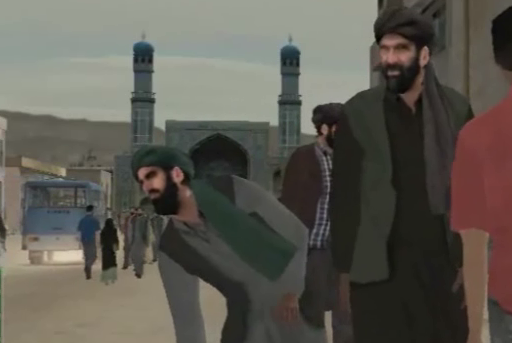
Gazing and pointing can be commanded in a variety of ways from the API. A character can gaze and point:
API functions allow you to access and modify how quickly the gaze or pointing takes effect and how interpolation is performed.
Gazing can be as minimal as eyes rotating towards a target, or as dramatic as the character stepping to turn around, while altering the hips, back, and cervical joints. Pointing affects the left shoulder and left elbow. (Use gestures for right arm pointing.)
Please see the DI-Guy SDK Reference for a function-by-function description of the gazing and pointing features available in DI-Guy.
Use the Aim API to have a character equipped with a weapon aim that weapon. Like gazing and pointing, aiming can be specified in a variety of ways. A character can aim:
The Aim API lets you read and set how quickly an aim takes effect, as well as how interpolation is performed.
Characters need to be playing an aiming action to enable the aiming API. Thus, a character performing a "stand" action cannot aim, but a character doing a "stand_aim" can.
Please see the DI-Guy SDK Reference for a function-by-function description of the aiming features available in DI-Guy.
You can directly set or modify a part of a pose or the entire pose of a character using a pose override. Pose override essentially views the state of the character as an array of values for each degree-of-freedom. You capture the current state and modify it. An array of weights is available that indicates for each degree-of-freedom how much the pose override value should affect the value already calculated in the motion pipeline up to the point in time that the pose override is applied.
Please see the DI-Guy SDK Reference for a detailed functional description of user pose override capabilities.
Gestures are motions that are applied to a subset of the degrees-of-freedom of a character. You can order the character to perform gestures. Gestures augment any motion already being performed. Layering motions in this way can be useful for creating signals and are critical when wanting to create a believable talking character. Most gestures are available to all characters.
Gestures have stages, which are played in order. Before stage 2 of the gesture is played, stage 1 must be played. Sometimes a stage is repeated multiple times before the gesture moves on to the next stage. Stages are numbered 1 to 3, not 0 to 2.
An example of a three stage gesture could be a wave. In stage 1, the gesture raises the character's arm. In stage 2, the arm waves back and forth. Stage 2 may be repeated multiple times to get the character to wave more than once. Stage 3 lowers the arm back to the character’s side.
Some gestures use the concept of channels. If a gesture has more than one channel, usually the gesture is represented in a different manner in each channel, perhaps to indicate different emotive states. An example of a two channel gesture could be a chop beat gesture for emphasizing speech. Channel A may have a small, tentative chop gesture, while Channel B contains a strong, emphatic chop gesture. If the weights of channels A and B are 1 and 0, respectively, the final gesture would be identical to the small chop. If the weights are 0 and 1, respectively, the final gesture would be the emphatic chop. If the weights are 0.5 and 0.5, respectively, the final gesture would be a combination – partly small, partly emphatic. As the gesture progresses, the weights can be varied to add even more flavor and nuance to the resultant gesture.
Please see the DI-Guy SDK Reference for an abstract and functional description of these capabilities.
DI-Guy characters have head nodding and head shaking functions. These are simple functions that are appropriate if you do not need the flexibility that comes with manipulating the head using gestures.
Please see the DI-Guy SDK Reference for a functional description of these capabilities.
[Home] [Top of Page]
 1.8.9.1
