 |
DI-Guy SDK Documentation
13.7.1
|
|
DI-Guy SDK Documentation
13.7.1
|
This chapter provides three detailed examples of how you can use the DI-Guy SDK to simulate entity behavior:
The DI-Guy SDK includes programming examples. The examples assume a Windows operating system using OpenGL. Source code for the examples is provided with the DI-Guy distribution. They are in ./programming_examples/. In addition to OpenGL, examples are provided for DirectX and OpenSceneGraph (OSG) in the DI-Guy Graphics API, featuring open source implementation details. DI-Guy can render on just about any Windows or Linux rendering system imaginable.
All the OpenGL Windows examples should be looked at by all users, not just OpenGL users. Although the rendering environments can be very different, almost all your DI-Guy code will look the same.
The DI-Guy SDK can load and play scenarios created using DI-Guy Scenario. The .dss scenario file describes the scenario, the characters, behaviors, AI, decisions, and logic that play out over time. The characters are still accessible using the DI-Guy API, so you can both monitor and alter their behavior at runtime.
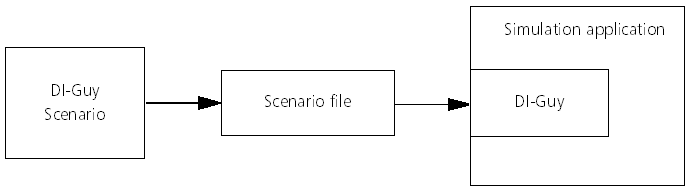
We think this is the most productive way to work with DI-Guy, because DI-Guy Scenario and DI-Guy AI are designed to let you quickly and efficiently create compelling human performances whether you are a programmer or not. The high-level process is as follows:
This method of adding humans is shown in the simple_playback example. This example is in ./programming_examples/diguy_ogl/simple_playback.
(Details about programming examples can be found in 10 - Programming Examples.)
The following DI-Guy OpenGL example loads and then plays back a scenario file created with DI-Guy Scenario.
Initialize DI-Guy. This particular initialization works for OpenGL, but diguy_graphics_api_initialize() should be used for the DI-Guy Graphics API implementations.
Create a DI-Guy scenario.
Load the .dss file into the scenario.
In your update loop, update the scenario with the current time in seconds.
In your draw loop, draw the scenario. In scene graph style renderers, this step is not necessary.
6. When finished, clean up the scenario and DI-Guy.
Another straight-forward way to use DI-Guy is to add DI-Guy characters to your application and then command their behaviors directly in real time using the DI-Guy API.
The "simple" example, creates a soldier character and then commands the character to perform a sequence of movements starting from a standing position. The source code for this example is in ./programming_examples/diguy_ogl/simple. You can run the compiled example by executing simple.exe (Windows) or simple (Linux).
Initialize DI-Guy. In this example, we used the OpenGL version of DI-Guy.
Create a DI-Guy scenario. You need at least one scenario to run DI-Guy.
Create a DI-Guy character of type soldier. You must specify the name, character type, and appearance of your character. You can specify body appearance, head appearance, and hand item. If you do not specify one of these, default values are used.
Set the initial position, orientation, and action for the character:
You will update the scenario periodically using scenario_update(). Before calling scenario_update() in the update loop, make any calls to change the behavior of your character. Here prev_t is the value of t the last time through the loop. At 2 seconds the character is commanded to walk, at 8 seconds the characters walks in a crouch, at 14 seconds he gets on the ground and aims the weapon, and at 18 seconds he fires the gun in 1 second intervals. All transitions are handled automatically by the DI-Guy motion engine.
In your update loop, update the scenario with the current time, in seconds:
In your draw loop, draw your DI-Guy characters. (In scene graph style renderers, this step is not necessary.)
When finished, clean up the character, the scenario, and DI-Guy:
A common mode of operation for DI-Guy SDK is to visualize human characters simulated by a remote application. A typical case is when you connect your simulation to a DIS or HLA network. (DI-Guy support HLA 1.3, HLA 1516 (SISO DLC), and HLA Evolved.)
Another common case is where your simulator is a HOST-IG style simulator, often connected using a CIGI pipe. DI-Guy provides support for broadcasting, receiving, displaying, and controlling characters in networked simulations. In addition to functions that deal with standard DIS and HLA lifeform functions, DI-Guy provides custom PDUs for DIS and the DI-Guy FOMs for HLA, that extend these protocols to take full advantage of DI-Guy’s capabilities. (DI-Guy has a custom FOM for HLA 1.3 and HLA 1516 and FOM modules for HLA Evolved.)
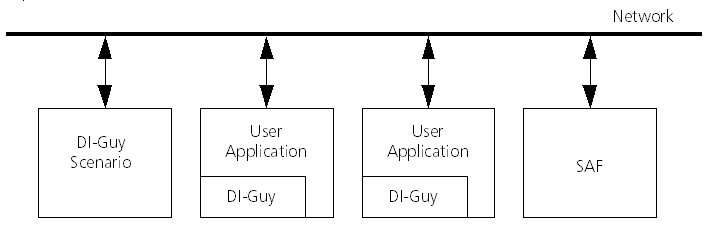
The following example shows how to network your DI-Guy characters to a DIS network. It is in ./programming_examples/diguy_networking/DIS. This example uses VR-Link (sold separately) to provide the networking layer. DI-Guy is designed to interface easily with whatever networking layer you use, so if you want to hook up your own networking middleware to DI-Guy, you can do so.
Initialize DI-Guy:
Initialize DIS:
Create a DI-Guy scenario:
Call networking functions to specify that we are receiving. Set the network host ID and go online:
In your update loop, get updates from DIS and update the scenario with the current time in seconds:
In your draw loop, draw the scenario. Scene graph style renderers do not require this step.
When you shut down, do it in the proper order.
The SDK also has the following examples of networking using HLA:
[Home] [Top of Page] [Querying and Setting Actions in a Pipeline Setting >>]
 1.8.9.1
