 |
DI-Guy SDK Documentation
13.7.1
|
|
DI-Guy SDK Documentation
13.7.1
|
DI-Guy broadcasts and responds to standard DIS entity state PDUs.
It can also broadcast and respond to DI-Guy Custom DIS PDUs. DI-Guy also broadcasts and responds to standard DIS fire and detonation PDUs. Examine the programming example diguy_networking/DIS, detailed below:
Before the DI-Guy scenario object is constructed, call:
and retrieve the net interface:
To join the exercise once the DI-Guy scenario object is constructed, call:
Once per frame or tick of the simulation clock during your simulation, call:
When you want to leave the DIS exercise, call:
At least once after calling diguy_net_module->go_offline() and before calling diguy_module_net_deinitialize(), call:
This allows the offline command to be processed, so that objects to be destroyed in Step 6 are unused.
After the DI-Guy scenario object has been destroyed, call:
Please see diguy_module_dis.h for more information about these functions, as well as a listing of other DIS-related functions offered by DI-Guy.
\note The diguyNetInterface class acts as a wrapper around either a DIS or an HLA network interface. The type of interface that is created depends on which library is linked against.
The ./programming_examples/diguy_networking/DIS/net_send example demonstrates broadcasting DIS. The ./programming_examples/diguy_networking/DIS/net_recv example demonstrates receiving DIS.
DI-Guy periodically broadcasts DIS entity state PDUs for each character. It broadcasts PDUs when the dead-reckoned error in position of an entity exceeds one of the following:
PDUs are also sent if the timeout threshold is reached (default 5 seconds). The timeout rate can be altered by calling diguyNetInterface::set_timeout_interval().
These threshold parameters are specified in the configuration file ./custom/config/diguy/scenario/network.cfg.
The IEEE standard 1278.1 defines DIS PDUs. The first record of a PDU is the PDU Header Record, defined as follows:
Setting the m_pdu_kind variable to a value between 220 and 255 designates a custom PDU. You can change the m_pdu_kind by editing the cust_pdu_kind = 220 line in network.cfg. The default value is 220. All your DI-Guy custom PDUs should use a single common number. m_version should be:
The overall DI-Guy Custom PDU is defined by the structure:
where:
m_bdimessageid. A zero-based enumeration, with the following mnemonics defined:
\note A second set of message IDs, the DI-Guy Scenario Control PDUs, are discussed in \ref diguysdkControllingDIGuyScenarioRemotelyUsingCustomPDUs. The message IDs listed here are for Live Reckoning.
The most important messages are for the type, appearance, and action. For a complete list, see the diguyCustomPDUType enumeration in diguy_dis_constants.h.
For further information and type definitions, consult IEEE 1278.1.
\note In DIS PDUs, the network representation of multi-byte integers is big-endian. Therefore, on Intel architectures, multi-byte integers sent to and received from the network must have their byte order reversed.
DI-Guy using custom DIS PDUs supports the full range of characters available in DI-Guy by specifying the character type and appearance within the PDU. In the absence of custom PDUs, a mapping configuration file specifies:
If neither custom PDUs nor an entity map specify the character and appearance, DI-Guy displays and sends the entity as either:
Specify the desired mappings in ./custom/config/diguy/scenario/network_model_map.cfg. The default configuration file is ./config/diguy/scenario/network_model_map.cfg.
DI-Guy offers a network model map application as part of DI-Guy Scenario that has an easy-to-use GUI to update this file.
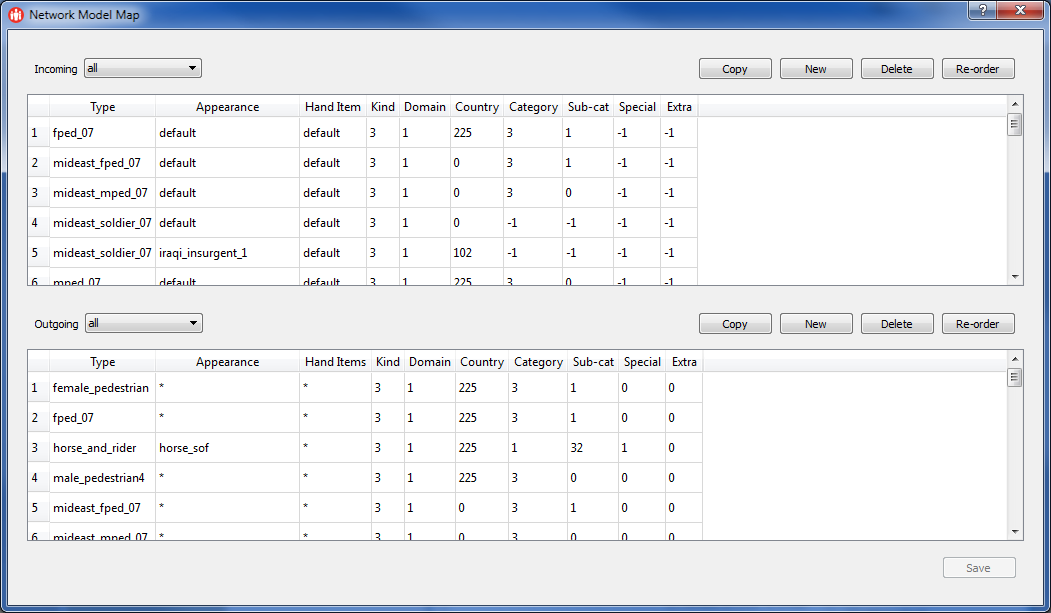
Each entry line in network_model_map.cfg corresponds to a DIS Entity Type Record of a DIS Entity State PDU.
In the mapping file:
The following are some example entries in network_model_map.cfg:
[<< Networking with DI-Guy] [Home] [Top of Page] [HLA Networking >>]
 1.8.9.1
