 |
MAK Data Logger API Documentation for DIS
|


All Classes Namespaces Files Functions Variables Typedefs Enumerations Enumerator Properties Friends Macros Groups Pages
|
MAK Data Logger API Documentation for DIS
|
The Logger remote control interface is a set of classes within the Logger API that can be used to remotely control one or more Loggers from a remote application.
The interface automatically connects to a specified number of remote Loggers. It provides methods to invoke basic commands such as play, record, pause, stop, rewind, and so on, that are sent to connected Loggers. It receives and collects acknowledgements (indication of command reception) and responses (indication of command execution) from all the Loggers and presents them in unified callbacks.
The interface is broken down into a primary remote control interface that handles sending and receiving messages, and domain-specific interfaces for the various Logger controls. The remote control interface is implemented by the class DtRemoteControInterface (in remoteControlInterface.h). The domain interfaces are derived from DtRemoteControlDomainInterface (remoteControlDomainInterface.h), for example, DtRemoteControlRecordInterface (remoteControlRecordInterface.h) or DtRemoteControlPlaybackInterface (remoteControlPlaybackInterface.h).
The remote control interface creates the domain interfaces using virtual creators and provides accessors to them. The domain interfaces provide methods to invoke basic Logger actions (for example, openFile, play, pause, and so on). Calls to these methods are converted into Logger commands, which are then transmitted over the network using the remote control interface. The domain specific interfaces also have methods that are called by the remote control interface in response to messages received from the Logger indicating changes in the Logger state. Derivation of the domain interfaces allows these methods to be overridden with customized behavior in order for the controlling application to react to the responses.
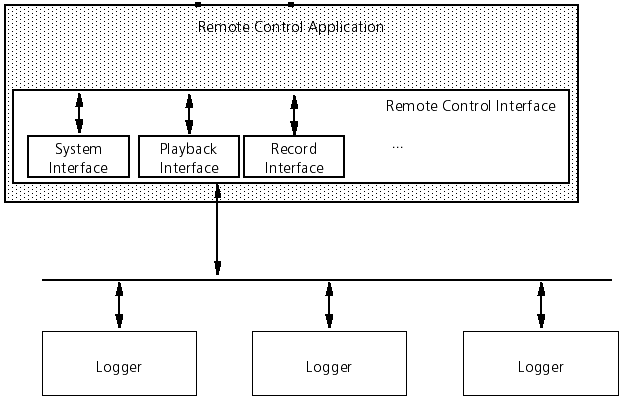
The example Logger control application demonstrates the use of the interface.
The primary purpose of using multiple Loggers is to distribute the load among multiple Logger applications when the amount of simulation data would overwhelm a single Logger. The best approach for segregating simulation data is the use of DDM. However, the configuration of DDM can be complicated for both the Logger and the participating federates.
Another purpose for using multiple Loggers is for fault tolerance.
To configure multiple Loggers, in lgrConfig.xml, do the following:
[Home] [Top of Page] [Connecting to Loggers >>]