 |
VR-Forces 4.0.4 Class Documentation
|
|
VR-Forces 4.0.4 Class Documentation
|
This is a general description of the process the DtObjectSensor and its derived sensor classes go through when trying to detect an object.
The DtObjectSensor is the base class for all the sensors in VR-Forces. It detects things purely on whether the object is within its sensor geometry (DtSpatialFilterEvaluator).
The process of detecting other entities begins in the sensor's tick function.
The sensor checks for new objects. It calls detectObject, which iterates through a list of all the objects in the simulation that meet the sensor's detection criteria to determine if there are any new detections.
Both continueDetectingObject and detectObject follow a similar process. They check to see if the object is destroyed and whether this sensor detects destroyed objects or not. Then they call objectWithinSensorGeometry, which checks to see if the object falls within the sensor's geometry. If it does, a DtRwSensorContactInfo is created for newly detected objects or updated for previously detected objects.
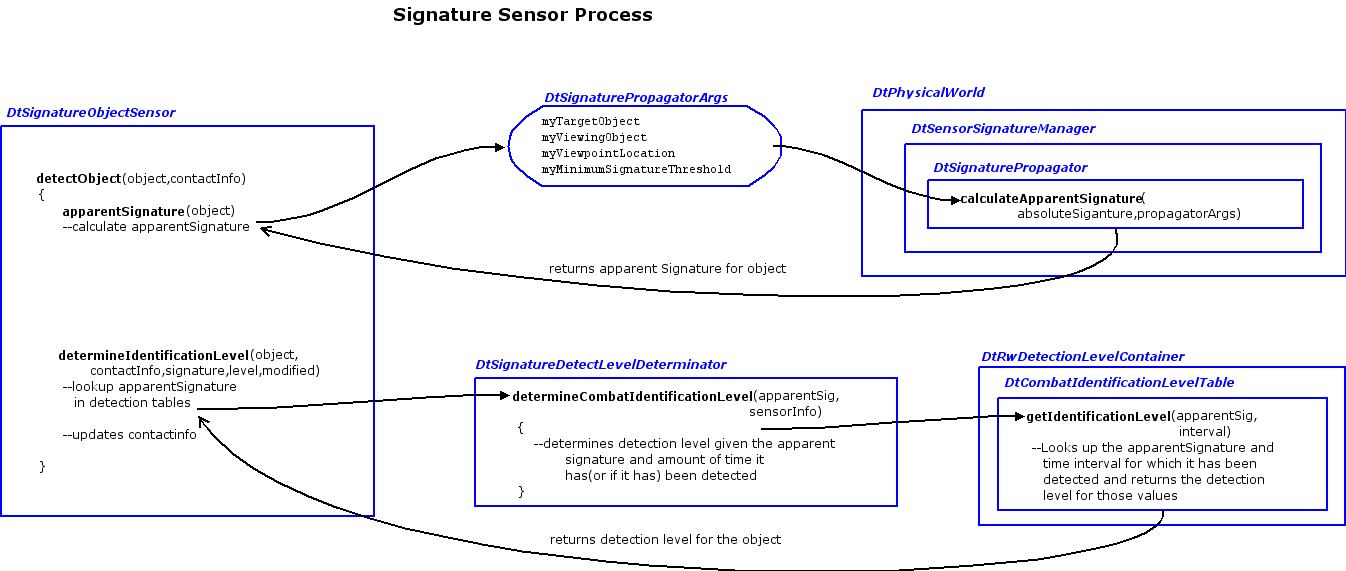
The DtSignatureObjectSensor is derived from the DtObjectSensor. It adds more constraints on the detection of objects. The object does not just have to be in the sensor geometry. The object has an associated absolute signature for each sensor domain.
This represents how much this object radiates in a particular domain. A hot engine on a car would produce a high absolute signature in the infra-red domain, but not necessarily in the visual domain. The physical world that comes between the object and the sensor affects how the sensor perceives the signature of the object, producing an apparent signature. The physical world can degrade the sensor's perception in many ways, such as range, time of day, visibility and so forth.
This class takes into account effects from the object's state (how it affects its absolute signature) and from the physical world (how the physical world affects how the sensor sees the object). Both detectObject and continueDetectingObject have been overridden the same way:
Currently there are two types of propagators:
The figure below shows the detection process of the signature sensor.
The DtRadarObjectSensor is dervied from the DtSignatureObjectSensor. It is very similar to its parent class except that it allows the user to have an emitter system attached to the sensor that can be turned on or off. It doesn't have its own propagator. It uses the default DtSignaturePropagator. So it detects objects strictly based on line of sight and range. To make it detect more realistically, derive a radar propagator to handle changing object cross sections or material characteristics effects.