 |
VR-Forces 4.1.1 Class Documentation
|
|
VR-Forces 4.1.1 Class Documentation
|
Most of DtVrfRemoteController's member functions take an optional simulation address argument.
(In a custom VR-Forces application, you set the simulation address by passing it to the DtCgf or DtVrfApp constructor.) For most of DtVrfRemoteController's functions, the simulation address argument defaults to DtSimSendToAll, meaning that the command should apply to all VR-Forces applications that are currently part of your exercise.
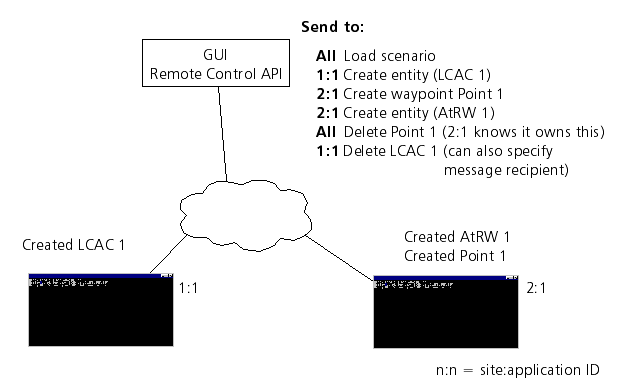
If there is only a single VR-Forces application running, it does not matter if you send commands to the specific address of that simulation engine, or if you just use the default DtSimSendToAll. But if there are multiple remote simulation engines, you must be sure that commands are addressed appropriately. For example, when you want to create a new scenario, use DtSimSendToAll, so that all simulation engines can load the terrain, close any previously loaded scenario, and prepare to accept object creation commands. But when you create an object, you must indicate which simulation engine should instantiate and simulate the object. (If you mistakenly pass DtSimSendToAll to any of the functions that request that an object be created, the command will be sent only to the first address on the Remote Controller's list of known simulation engines. This prevents multiple applications from trying to instantiate the same object.)
It is safe to pass DtSimSendToAll to the functions that implement modify and delete commands, since the simulation engine that is simulating the designated object will know that the command is designated for that application. The figure illustrates sending messages to specific back-ends and to all back-ends.
[<< Using the Remote Control API] [Home] [Top of Page] [Finding Out About Remote VR-Forces Applications >>]