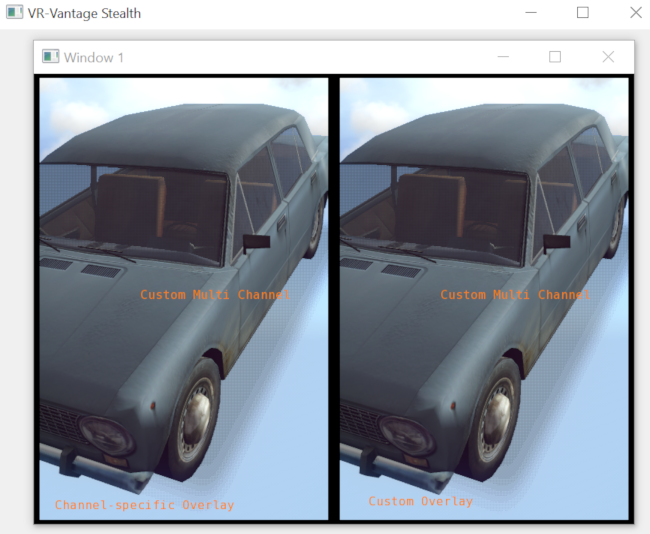
Show how to use multiple windows, each with multiple channels rendering a different model-set (with specific text overlay).
This Vantage application configures the display-engine with one window containing two channels displaying the same scene. Each channel uses a different overlay to display unique 2D text within the channel.
This example is an application. You can run it by running ./bin64/exampleMultipleChannelText.exe (on Windows) or ./bin64/exampleMultipleChannelText (on Linux). For more information about running examples, please see Running Applications and Examples.
#include <matrix/vlTaitBryan.h>
#include <iostream>
#define CUSTOM_TEXT_USES_NORMALIZED_COORDS 1
using namespace makVrv;
const std::string vehicle("$(DATA_DIR)/Vehicles/Wheeled/Fiat_124/Fiat_124.medf");
const unsigned int windowW(800);
const unsigned int windowH(600);
DtVector channel1Coords( 1.0, 49.0, 0.0);
DtVector channel2Coords( 51.0, 99.0, 0.0);
#if CUSTOM_TEXT_USES_NORMALIZED_COORDS
DtVector customOverlayTextCoords( 0.1, 0.033, 0.0 );
DtVector customMC_OverlayTextCoords( 0.35, 0.5, 0. );
#else
DtVector customOverlayTextCoords( 0.01 * windowW + 20.0, 20., 0. );
DtVector customMC_OverlayTextCoords( 0.35 * windowW, 300., 0. );
#endif
DtVector channelSpecificOverlayTextCoords( channel1Coords.x() * 0.01 * windowW + 20.0, 20., 0. );
{
overlayDrawable->setOverlayToRender(& ovlRenderer );
if (osgChannel)
{
#if CUSTOM_TEXT_USES_NORMALIZED_COORDS
#else
#endif
if (d2Camera)
{
osg::Geode* geode = new osg::Geode;
geode->addDrawable(overlayDrawable);
d2Camera->addChild(geode);
overlayDrawable->setProjectionCamera(d2Camera);
#if CUSTOM_TEXT_USES_NORMALIZED_COORDS
#else
#endif
}
}
}
{
DtChannelManager::ChannelMap::iterator curIter = channels.begin();
DtChannelManager::ChannelMap::iterator endIter = channels.end();
for( ; curIter != endIter; ++curIter )
{
if (osgChannel)
{
overlayDrawable->setOverlayToRender(& ovlRenderer );
#if CUSTOM_TEXT_USES_NORMALIZED_COORDS
#else
#endif
if (d2Camera)
{
osg::Geode* geode = new osg::Geode;
geode->addDrawable(overlayDrawable);
d2Camera->addChild(geode);
overlayDrawable->setProjectionCamera(d2Camera);
#if CUSTOM_TEXT_USES_NORMALIZED_COORDS
#else
#endif
}
}
}
}
{
channel1Ptr = (cm.find("Channel 1"))->second;
DtChannel* channel = (cm.find(
"Channel 2"))->second;
}
{
if (textProxy)
{
textProxy->
setPosition(position.x(), position.y(), position.z());
textProxy->
setColor(1.0, 0.5, 0.0, 1.0);
}
}
{
channel1Ptr );
channelSpecificOverlayTextCoords, font);
customOverlay );
customOverlayTextCoords, font);
customMultiChannelOverlay );
customMC_OverlayTextCoords, font);
}
DtDe& de,
double left,
double right,
double bottom,
double top)
{
std::stringstream idName;
idName << " " << id++;
oName += idName.str();
observerConfig.setObserverMode(std::string("3D"));
cName += idName.str();
return channelConfig;
}
{
std::stringstream idName;
idName << " " << id++;
wName += idName.str();
windowConfig.
setSize(windowW, windowH);
return windowConfig;
}
{
return dc;
}
{
std::stringstream modelName;
modelName << "model " << id;
++id;
return modelName.str();
}
{
osg::DegreesToRadians(-150.0f),
osg::DegreesToRadians(-30.0f),
osg::DegreesToRadians(-10.0f)));
++id;
}
{
std::cerr << "Adding Model: [" << modelName << "] " << vehicle << std::endl;
}