
VR-Forces 4.10 Class Documentation
 All Classes Namespaces Files Functions Variables Typedefs Enumerations Enumerator Properties Friends Macros Groups Pages
exampleThreadedDriver

Table of Contents

Overview

Show how to create your own driver (in a multi thread appllication). Use it to put an entity in the scene (Makland) and use simengine to calculate height-above-terrain (HAT).
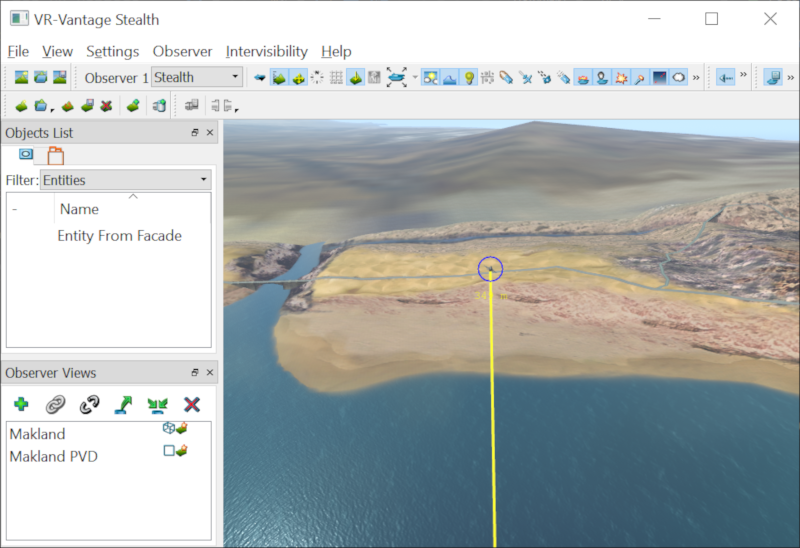
Expected Result

exampleThreadedDriver.png
Threaded Driver Result

Example details

The Driver

This example creates a new driver. On start, this driver will load the Makland terrain database if it is not already loaded; create and initialize an example sim engine; and attach the main observer to the entity created by the sim engine. On tick, the driver will tick the sim engine. On stop, it will destroy the sim engine.

The example driver's onStart() method loads the database first.

DtScene& sceneDriver = myAgentManager.de().scene();
std::string maklandPath = myAgentManager.de().dePathConfiguration().userPath();
maklandPath += "/terrains/Makland.mtf";
if ( sceneDriver.terrainFileName() != maklandPath )
{
sceneDriver.loadTerrain( maklandPath );
#ifdef SIM_IS_SHIP
// add an ocean layer - this can be saved with the database in an mtf file
myAgentManager.de().scene().terrain().addOceanLayer("Ocean");
// set the sea level above to 10 m since this database has water polygons instead
// of bathymetry
DtOceanLayer* layer = myAgentManager.de().scene().terrain().findOceanLayer( "Ocean" );
layer->setSeaLevel( 10. );
// ---- set the sea state
// Put sea state in manual mode ( otherwise, its driven by the wind speed / direction
DtEnvironment& env = myAgentManager.de().scene().environment();
// Now we can manually set sea state and direction
env.setSeaState( (int) DtDouglasSeaState::Slight );
env.setSeaStateDirection( 1.57 ); // roughly east
env.setSeaChoppiness( 0.8 ); // 0.-1.
#endif
}

It then creates the example sim engine and initializes it.

if ( ! myExampleSimEngine )
{
myExampleSimEngine = new DtExampleSimEngine( myAgentManager.de() );
myExampleSimEngine->init();
}

Finally, it attaches the current observer to the entity that the sim engine will create by calling attachObserverToEntity.

attachObserverToEntity( "Entity From Facade" );

attachObserverToEntity fills out a DtObserverStateRecord by getting the current state of the current observer, changing the attached state, and then calling DtObserver::setFromRecord on the same observer. setFromRecord has the special property that if an attachment is specified and the entity indicated is not yet available to attach to, the observer listen for signals that elements have been added, until the desired element is created.

DtObserver* currentObserver = myAgentManager.de().
driverManager().inputDriver().currentObserver();
currentObserver->getRecord( observerStart );
std::set<std::string> displayNames;
displayNames.insert( entityName );
observerStart.setAttachedToDisplayNames( displayNames );
observerStart.setObserverOffsetVector( 150., 0., 20. );
currentObserver->setFromRecord( observerStart );

The example driver's onTick() method calls the sim engine's tick function, providing the current simulation time from the display engine.

myExampleSimEngine->tick( myAgentManager.de().simulationTime() );

The example driver's onStop() method call's the sim engine's uninit method and then deletes the sim engine if the sim engine exists (it may not, since onStop() may be called multiple times).

if ( myExampleSimEngine )
{
myExampleSimEngine->uninit();
delete myExampleSimEngine;
myExampleSimEngine = 0;
}

The Sim Engine

The example sim engine creates and updates an entity that includes an entity indicator and a height-above-terrain (HAT) line. The sim engine is constructed with a reference to the display engine (DtDe) which provides access to the agent manager for creating distributed objects; a coordinate system object for converting locations and orientations to the current coordinate system is use; the databank, so that the engine can report element creation and attribute changes; and the main event queue, to listen for mouse over signals for the entity indicator.

The init() method is responsible for creating and initializing the entity, entity indicator, entity information widget, and HAT line.

First, the sim engine creates a new entity facade and tells it to use the F16 Visual Definition.

// Create the entity
DtElementID parentElementId = 0;
myEntityDisplayName = "Entity From Facade";
DtElementID elementId = mySimulationConnection.sceneInterface().createNewUniqueId();
myEntityFacade = new DtEntity3dFacade( mySimulationConnection.sceneInterface(),
mySimulationConnection.settingsManager(), elementId, true );
// Load the model
myEntityFacade->setArticulatedModelDefinition("FixedWingRQ-1Predator");

It creates the entity indicator, and adds the new model agent to the existing entity facade's scene object (so that it will be positioned in the same place).

myEntityIndicator =
new DtEntityIndicatorWidget( mySimulationConnection.sceneInterface(), myEntityFacade->modelSet() );
myEntityIndicator->setEventsEnabled( true );
myEntityIndicator->setColor( 0, 0, 1, 1 );
setHoverSignalsActive( true );
// Attach the entity indicator to the entity
myEntityFacade->sceneObjectAgent().addModel( myEntityIndicator->model(),

It creates a HAT line using the DtEntityHATLineFacade, which will create the necessary models and attach to the entity's scene object.

myEntityHATLineFacade = new DtEntityHATLineFacade( mySimulationConnection.sceneInterface(), myEntityFacade->modelSet(),
myEntityFacade->sceneObjectAgent().uniqueId() );

init() then connects to the selection manager's signal_entityInfoToggled.

As labels are pinned or unpinned, this will cause slot_toggleLabelPinnedState to be called. This method updates the visibility of both the indicator and the info label, and also tells the sim to listen or stop listening to the mouse hover signals (detailed below).

The example driver updates the sim engine by calling its tick() method. The sim engine's tick() method updates the F16's position using updatePosition(), and updates the text displayed on the F16's entity info label.

The driver's generateInfoString() method essentially performs some formatting and unit conversion on the information it has about the aircraft's position and orientation in the scene. The value returned from this method is then simply set on the entity info widget (if there is one present - if the mouse isn't hovering, there won't be an info widget).

The driver's updatePosition() method first determines how long it's been since the last update, and updates the aircraft's clock angle based on its angular velocity. The clock angle is the bearing to the aircraft from the point at the center of the aircraft's orbit (0 for north, and increasing in the clockwise direction). It then determines the aircraft's offset from the center of its orbit.

The aircraft's orbit is circular, so computing the heading is as easy as adding 90 degrees (Pi/2) to the clock angle. Once this has been done, the heading and roll can be used to determine the net orientation of the F16.

Now that the F16's position and orientation have been computed, the aircraft can be repositioned in the scene.

Finally, the current time is set as the last update time in preparation for the next update.

Positioning the aircraft takes place in the repositionAircraft(..) method. This method first determines the type of coordinate system using the DtCoordinateConverter, then converts the position and orientation to local database (CIG) coordinates. Finally, the CIG coordinates are set on the entity facade, performing the actual reposition.

// Get the coordinate converter and initialize.
DtCoordinateConverter* coordConverter;
coordConverter = mySimulationConnection.coordinateSystem().converter();
if ( coordConverter->type() == DtCoordinateConverter::Geocentric )
{
// => Use this for MaklandGeocentric - not exact but close enough
DtGeodeticCoord geod( DtDeg2Rad( 10.0 ), DtDeg2Rad(60.0), 0.0 );
coordConverter->setupTopoFrame( geod.geocentric() );
}
else
{
// Or this for Makland (UTM)
coordConverter->setupTopoFrame( position );
}
// Convert the position (from ENU) to local database (CIG) coords.
coordConverter->enuToCig_coordTrans( position, myPosition );
// Convert the orientation (from NED) to local database (CIG) ori.
myOrientation = coordConverter->nedToCig_EulerTrans( ori );
// Set the Position and Orientation on the aircraft.
myEntityFacade->setOrientation( myOrientation );
myEntityFacade->setPosition( myPosition );

The sim engine is unitialized by calling its uninit() method. This cleans up the entity facade, indicator, info widget, and HAT line allocated on the heap. It also tells the DataBank that the element has been destroyed.

if ( myEntityFacade )
{
if ( myEntityInfoWidget )
{
myEntityFacade->sceneObjectAgent().removeModel(
myEntityInfoWidget->model() );
delete myEntityInfoWidget;
myEntityInfoWidget = 0;
}
if ( myEntityIndicator )
{
setHoverSignalsActive( false );
myEntityFacade->sceneObjectAgent().removeModel(
myEntityIndicator->model() );
delete myEntityIndicator;
myEntityIndicator = 0;
}
mySimulationConnection.reportElementDestroyed(
myEntityFacade->elementId() );
delete myEntityFacade;
myEntityFacade = 0;
}
return true;

The example driver is created, added to the driver manager, and started in the main program.

Building the Example

VR-Vantage includes pre-built versions of the example application. To build it yourself, follow the instructions at Building VR-Vantage Examples, Applications, and Plug-ins.

Running the Example

This example is an application. You can run it by running ./bin64/exampleDistributedObject.exe (on Windows) or ./bin64/exampleDistributedObject (on Linux). For more information about running examples, please see Running Applications and Examples.

Example Source Files


exampleDriver.cxx

/*****************************************************************************
* Copyright (c) 2019 MAK Technologies, Inc.
* All rights reserved.
*****************************************************************************/
#include "exampleDriver.h"
#include <vrvCore/DtDe.h>
#ifdef SIM_IS_SHIP
#endif
// Use the VR-Vantage namespace.
// All classes in VR-Vantage are in this namespace.
using namespace makVrv;
: makVrv::DtDriver(am, "DtExampleDriver")
, myExampleSimEngine(0)
{
}
{
}
const std::string& DtExampleDriver::className() const
{
static std::string name = "DtExampleDriver";
return name;
}
{
// Load Makland programatically.
DtScene& sceneDriver = myAgentManager.de().scene();
std::string maklandPath = myAgentManager.de().dePathConfiguration().userPath();
maklandPath += "/terrains/Makland.mtf";
if (sceneDriver.terrainFileName() != maklandPath)
{
sceneDriver.loadTerrain(maklandPath);
#ifdef SIM_IS_SHIP
// add an ocean layer - this can be saved with the database in an mtf file
// set the sea level above to 10 m since this database has water polygons instead
// of bathymetry
layer->setSeaLevel(10.);
// ---- set the sea state
// Put sea state in manual mode ( otherwise, its driven by the wind speed / direction
// Now we can manually set sea state and direction
env.setSeaState((int)DtDouglasSeaState::Slight);
env.setSeaStateDirection(1.57); // roughly east
env.setSeaChoppiness(0.8); // 0.-1.
#endif
}
{
}
// Attach to entity.
#ifdef SIM_IS_SHIP
#else
#endif
return true;
}
{
{
}
return true;
}
{
{
}
return true;
}
void DtExampleDriver::attachObserverToEntity(const std::string& entityName)
{
DtObserver* currentObserver = myAgentManager.de().
driverManager().inputDriver().currentObserver();
currentObserver->getRecord(observerStart);
std::set<std::string> displayNames;
displayNames.insert(entityName);
observerStart.setAttachedToDisplayNames(displayNames);
observerStart.setObserverOffsetVector(150., 0., 20.);
currentObserver->setFromRecord(observerStart);
}
{
stop();
start();
}

DtExampleDriver.h

/*****************************************************************************
* Copyright (c) 2019 MAK Technologies, Inc.
* All rights reserved.
*****************************************************************************/
#pragma once
#include <string>
// This driver creates and owns the example driver.
{
public:
virtual ~DtExampleDriver();
virtual const std::string& className() const;
protected:
virtual bool onStart();
virtual bool onStop();
virtual bool onTick();
virtual void attachObserverToEntity( const std::string& entityName );
virtual void slot_displayEngineAdded( const makVrv::DtDeRecord& igRecord );
protected:
};

DtExampleDriver.cxx

/*****************************************************************************
* Copyright (c) 2019 MAK Technologies, Inc.
* All rights reserved.
*****************************************************************************/
#include <vrvCore/DtDe.h>
#include "DtExampleSimEngine.h"
#ifdef SIM_IS_SHIP
#endif
// Use the VR-Vantage namespace.
// All classes in VR-Vantage are in this namespace.
using namespace makVrv;
: makVrv::DtDriver( am, "DtExampleDriver" )
, myExampleSimEngine( 0 )
{
}
{
}
const std::string& DtExampleDriver::className() const
{
static std::string name = "DtExampleDriver";
return name;
}
{
// Load Makland programatically.
DtScene& sceneDriver = myAgentManager.de().scene();
std::string maklandPath = myAgentManager.de().dePathConfiguration().userPath();
maklandPath += "/terrains/Makland.mtf";
if ( sceneDriver.terrainFileName() != maklandPath )
{
sceneDriver.loadTerrain( maklandPath );
#ifdef SIM_IS_SHIP
// add an ocean layer - this can be saved with the database in an mtf file
// set the sea level above to 10 m since this database has water polygons instead
// of bathymetry
layer->setSeaLevel( 10. );
// ---- set the sea state
// Put sea state in manual mode ( otherwise, its driven by the wind speed / direction
// Now we can manually set sea state and direction
env.setSeaState( (int) DtDouglasSeaState::Slight );
env.setSeaStateDirection( 1.57 ); // roughly east
env.setSeaChoppiness( 0.8 ); // 0.-1.
#endif
}
{
}
// Attach to entity.
attachObserverToEntity( "Entity From Facade" );
return true;
}
{
{
}
return true;
}
{
{
}
return true;
}
void DtExampleDriver::attachObserverToEntity( const std::string& entityName )
{
DtObserver* currentObserver = myAgentManager.de().
driverManager().inputDriver().currentObserver();
currentObserver->getRecord( observerStart );
std::set<std::string> displayNames;
displayNames.insert( entityName );
observerStart.setAttachedToDisplayNames( displayNames );
observerStart.setObserverOffsetVector( 150., 0., 20. );
currentObserver->setFromRecord( observerStart );
}
{
stop();
start();
}

[<< Examples] [Home] [Top of Page]


Document ID: Generated on Tue Sep 21 17:42:52 EDT 2021 from SVN revision 234861
Copyright © 2005-2021 MAK Technologies. All Rights Reserved (www.mak.com)