 |
VR-Forces 4.10 Class Documentation
|


All Classes Namespaces Files Functions Variables Typedefs Enumerations Enumerator Properties Friends Macros Groups Pages
|
VR-Forces 4.10 Class Documentation
|
The Organization Manager (DtOrganizationManager, in orgManager.h) is a subcomponent of the Object Manager.
It maintains the organizational hierarchy for all organized simulation objects. Any simulation object whose object parameter database entry has is-organized set to True has an entry in the Organization Manager. An entity’s place in the hierarchy is expressed through its echelon ID. (For details, please see VR-Forces Users Guide.)
The Organization Manager has the following responsibilities:
In simulations that use multiple VR-Forces simulation engines, each simulation engine has its own Organization Manager. Each Organization Manager maintains a complete picture of the hierarchy, including all remote VR-Forces simulation objects. Calls to modify the hierarchy can be made to any Organization Manager. The Organization Manager that receives the call, sends the appropriate messages to the other Organization Managers to ensure that the hierarchy is changed correctly.
Organized simulation objects in VR-Forces exist in an organization tree beneath a force-level superior. Each force has a force-level unit that is locally simulated on each VR-Forces simulation engine and not published to the network. By default, a newly created simulation object is placed immediately below the force level superior corresponding to the force of the simulation object. For example, when a new M1A2 is created, it is added as a subordinate of 1 Force. If this M1A2 is the first subordinate of 1 Force to be created, the 1 Force unit is created at the same time. You can move simulation objects in the hierarchy with calls to the Organization Manager API, for example:
The Remote Control API also has function calls to change the simulation object hierarchy.
Note:
Every VR-Forces simulation object that has an organization controller is assigned an echelon ID that indicates its position in the simulation object hierarchy.
VR-Forces Users Guide discusses organized simulation objects in detail. To summarize, an echelon ID specifies an entity’s position in a unit and identifies the hierarchical units to which it belongs. Echelon IDs are formatted as follows:
For example, the third M1A2 tank in 1st platoon, Force 1, would have the echelon ID string:
You can get an organized entity’s echelon ID through its echelonId() accessor. The elements that make up the echelon ID (designator, category, echelon-level, and superior) can also be retrieved individually from the entity’s echelon ID.
Each organized simulation object has an organization controller component attached to it (DtOrganizationController, in orgCtlr.h). Units have a DtAggregateOrganizationController (pseudoAggOrg.h), which is a derived version of DtOrganizationController. Additionally, the force level units have their own derived version of the organization controller, DtTopLevelOrganizationController (topLevOrgCtrl.h).
DtOrganizationController maintains the echelon ID of the simulation object it is attached to. It registers for DtSetDesignator messages, which are used to determine the designator that will be used in the echelon ID, and it monitors its superior’s echelon ID, using it to reset its own if a change occurs.
DtAggregateOrganizationController sets its own echelon ID (just like individual entities do) and sends DtSetDesignator messages to its immediate subordinates. This component registers for subordinatesChanged() callbacks from the Organization Manager, and is responsible for making sure that all of its subordinates use different designators, as well as performing reorganizations if necessary.
DtTopLevelOrganizationController is a special controller. It is used only for the force-level units. Force level units are simulated locally on each back-end and are not published. DtTopLevelOrganizationController handles these differences.
To illustrate how an echelon ID is built by the organization controllers, consider the echelon ID 1 M1A2, 1 Plt, 1 Force. From left to right, the echelon ID is created as follows:
The following figure illustrates changes to a simulation object hierarchy and changes to the echelon IDs to show each entity’s place in the hierarchy. In the initial order of battle, the echelon IDs show that each simulation object is subordinate to the force level. In the second order of battle, four of the entities are organized into a platoon and their echelon IDs have changed to show that the platoon is their superior. In the third order of battle, one of the entities is removed from the platoon. It is superior is the force level again. Notice that it does not have the same echelon ID it had when it was originally under the force level. Also, note that the echelon IDs for the remaining subordinates of 1 Plt did not change. When the membership of a unit changes, the echelon IDs do not change unless you enable auto-reorganization or manually reorganize the unit. For more information about reorganization, please see "ReorganizingAggregateEntities.
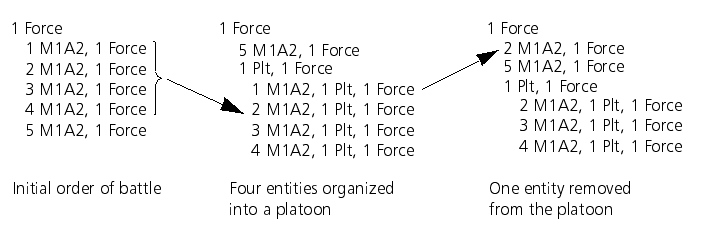
The Organization Manager has two parts - the DtOrganizationView (orgView.h) and the DtOrganizationManager.
The DtOrganizationView listens to the network and maintains a set of interconnected nodes (DtOrganizationManagerNode, in orgMgrNode.h) that correspond to the current organization state of all simulation objects in the exercise. These nodes are in the form of a set of trees, with the root node of each tree being a force level unit. A node does not have to be part of a tree at all times. It needs to be independent when a simulation object is in transition from one location in the hierarchy to another, or when a simulation object is first created.
The organization information is sent over the network as part of aggregate state PDUs. Each unit publishes a list of subordinates. Additionally, VR-Forces objects publish whether they are a subordinate of the force level unit, because the force level aggregates are unpublished objects. From this information, the DtOrganizationView keeps its representation of the organization synchronized with the other Organization Managers in the exercise (if any).
The DtOrganizationManager class manipulates the simulation object hierarchy. It uses the setSuperior() and setSuperiorToForce() member functions, to assign simulation objects as subordinates of published units or the force-level unit. These function calls result in modification of the subordinate lists maintained by each unit’s subordinate manager. The modifications to the hierarchy are not observed by DtOrganizationView until the units publish their updated subordinate lists.
You can make an API call to modify the hierarchy from any back-end's Organization Manager. An Organization Manager can only change the state of local units (modify their subordinate lists). Therefore when you make a request that requires action by multiple Organization Managers, the Organization Manager that receives the request sends messages to remote Organization Managers to enlist their help in carrying out the request. Each Organization Manager makes the changes required to the simulation object hierarchy on its back-end.
The DtOrganizationView maintains the simulation object hierarchy for each Organization Manager. You can use the following member functions to determine an entity’s superior and its subordinates:
DtOrganizationView::lookupNode() returns a pointer to the DtOrganizationManagerNode for a simulation object in the organization hierarchy. You can use this node to find more detailed organization information about a particular simulation object, such as a list of subordinate identifiers.
If you need to know when an entity’s subordinate list changes, you can register for callbacks with the Organization Manager. To register a callback, call DtOrganizationManagerNode::addSubordinatesChangedCallback(). The callback is invoked any time a subordinate is added or removed from a node in the Organization Manager. You can register this callback on both local and remote VR-Forces objects.
You can change the simulation object hierarchy using the Simulation API and the Remote Control API. (For details, please see 14.7.3 Changing the Simulation Object Hierarchy.)
The DtOrganizationManager class has the following member functions for changing the simulation object hierarchy:
The setSuperior() and setSuperiorToForce() member functions identify simulation objects by their echelon IDs. The simulation objects and superiors must exist.
The queueSetSuperior() and queueSetSuperiorToForce() member functions identify simulation objects by name. The simulation objects do not have to exist. These functions are used when VR-Forces loads a scenario.
The detachFromSuperior() member function removes a subordinate from its superior’s subordinate list. The simulation object is then left without any parent in the organization hierarchy. This call is made implicitly by the setSuperior() and setSuperiorToForce() calls. Normally, you should not use it.
The organization of simulation objects within a unit is expressed by the numeric designator assigned to each member simulation object in its echelon ID. The lower the designator, the higher the simulation object is in the chain of command. For example, in the following list of subordinates of a hypothetical platoon, the lead subordinate is 1 M1A2, 1 Plt, 1 Force. It has the lowest designator, the "1" in 1 M1A2.
1 M1A2, 1 Plt, 1 Force
2 M1A2, 1 Plt, 1 Force
3 M1A2, 1 Plt, 1 Force
4 M1A2, 1 Plt, 1 Force.
If simulation objects get removed from a unit or get destroyed, you can reorganize the unit. When you reorganize a unit, the echelon IDs get reassigned so that the lowest numerical designators are assigned to functioning (non-destroyed) simulation objects. The benefit of reorganization is that if plans are associated with the echelon IDs with the lowest numerical designators, simulation objects will continue to carry out the plans.
The reorganization controller has two modes - automatic and manual. In auto-reorganization mode, the reorganization controller continually monitors the health and status of its member simulation objects, and reorganizes the unit the instant it determines that it is necessary. In manual mode, a reorganization of the unit only occurs when the controller receives a DtSetReorganizeRequestType interface message from the front end.
To manually reorganize a unit, you need to send a DtSetReorganizeRequestType interface message.
[<< Managing Local and Remote Simulation Objects] [Home] [Top of Page] [State Repositories for Simulation Objects >>]