 |
VR-Forces 4.3 Class Documentation
|


All Classes Namespaces Files Functions Variables Typedefs Enumerations Enumerator Friends Macros Groups Pages
|
VR-Forces 4.3 Class Documentation
|
The Control Interface layer provides agents, proxies, and higher-level classes (facades) that allow you to control objects in the Rendering System independently of whether they exist in your application or in a remote display engine.
(This allows VR-Vantage applications to support multi-channel distributed rendering). The Rendering System objects act on the commands that they receive from the Control Interface by making changes to the OSG Scene Graph, or by changing other OSG rendering parameters. OSG makes calls to OpenGL, which ensures that the correct scene is rendered by the graphics card.
DtDe, the top-level class, provides access to objects in all of these layers (as well as direct access to OpenSceneGraph!) You can write your application code so that it makes direct calls to the Rendering System (or to OSG). But if you just want to use the built-in capabilities of the VR-Vantage Toolkit (rather than trying to extend the capabilities of the toolkit), we recommend that you stay at the level of the Control Interface rather than going directly to the Rendering System. There are two reasons for this:
The VR-Vantage Toolkit does not group all of the Rendering System classes under a single "Rendering System" object, and all of the Control Interface objects under a "Control Interface" object. Instead, both sets of classes are accessible from DtDe. So it can sometimes be difficult to tell which classes are parts of which layer. For the most part, classes that end in the word "Object" represent scene objects that are part of the Rendering System. Classes that end in the word "Agent" are the agents that are used in the Control Interface to pass commands to their corresponding scene objects. There is usually a one-to-one relationship between scene objects and the agents that command them. For example, a DtObserverObjectAgent.hpp is used to control DtObserverObjects in the Rendering System.
Note: Generated classes have the extension .hpp or .cpp.
However, in many cases, a higher-level class in the Control Interface layer groups together several agents, and provides an interface that allows you to control several different Rendering System objects from a single object (through multiple agents). Two important examples of this are DtScene and DtEntityFacade. They use a variety of agents to control several objects related to terrain, the environment, and moving entity models.
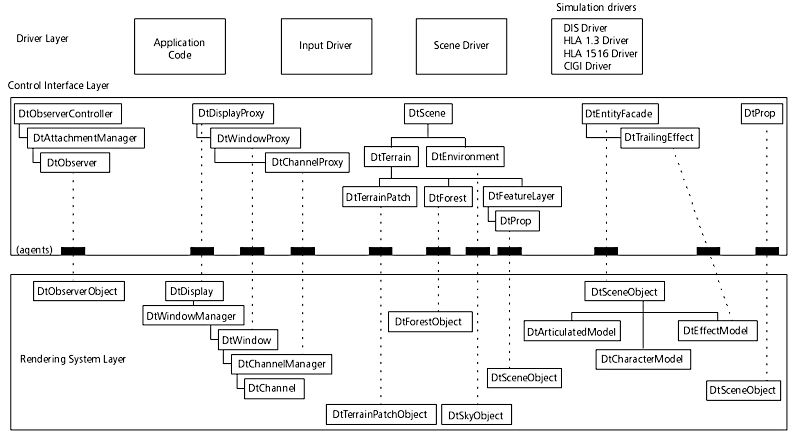
The exampleDriver and exampleDriverPlugin examples use DtScene DtEntity3dFacade and DtEntityFacade to load a terrain database and place a 3D model of an F16 into the world. In general, when you create a particular Control Interface object (for example, DtEntity3dFacade or one of the agents), the corresponding Rendering System objects will be automatically created in all display engines to which you are currently connected (including the one that is local to your application). The only thing that the Control Interface objects need to communicate with the Rendering System is a pointer to an interface object called an Agent Manager. The Agent Manager is created automatically by a DtDe, and is accessible by calling displayEngine->agentManager().

| exampleSimpleAgent - Shows how to create an agent for a custom object. |

| exampleModelArticulationDistributed - Shows how to load a distributed articulation model and move the different parts using an agent. |

| exampleMultipleChannels - A VR-Vantage Renderer example showing how to multiple windows, each with multiple channels rendering a different model-set. |
[<< The Rendering System Layer] [Home] [Top of Page] [The Driver Layer >>]