 |
VR-Forces 4.5 Class Documentation
|


All Classes Namespaces Files Functions Variables Typedefs Enumerations Enumerator Friends Macros Groups Pages
|
VR-Forces 4.5 Class Documentation
|
When you use saveScenario() to ask remote VR-Forces applications to save the current scenario, the reverse of the load process occurs.
The DtVrfRemoteController sends a message to all simulation engines asking each to save order of battle and plan files containing information for just the objects that it simulates. Once those saves are complete, those simulation engines send their files to the remote controller that initiated the save. The DtVrfRemoteController then combines the individual files into a single scenario-wide order of battle file and plan file, and saves the scenario locally using the indicated file name. So when saveScenario() returns, the scenario will not have actually been saved yet. Make sure to continue calling drainInput() on your DtExerciseConn after saveScenario() returns, so that the DtVrfRemoteController can receive saved information from the simulation engines (through callbacks on DtExerciseConn), and complete the save. The figure illustrates the save process.
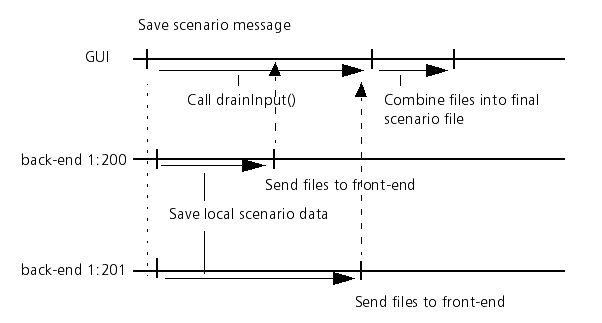
After the remote control application sends out a save command, it waits a specific amount of time for all the back-ends to reply. If all back-ends reply before the time is up, the files are saved. If some back-ends do not reply within the time interval, the Remote Controller prints a warning and saves whatever information it has. You can configure the time-out period with the DtVrfRemoteController::setMaxWaitTime() member function.
You can keep track of back-ends that failed to save by registering a backendSave() callback. This callback gets invoked once for each back-end involved in the save and indicates whether the save was successful or not.
To find out when you have received save information from each back-end, you can register for callbacks through the DtVrfRemoteController. You can use add/removeBackendSavedCallback() to register/unregister callbacks that you would like to have executed when we have finished receiving save information for a particular back-end. Or, you can use add/removeScenarioSavedCallback() for callbacks that you want to have called only when the scenario has been completely saved.
[<< Loading a Scenario] [Home] [Top of Page] [Managing VR-Forces Objects >>]