 |
VR-Forces 4.5 Class Documentation
|


All Classes Namespaces Files Functions Variables Typedefs Enumerations Enumerator Friends Macros Groups Pages
|
VR-Forces 4.5 Class Documentation
|
A scene object (DtSceneObject) groups together models with shared spatial data and represents one conceptual element in the scene within one model set.
For example, one scene object could represent a single tree in the 3D Models model set, or the main model, flames, and trajectory history line associated with a tank. Scene objects track the element ID of the simulated element they represent.
Each scene object contains a vector of positions and orientations associated with it. It is up to the scene object's models to determine how those kinematic parameters are used. For example, a simple model might use its scene object's first position and orientation values to position and orient itself in the scene, while a polygon model might use several of the scene object's positions to define its vertices.
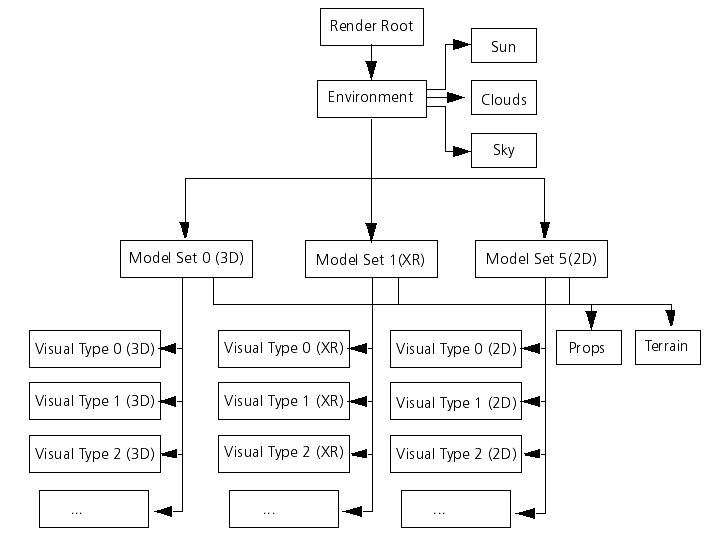
A scene object is given a model set when it is created. When adding a model to a scene object, the model's visual type is also specified. Available visual types are defined in the visual type manager (DtVisualTypeManager). The combination of model set and visual type is used to determine which models to render on a particular channel. For example, a model added to a scene object in the XR model set with the visual type "dust_clouds" is rendered only on channels that are displaying the XR model set and have dust clouds turned on. VR-Forces implements this render control by creating a root node in the scene graph for each visual type in a model set (as illustrated). The nodes for each model are placed under the appropriate root node, and during a channel's render traversal the roots that should not be rendered are skipped.
If a scene object's spatial data changes frequently, it may have an updater (DtUpdater) associated with it. The updater is responsible for any changes that need to be made to the scene object (usually position and orientation) on a per-frame basis, such as dead reckoning and ground clamping.
[<< Forests] [Home] [Top of Page] [Entities >>]