 |
VR-Forces 4.6 Class Documentation
|


All Classes Namespaces Files Functions Variables Typedefs Enumerations Enumerator Properties Friends Macros Groups Pages
|
VR-Forces 4.6 Class Documentation
|
Each VR-Forces application has a Simulation Manager (DtSimManager, in simMgr.h).
The Simulation Manager maintains the exercise clock and the scheduler, as well as providing access to some of the top-level managers and classes. The principal components that the Simulation Manager creates and maintains are the:
The Simulation Manager also provides accessors to the following items:
Each time the Simulation Manager’s tick() function is called, it does the following:
The Simulation Manager is one of the top-level classes maintained by the DtCgf class. You can obtain a pointer to it through DtCgf::simManager().
VR-Forces maintains an exercise clock, which is an instance of DtExerciseClock (exClock.h). The clock keeps track of elapsed simulation time and simulated time of day. Elapsed simulation time is the amount of simulation time that has passed since the simulation started. VR-Forces represents the day/night cycle with the Time of Day value. By default, it starts at 12:00 noon, but can be set when you create a scenario. Time of day affects the simulation, for example, visual sensors are less able to detect objects at night than they are in the day.
Time is represented by the VR-Link DtTime type (in seconds), and is advanced when the clock is ticked. The exercise clock also provides static functions for converting seconds into the days:hours:minutes:seconds format.
The exercise clock supports several different modes of operation. The mode the clock is in determines how much simulation time is advanced when the clock is ticked. These modes are described in detail in "Representing and Managing Time in VR-Forces", in VR-Forces Users Guide.
As described in 2 - The VR-Forces Simulation Engine, the only function that needs to be called periodically for the simulation engine to execute properly is DtCgf::tick(). This causes managers and objects to be ticked, for example, DtVrfObjectManager (and therefore DtVrfObjects and their components). If you have registered custom subclasses of any of the VR-Forces classes with the simulation engine (either through factories, or through DtVrfCreator), instances of your subclasses will automatically be ticked at the appropriate times.
However, there may be cases where you want objects that exist outside of the VR-Forces simulation engine to be automatically ticked each time the simulation engine is ticked. VR-Forces provides a tick callback mechanism to support this. You can obtain a pointer to the DtCgf's DtSimManager, and use its addTickEntry() member function to register the callback that you would like to have executed each frame. In fact, the way that VR-Forces classes like DtVrfObjectManager ensure that they are ticked each frame is by registering their own tick callbacks with the DtCgf's DtSimManager.
The following example shows how to add a function named tickCallback() that will get invoked each tick:
Register your function with the DtSimManager. You can optionally configure the callback with a pointer to some user-defined data (usr). This data pointer will be passed into the callback function when it is invoked.
When you no longer want your callback to be called, unregister the callback function with the DtSimManager, as follows:
You might want VR-Forces to invoke a callback whenever some amount of time has passed, but not necessarily every frame. VR-Forces uses timers for this purpose. Through the DtCgf's DtSimManager, you can get a pointer to a DtScheduler (scheduler.h) that you can use to schedule events. Events are scheduled by elapsed simulation time.
The Scheduler manages instances of DtTimer (timer.h) objects, and its use is optional. A DtTimer is given a time to fire, a callback function to call when it fires, and a pointer to user data that will be provided to the callback. You can tick the timer directly each simulation frame, or place the timer on the Scheduler.
The Scheduler maintains a list of DtTimers given to it. The Scheduler ticks its timers when it is ticked. The timers are listed in the order they will fire. It is your responsibility to remove timers from the Scheduler once they have fired.
You can designate a DtTimer as recurring, DtRecurringTimer (recTimer.h) or periodic, DtPeriodicTimer (periTimer.h). Recurring and periodic timers are rescheduled by the scheduler after they fire.
Recurring timers are timers that, after firing, are rescheduled to fire at a specified time after the actual firing time. Periodic timers are timers that, after firing, are rescheduled to fire at a specified time after the last time the timer was scheduled to fire. The figure illustrates the difference.
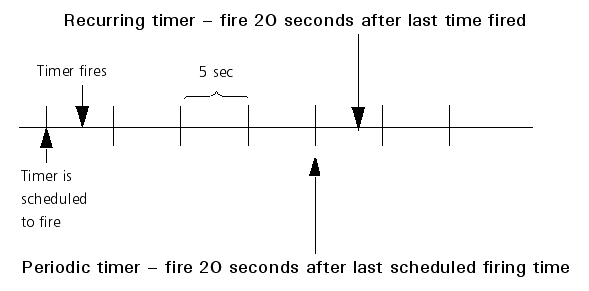
If a timer fires at exactly the time that it is supposed to, the two types of timers are equivalent. However, timers can only fire when the scheduler is ticked. Since the scheduler is ticked once per frame, there is a potential error of +/- the current frame time between the scheduled time of fire and the actual time of fire. The two different types of timers provide two different ways of dealing with this error.
The DtVrfStatusPublisher class sends out the DtIfStatus message in a heartbeat and as a response to requests for status.
The Joystick Device Manager, DtJoyDeviceManager (joyDevMgr.h), provides a hardware independent interface for using a joystick with VR-Forces. Entities that support joystick control access the DtJoyDeviceManager to get control input data from the device.
[Home] [Top of Page] [The Physical World >>]