 |
VR-Forces 4.8 Class Documentation
|


All Classes Namespaces Files Functions Variables Typedefs Enumerations Enumerator Properties Friends Macros Groups Pages
|
VR-Forces 4.8 Class Documentation
|
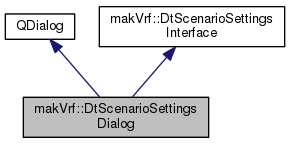
The Master Scenario Settings Dialog. More...
Public Member Functions | |
| DtScenarioSettingsDialog (makVrv::DtDe &de, QWidget *parent, Qt::WindowFlags f=Qt::Tool, bool isNewScenario=false) | |
| CTOR. More... | |
| virtual | ~DtScenarioSettingsDialog () |
| DTOR. More... | |
| virtual bool | chooseInitialScenarioOptions () |
| Allows user to choose simulation terrain and model set by calling down to the scenario preview page to do so. More... | |
| virtual void | setShowScreenElement (DtScenarioInformationWidget::DisplayElement, bool) |
| Whether or not to show the particular screen element. More... | |
| virtual void | setEnableScreenElement (DtScenarioInformationWidget::DisplayElement, bool) |
| Whether or not to enable the display element. More... | |
Public Attributes | |
| DtScenarioPreviewPage * | myScenarioPreviewPage |
| QPushButton * | myOkButton |
| QPushButton * | myCancelButton |
| QPushButton * | myAdvancedButton |
| QPushButton * | myPreviewButton |
 Public Attributes inherited from makVrf::DtScenarioSettingsInterface Public Attributes inherited from makVrf::DtScenarioSettingsInterface | |
| boost::signals2::signal< bool(const DtScenarioLoadInformation &)> | signal_loadScenario |
Protected Slots | |
| virtual void | onOkClicked () |
| Tells preview page to set all information into scenario object and then signals to load that scenario. More... | |
Protected Attributes | |
| makVrv::DtDe & | myDe |
| DtScenarioLoadLogic * | myLogic |
The Master Scenario Settings Dialog.
| makVrf::DtScenarioSettingsDialog::DtScenarioSettingsDialog | ( | makVrv::DtDe & | de, |
| QWidget * | parent, | ||
| Qt::WindowFlags | f = Qt::Tool, |
||
| bool | isNewScenario = false |
||
| ) |
CTOR.
|
virtual |
DTOR.
|
virtual |
Allows user to choose simulation terrain and model set by calling down to the scenario preview page to do so.
|
virtual |
Whether or not to show the particular screen element.
|
virtual |
Whether or not to enable the display element.
The setting of editable after making individual changes will clear all editable items, so, only call this after calling the main setEditable
|
protectedvirtualslot |
Tells preview page to set all information into scenario object and then signals to load that scenario.
|
protected |
|
protected |
| DtScenarioPreviewPage* makVrf::DtScenarioSettingsDialog::myScenarioPreviewPage |
| QPushButton* makVrf::DtScenarioSettingsDialog::myOkButton |
| QPushButton* makVrf::DtScenarioSettingsDialog::myCancelButton |
| QPushButton* makVrf::DtScenarioSettingsDialog::myAdvancedButton |
| QPushButton* makVrf::DtScenarioSettingsDialog::myPreviewButton |