Overview
The purpose of this example is to show how to use the Display Unit Manager to display an object's position, with appropriate labels, using the current Display Units settings. The example creates a plugin that displays a dialog with a drop down box that allows the user to chose from any of the elements currently selected in a scene, and displays the name, type, and position of the currently chosen element.
Expected Result
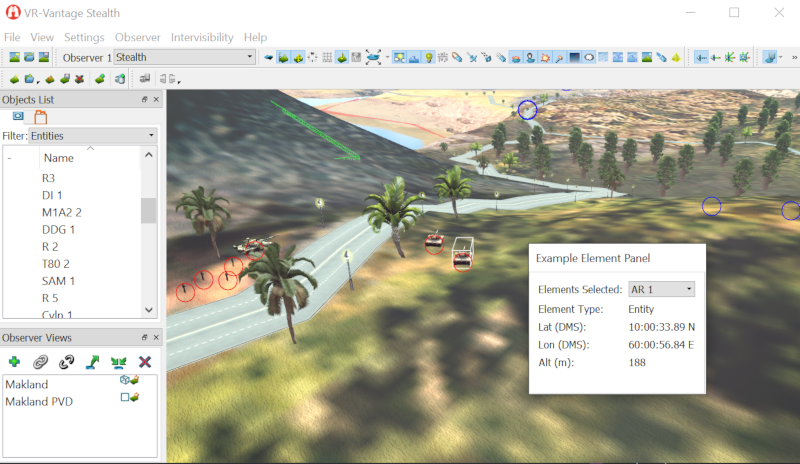
Display Unit example Result
Example details
The example also shows how to
- create and register a new dialog page
- maintain a list of the currently selected elements in the scene
- get a DtElementEntry for a selected element, from which the element's name and type can be determined
- get the position of an element that is represented by one or more scene objects (in local coordinates)
- get the position of an observer
- convert a position in local coordinates into geocentric coordinates.
Plugin Initialization
When a plugin is loaded, VR-Vantage invokes its initDeModule function. This plugin simply calls its init function from initDeModule.
The init function ensures that it will only ever be initialize once (even if its init function is called multiple times).
It then makes sure the vrvCoreQt plugin is initialized, as it depends on it (and since vrvCoreQt also calls DT_DE_INIT_ONCE, this call will do nothing if that plugin has already been initialized).
The plugin then registers a creator for the dialog page it will display (defined in ElementInspectorPage.cxx) with the DtQtPageAssembler.
Finally, it defines how that dialog should appear in the GUI by adding a path to it in the masterModePageConfiguration.
if(igApp)
{
"ElementPanel",DtUnicode::fromAscii("Example Element Panel"),
DtPageConfiguration::FloatRight,true,"ElementInspectorPage",
false, true, true);
}
Element Inspector Page
The ElementInspectorPage dialog maintains a list box that contains all the currently selected elements. For access to this information, it needs to connect to a signal from the DtSelectionManager. Because the DtSelectionManager is created by the Display Engine, it's important to ensure that the connection is done after the Display Engine is fully initialized. One way the VR-Vantage toolkit enables this is through the DtDeObserver class. By inheriting from this class and overriding its slot_activate and slot_deactivate methods, the dialog can know when it is safe to connect (and needs to disconnect) from display engine managed signals creators.
The ElementInspectorPage declaration shows this inheritance.
class ElementInspectorPage :
public DtPage,
public DtDeObserver
In slot_activate, the ElementInspectorPage connects to the DtSelectionManager's selectionChanged signal.
void ElementInspectorPage::slot_activate(DtDe* de)
{
mySignals += DtSelectionManager::instance(myDe).signal_currentSelectionChanged.connect(
boost::bind(&ElementInspectorPage::selectionChanged,
this,_1,_2,_3,_4));
}
It disconnects from the signal in slot_deactivate.
void ElementInspectorPage::slot_deactivate(DtDe* de)
{
mySignals.disconnectSignals();
}
The ElementInspectorPage also needs to periodically update itself irrespective of any selection changes, since it displays the position of a selected element, that may be moving. However, it only needs to do this if it is actually displayed. Because it derives from DtPage, it can override DtPage's activate and deactivate methods to know when it is being displayed, and start and stop its refresh timer accordingly.
void ElementInspectorPage::activate()
{
myRefreshTimer->start();
}
void ElementInspectorPage::deactivate()
{
myRefreshTimer->stop();
}
Whenever a selection changes, or when the refresh timer expires, the dialog updates its information. The updateElementPosition method demonstrates the use of the DtDisplayUnitsSettingsManager to display the element's current position in the current coordinate system and with the current unit settings.
First, updateElementPosition gets a reference to an instance of the DtDisplayUnitsSettingsManager.
DtDisplayUnitsSettingsManager& mgr = DtDisplayUnitsSettingsManager::instance(myDe);
It queries the DtDisplayUnitsSettingsManager for the correct X, Y, and Z labels given the current display coordinate system and units, and sets the dialog's QLabel labels to those values.
DtUnicode xLabel,yLabel,zLabel;
mgr.converter().coordinateSystemLabels(xLabel,yLabel,zLabel);
myXLabel->setText(xLabel.toQString<QString>() + ":" );
myYLabel->setText(yLabel.toQString<QString>() + ":" );
myZLabel->setText(zLabel.toQString<QString>() + ":" );
Using the DtElementEntry passed into updateElementPosition, updateElementPosition gets the element's current position using its getPosition method.
The position returned is in local (or database) coordinates; updateElementPosition coverts it to geocentric coordinates for use with the DtDisplayUnitsSettingsManager.
myDe.sharedState().coordinateSystem().localToNetPos(position,geocPosition);
It then queries DtDisplayUnitManager with the geocentric position for properly format x, y, and z position strings, and sets its Qlabel value fields to the returned strings.
std::vector<std::string> strings =
mgr.converter().convertPositionToStringList(geocPosition);
if(strings.size() > 0)
{
myXValue->setText(QString::fromStdString(strings[0]));
}
if(strings.size() > 1)
{
myYValue->setText(QString::fromStdString(strings[1]));
}
if(strings.size() > 2)
{
myZValue->setText(QString::fromStdString(strings[2]));
}
Building the Example
VR-Vantage includes pre-built versions of the example plug-in. To build it yourself, follow the instructions at Building VR-Vantage Examples, Applications, and Plug-ins.
Running the Example
This example is a plug-in. You can run it by running ./bin64/exampleDisplayUnits_stealth.bat (on Windows) or ./bin64/exampleDisplayUnits_stealth.sh (on Linux). Load Makland terrain, from the menu "Settings->Connections...", connect to the localDIS. Then open MakLoggerDIS and load makland2016-DIS.lgr (make sure its connected with the local DIS also) and hit play. In Vantage Zoom on an entity and select it. You will see the entity information display in the popup that is created by this example.
For more information about running examples, please see Running Applications and Examples.
Example Source Files
ElementInspectorPage.h
#pragma once
#include <matrix/vlVector.h>
class QGridLayout;
class QTimer;
namespace makVrv
{
class DtElementEntry;
namespace vrvExampleDisplayUnitsPlugin
{
class ElementInspectorPage :
public DtPage,
public DtDeObserver
{
Q_OBJECT;
public:
protected slots:
protected:
protected:
};
}
}
ElementInspectorPage.cxx
#include <QtWidgets/QLabel>
#include <QtWidgets/QGridLayout>
#include <QtWidgets/QComboBox>
#include <QtCore/QTimer>
#include <boost/bind.hpp>
using namespace makVrv;
using namespace vrvExampleDisplayUnitsPlugin;
: DtPage(de,parent,f)
, DtDeObserver()
{
setupGui();
}
ElementInspectorPage::~ElementInspectorPage()
{
}
QIcon ElementInspectorPage::icon()
{
return QIcon();
}
QString ElementInspectorPage::title()
{
return tr("Element Inspector");
}
const std::string& ElementInspectorPage::pageClassName() const
{
return thePageClassName();
}
const std::string& ElementInspectorPage::thePageClassName()
{
static std::string theClassName("ElementInspectorPage");
return theClassName;
}
void ElementInspectorPage::activate()
{
myRefreshTimer->start();
}
void ElementInspectorPage::deactivate()
{
myRefreshTimer->stop();
}
void ElementInspectorPage::slot_activate(
DtDe* de)
{
mySignals += DtSelectionManager::instance(myDe).signal_currentSelectionChanged.connect(
boost::bind(&ElementInspectorPage::selectionChanged,
this,_1,_2,_3,_4));
}
void ElementInspectorPage::slot_deactivate(
DtDe* de)
{
mySignals.disconnectSignals();
}
{
DtSelectionManager::IdSet::const_iterator i = selected.begin();
DtSelectionManager::IdSet::const_iterator e = selected.end();
for(; i != e;++i)
{
QString nameQStr = tr("Unnamed");
std::string nameStr;
if (myDe.dataBank().elementData().attributeManager().getElementDisplayName(*i, nameStr))
{
nameQStr = QString::fromStdString(nameStr);
}
myIdBox->addItem(nameQStr, QVariant(*i) );
}
i = deselected.begin();
e = deselected.end();
for(; i != e;++i)
{
int index = myIdBox->findData( QVariant( *i ) );
if ( index != -1 )
{
myIdBox->removeItem(index);
}
}
}
void ElementInspectorPage::setupGui()
{
int row = 0;
myMainLayout = new QGridLayout(this);
myMainLayout->setAlignment(Qt::AlignTop);
myIdLabel =
new QLabel(tr(
"Elements Selected:"),
this);
myMainLayout->addWidget(myIdLabel,row,0);
QObject::connect(myIdBox,SIGNAL(currentIndexChanged(int)),SLOT(onCurrentElementIdChanged(int)));
myMainLayout->addWidget(myIdBox,row,1);
++row;
myTypeLabel =
new QLabel(tr(
"Element Type:"),
this);
myMainLayout->addWidget(myTypeLabel,row,0);
myTypeValue =
new QLabel(tr(
""),
this);
myMainLayout->addWidget(myTypeValue,row,1);
++row;
myMainLayout->addWidget(myXLabel,row,0);
myXValue =
new QLabel(tr(
""),
this);
myMainLayout->addWidget(myXValue,row,1);
++row;
myMainLayout->addWidget(myYLabel,row,0);
myYValue =
new QLabel(tr(
""),
this);
myMainLayout->addWidget(myYValue,row,1);
++row;
myMainLayout->addWidget(myZLabel,row,0);
myZValue =
new QLabel(tr(
""),
this);
myMainLayout->addWidget(myZValue,row,1);
myRefreshTimer = new QTimer(this);
QObject::connect(myRefreshTimer,SIGNAL(timeout()),SLOT(onRefreshElementDisplay()));
myRefreshTimer->setInterval(500);
myRefreshTimer->stop();
}
void ElementInspectorPage::onCurrentElementIdChanged(int index)
{
if(index == -1)
{
updateElementParameters(0);
return;
}
DtUniqueID id = myIdBox->itemData(index).toULongLong();
DtElementEntry* entry = myDe.dataBank().elementData().findElement(
id);
updateElementParameters(entry);
}
{
int index =
myIdBox->currentIndex();
if( index == -1) return;
if(
myIdBox->currentText() == QString())
return;
bool ok = false;
if(!ok) return;
}
{
}
{
if(entry)
{
std::vector<std::string> strings =
if(strings.size() > 0)
{
myXValue->setText(QString::fromStdString(strings[0]));
}
if(strings.size() > 1)
{
myYValue->setText(QString::fromStdString(strings[1]));
}
if(strings.size() > 2)
{
myZValue->setText(QString::fromStdString(strings[2]));
}
}
else
{
}
}
{
if(entry)
{
QString typeStr;
{
typeStr = tr("Entity");
break;
typeStr = tr("Aggregate");
break;
typeStr = tr("Prop");
break;
typeStr = tr("Observer");
break;
typeStr = tr("Graphic Point");
break;
typeStr = tr("Graphic Shape");
break;
typeStr = tr("Graphic Vertex");
break;
typeStr = tr("Remote Graphic");
break;
typeStr = tr("Intervisibility Line");
break;
typeStr = tr("Terrain Patch");
break;
typeStr = tr("Feature");
break;
default:
typeStr = tr("Unknown");
break;
}
}
else
{
}
}
{
if(!entry)
{
return DtVector::zero();
}
{
std::string observerName;
{
{
if ( observer )
{
}
return DtVector::zero();
}
}
return DtVector::zero();
}
int modelSet = -1;
{
DtModelSetRealizationManager::ModelSetRealizations::const_iterator i =
DtModelSetRealizationManager::ModelSetRealizations::const_iterator e =
for ( ; i != e;++i)
{
if(i->second)
{
modelSet = i->first;
break;
}
}
}
sceneObjects,modelSet);
if(sceneObjects.size() == 0)
{
return DtVector::zero();
}
if( !resolver )
{
return DtVector::zero();
}
if(!sceneObject)
{
return DtVector::zero();
}
return position;
}
exampleDisplayUnitsPluginInit.cxx
namespace makVrv
{
namespace vrvExampleDisplayUnitsPlugin
{
{
if(igApp)
{
false, true, true);
}
}
}
}
{
return true;
}
[<< Examples] [Home] [Top of Page]