 |
VR-Forces 4.8 Class Documentation
|


All Classes Namespaces Files Functions Variables Typedefs Enumerations Enumerator Properties Friends Macros Groups Pages
|
VR-Forces 4.8 Class Documentation
|
The Remote Draw API supports 2D objects such as lines, rectangles, ellipses, and triangles.
It also supports text. As seen in the example in the previous section, positions and sizes are specified as fractions of the current window size in X and Y (or width and height) using the DtVdcVector2D class. You can specify a counter-clockwise rotation in radians.
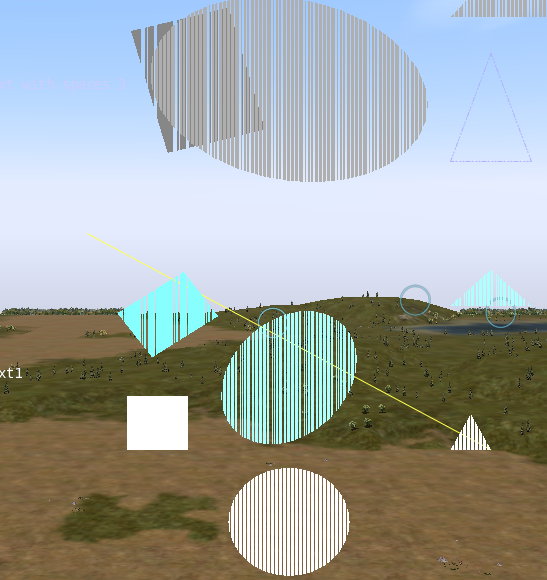
DtLine2DObject represents a line that can be positioned and displayed on the screen. The line can be divided into multiple segments of varying relative lengths. Each line has a start point and an end point, specified using DtVdcVector2Ds. You can specify a color, line style, arrow style, pattern, and thickness for each segment, and the line can flash.
Line styles are specified using the DtVdcLineSegment::DtVdcLineStyle enumeration, which includes:
Arrow styles are specified using the DtVdcLineSegment::DtVdcSegmentArrowStyle enumeration, which includes:
The following example creates and displays a green line that goes from the bottom left-hand corner of the screen to the top right hand corner of the screen. The first 20 percent of the line should be a separate segment with double arrowheads:
DtRectangleObject represents a rectangular object that can be positioned and displayed on the screen. The position specified is the lower lefthand corner of the rectangle. The size parameter specifies the length of the x-axis sides and y-axis sides, respectively (as fractions of the window size). You can specify a counter-clockwise rotation, in radians, the rectangle's color, an optional fill pattern, and whether or not it flashes.
The following example creates and displays a white rectangle at the center of the screen. It is 1/10 the size of the screen along the x-axis and 1/5 of the screen along the y-axis:
DtEllipseObject represents an elliptical object that can be positioned and displayed on the screen. The position specified is the center of the ellipse The size parameter specifies the length of the ellipsis' axes parallel to the screen's x-axis and y-axis. You can specify a counter-clockwise rotation, in radians, a color, and optionally, a fill pattern. The object can flash.
The following example creates and displays a flashing yellow circle in the lower right corner. The diameter is ½ the screen.
To hide the ellipse, do this:
DtTriangle2DObject represents a triangle that can be drawn on the Remote Draw overlay. Each vertex is specified in fractional screen coordinates. Triangles can be rotated, scaled along the X and Y axes independently, and offset from their specified position. They can be colored, filled with an optional pattern, and can flash.
The following example creates and displays an orange-striped pattern-filled triangle that covers the upper right-hand side of the screen.
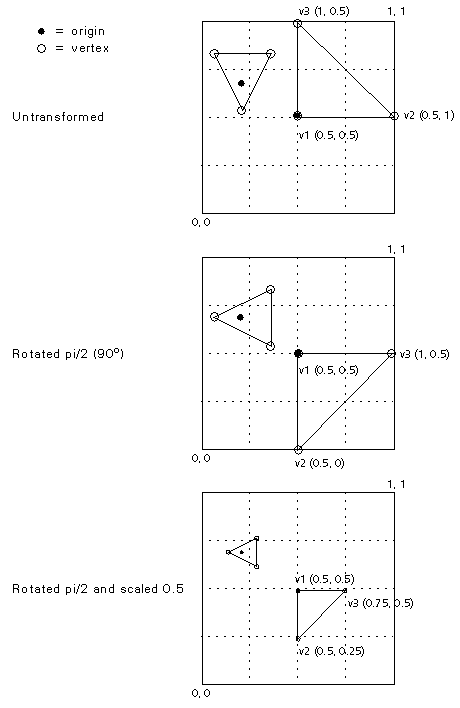
The vertices of 2D triangles are specified as three points (v_1, v_2, v_3) and one offset. The position of each vertex before rotation and scaling is v_n + offset, and the rotation and scale operations are centered around the offset.
The figure below illustrates a triangle with its vertices specified as v_1 = (0, 0), v_2 = (0.5, 0), v_3 = (0, 0.5) and an offset of (0.5, 0.5). Applying the offset to the specified vertices, it is displayed with vertices at (0.5, 0.5), (1, 0.5), and (0.5, 1). (Remember vertices are specified as screen coordinates, with 0,0 being the lower left corner of the screen and 1,1 the upper right.)
If the triangle is rotated pi/2 (90o), it rotates around the origin, as shown in the second view. If it is rotated and scaled 50%, it is displayed with vertices at (0.5, 0.5), (0.75, 0.5), (0.5, 0.75), as shown in the third view.
The smaller triangle demonstrates rotation around the origin when the origin is not a vertex.
DtText2DObject is used to place text on the Remote Draw overlay. The bottom-left corner of the text is positioned using fractional screen coordinates with the DtVdcVector2D class. The text can have a color and can flash.
The following example creates and displays yellow text in the upper left-hand side of the 2D overlay that flashes "Hello World".
You must provide a font filename and size, in points. The default is ../data/fonts/arial.ttf at 14 points.
[<< Objects] [Home] [Top of Page] [3D Objects >>]