 |
VR-Forces 4.8 Class Documentation
|


All Classes Namespaces Files Functions Variables Typedefs Enumerations Enumerator Properties Friends Macros Groups Pages
|
VR-Forces 4.8 Class Documentation
|
You can group Draw Control objects to control their visibility.
Showing a set is equivalent to showing each object and any other subordinate sets. These sets are communicated to VR-Forces and appear in the Remote Graphics panel. This panel allows sets to be hidden and shown.
Draw control objects can be added to or removed from sets. You can also add subordinate sets to a set. A set is created implicitly when you add an object to it.
The following example adds two draw control objects to the Squares set. They are pointed to by DtDrawControlObject* pointers square1 and square2.
To hide everything on the shapes layer, do this:
To show the (now hidden) squares using the squares layer:
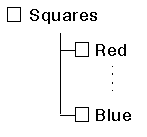
You can group sets hierarchically using double colon (::) syntax. For example, "Squares::Blue" and "Squares::Red" would result in the following hierarchy:
[<< Attributes] [Home] [Top of Page]