 |
VR-Forces 5.0.1 Developer's Guide
|


All Classes Namespaces Files Functions Variables Typedefs Enumerations Enumerator Properties Friends Macros Groups Pages
|
VR-Forces 5.0.1 Developer's Guide
|
Using the Remote Control API, applications can manage VR-Forces objects.
Users can command back-ends to create new objects, modify them, and delete them. The Back-End Remote Control example shows how to use the DtVrfRemoteController to perform these actions.
As mentioned in Choosing Which VR-Forces Applications to Control, the Remote Control API allows you to send messages to all back-ends or to a specific back-end. When you create a simulation object, you must ensure that a single back-end address is specified. Otherwise, multiple VR-Forces applications will try to instantiate the same object. If a value of DtSimSendToAll (the default) is passed to one of DtVrfRemoteController's create methods, DtVrfRemoteController issues a warning and sends the command to the first address in its back-end list.
When you create a simulation object using the Remote Control API, DtVrfRemoteController sends a command message to the appropriate back-end telling it to create a new object. The back-end responds by creating the object and replying with an "object created" message. The following figure illustrates this process.
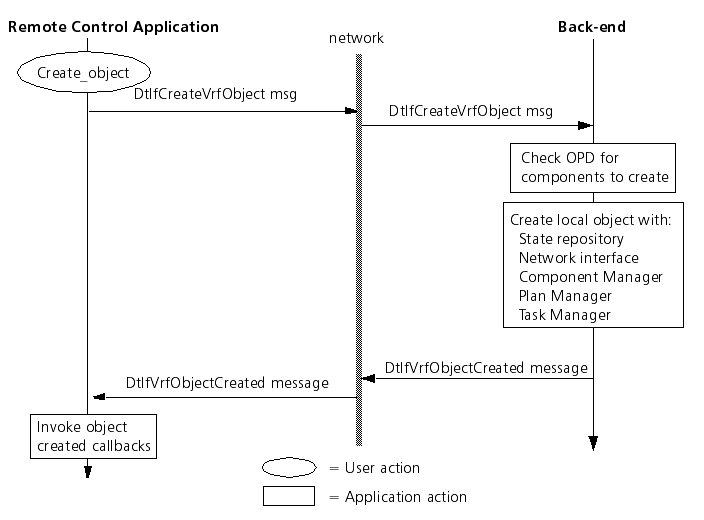
When you call a create*() method, you can register a callback that is invoked when the "object created" message arrives from the back-end. The callback function contains the object ID and object name of the new object. The callback is unregistered automatically by DtVrfRemoteController.
When you create an object, you can specify the name that the VR-Forces back-end should assign to the object. However, since names must be unique, if the name you request is already in use, VR-Forces assigns a name using the default naming convention.
You can change the name, label, or vertices that define a control object. The modify methods each take an object identifier to indicate which object should change.
For simulation objects, values can be modified through DtVrfRemoteController's set*() methods. These methods allow users to set and modify entity and unit attributes such as location, altitude, and formation. For the full list, please see vrfController.h.
Any VR-Forces object can be deleted by calling deleteObject() with either the object name or object ID.
The Remote Control API has function calls that reorganize simulation objects. These calls send messages to all of the simulation engines, and therefore all Organization Managers involved in the exercise.
The createAggregate() member function creates a new unit of the type and force specified. Then it calls setSuperior() for each of the subordinates to assign them as subordinates of the new unit.
The addToOrganization() member function causes a setSuperior() call to be made to the Organization Manager. The specified subordinate is detached from its current superior, and added to the new superior.
The addToForceLevelOrganization() member function causes a setSuperiorToForceLevel() call to be made to the Organization Manager. The specified subordinate is detached from its current superior and added to the force level matching the entity’s force type.
The removeFromOrganization() member function causes a detachFromSuperior() call to be made to the Organization Manager. The specified subordinate will not have any superior.