 |
VR-Forces 5.0.1 Developer's Guide
|


All Classes Namespaces Files Functions Variables Typedefs Enumerations Enumerator Properties Friends Macros Groups Pages
|
VR-Forces 5.0.1 Developer's Guide
|
The VR-Forces Simulation Engine is responsible for updating all object state for each simulation frame, and publishing the updated state to the network. In order to accomplish this, the simulation engine provides data to the simulation models to take into account when computing updated state, including the state of other objects in the world (potentially received from the network), the terrain, weather, messages, and much more. All interaction with the simulation engine is done though network messages.
All persistent state in VRF Sim is maintained in VRF Objects, using the DtLocalObject class. These objects include:
The DtCgf class is the primary top level class in a VR-Forces Simulation Engine. It creates and owns all other classes that make up a VR-Forces simulation engine. This includes the Sim Manager, DtSimManager, which owns all of the other managers.
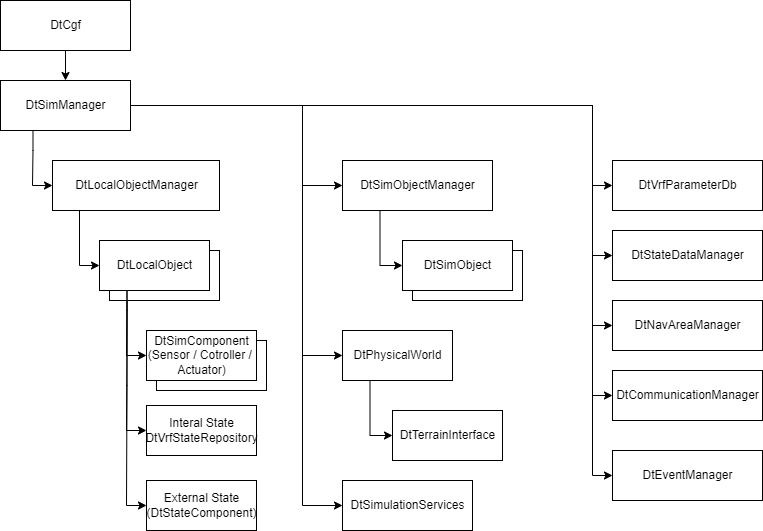
The simulation is run over a series of frames. Each call to DtCgf::tick() executes a single frame of the simulation. Most components of VR-Forces Simulation Engine have a tick() function which is called once per frame as a result of the top level DtCgf::tick().
The External State data of each object in the simulation is double buffered. This means that there are two copies of this data, referred to as Current Frame State and Next Frame State.
The VR-Forces Simulation Engine is a multithreaded application that can take advantage of many CPUs on the same physical hardware. Each simulation frame is broken into four major parts:
The double buffered state data for objects allows VR-Forces to simulate local objects using multiple threads, even when the objects need to access state of other objects in the simulation without requiring locking each time cross-object state is accessed.
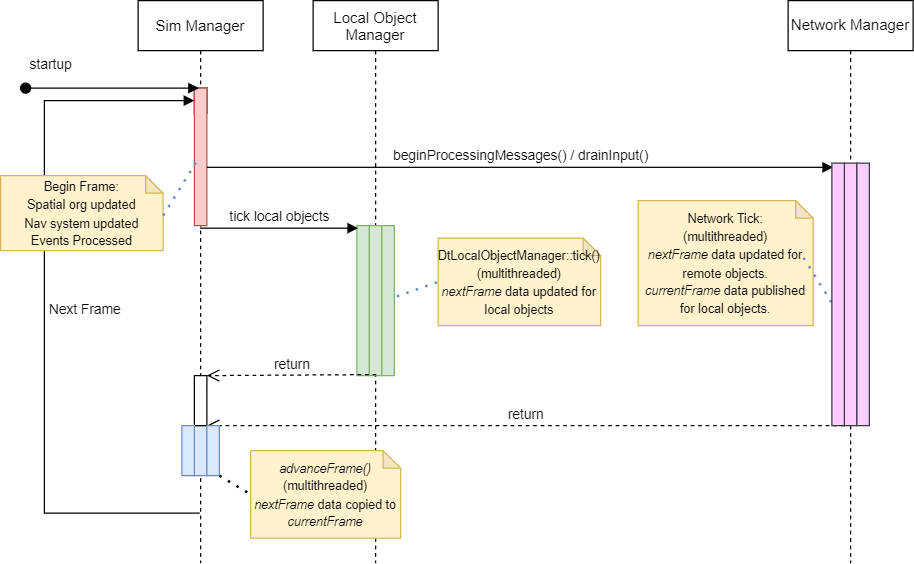
This section runs at the start of each frame, and sets up any necessary data structures and subsystems for use during the frame execution. This section includes:
This section runs all the simulation logic for local objects simulated by the engine by calling the DtLocalObject::tick() for each local object simulated by the engine. This is typically the most processor intensive section of the simulation engine.
Multiple threads are used during Object Tick, and objects are distributed among the threads to execute simultaniously. Each DtLocalObject and all its subcomponents are always executed by the same thread, so data can be set and accessed freely within a single DtLocalObject, but other DtLocalObject instances cannot be accessed, as they are running in other threads at the same time.
This section synconizes the local engine data with the simulation network by calling tick() on the DtSimObjectNetInterface instances as well as other NetInterface classes.
Depending on the configuration, there may be multiple threads used for Network Tick, and the DtSimObjectNetInterface instances will be distributed among the available threads.
This section ends the execution of the frame by copying all needed data from the Next Frame State into Current Frame State.
Advance Frame runs once both Object Tick and Network tick have completed.