
VR-Forces 5.0.2 Developer's Guide
 All Classes Namespaces Files Functions Variables Typedefs Enumerations Enumerator Properties Friends Macros Groups Pages
exampleSendControl

Table of Contents

Overview

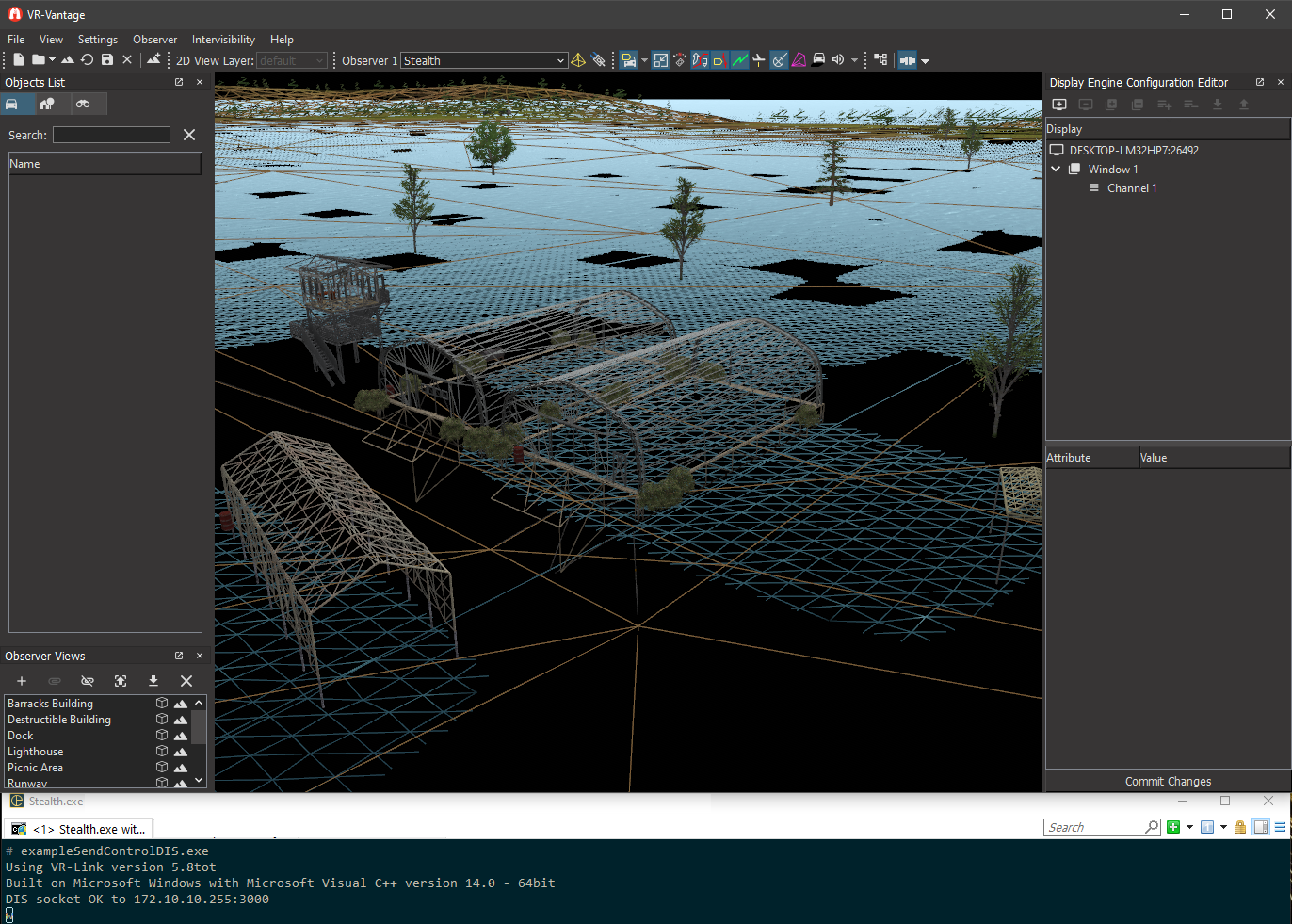
This example demonstrates how to use the vrvControlToolkit to send view control messages to an instance of VR-Vantage. It can send a Wireframe Control message and the LightCommand Control Message that the exampleViewControl plugin enables in VR-Vantage.
See Also
exampleViewControl

Expected Result

exampleSendControl.png
Send Control Result

Example details

When running this example, type 'w' (and press Enter) into the example's console window and it will send a view control message to VR-Vantage telling it to toggle wireframe mode on or off (the first message enables wireframe, further messages toggle). In order for VR-Vantage to listen and respond to the view control messages, make sure "Listen for View Controls" is checked in the connection's configuration page. Typing 'q' will shut down the example.

To test the custom view control packet, type 'l' (and press Enter). If VR-Vantage is running the plug-in created in exampleViewControl, this will toggle the ambient and diffuse settings between different values.

Building the Example

VR-Vantage includes prebuilt versions of the example application. To build it yourself, follow the instructions in Building VR-Vantage Examples, Applications, and Plug-ins.

Running the Example

This example is a VR-Link application, and requires a VR-Link license to run. Start Vantage with the exampleViewControl plugin loaded first, then load a terrain and connect with the protocol you want to test. Then run ./bin64/exampleSendControl<protocol>.exe (on Windows) or ./bin64/exampleSendControl<protocol> (on Linux) and press 'w' to send a 'toggle to wireframe' message to VR-Vantage or 'l' to toggle between different values for ambient and diffuse lighting. For more information about running examples, please see Running Applications and Examples.

Example Source Files


sendControl.cxx

/*********************************************************************
** Copyright (c) 2019 MaK Technologies, Inc.
** All rights reserved.
*********************************************************************/
#include <vl/dataInteraction.h>
#include "MyViewControlDataTypes.h"
#include <vl/exerciseConn.h>
#include <vl/exerciseConnInitializer.h>
#include <vlutil/vlKeyboard.h>
using namespace vrvControlToolkit;
DtTime dt = 0.05;
int keyTick()
{
char *keyPtr = DtPollBlockingInputLine();
if (keyPtr && (*keyPtr == 'q' || *keyPtr == 'Q'))
{
return -1;
}
if (keyPtr && (*keyPtr == 'w' || *keyPtr == 'W'))
{
return 1;
}
if (keyPtr && (*keyPtr == 'l' || *keyPtr == 'L'))
{
return 2;
}
return 0;
}
int main(int argc, char** argv)
{
//Initial wireframe state
bool wireframeState = false;
bool lightState = false;
// Initialize the application and connect
DtVrlApplicationInitializer appInit(argc, argv, "sendControl");
appInit.parseCmdLine();
DtExerciseConn exConn(appInit);
exConn.setApplicationId(3, 5);
DtClock* clock = exConn.clock();
DtTime simTime = 0;
while (true)
{
int key = keyTick();
if (key == -1)
{
break;
}
else
{
DtDataInteraction data;
if (key == 1) // 'w' or 'W'
{
//send a wireframe control PDU
wireframeState = !wireframeState;
cmd.myState = wireframeState;
marshall.encode(&cmd, &data);
}
else if (key == 2) // 'l' or 'L'
{
// send a Light Command PDU. This will only be recognized if VR-Vantage is
// using the exampleViewControl plugin which adds support for this packet
lightState = !lightState;
if (lightState)
{
}
else
{
}
marshall.encode(&cmd, &data);
}
#ifdef DtDIS
data.setExerciseId(1);
#endif
exConn.send(data);
}
// Tell VR-Link the current value of simulation time.
clock->setSimTime(simTime);
// Process any incoming messages.
exConn.drainInput();
DtTime sleeptime = ( simTime += dt ) - clock->elapsedRealTime();
DtSleep( sleeptime ); // returns immediately if negative
}
return 0;
}

[<< Examples] [Home] [Top of Page]


Document ID: Generated on Sun Dec 4 20:22:03 EST 2022 from SVN revision 249613
Copyright © 2005-2021 MAK Technologies. All Rights Reserved (www.mak.com)