 |
VR-Forces 5.0.2 Developer's Guide
|


All Classes Namespaces Files Functions Variables Typedefs Enumerations Enumerator Properties Friends Macros Groups Pages
|
VR-Forces 5.0.2 Developer's Guide
|
Each Object Manager maintains an object parameter database. The object parameter database is a set of text files that store parameter and component data for each type of object that VR-Forces can simulate. When you load a scenario, the Object Manager reads and stores the object parameter database. When an object is created, the Object Manager looks up the object type in the object parameter database and reads the components and parameter values specified for it. It creates the object using those components and parameters.
The contents of the object parameter database file and the meaning of each parameter are discussed in VR-Forces Users Guide. VR-Forces has an API that you can use to create object parameter databases in file formats of your own choosing. For details, please see The Object Parameter Database API.
All objects are associated with a parameters object, a DtVrfObjectParameters or derived class. Object parameters hold all of the information needed to construct a DtLocalObject with the proper type of subcomponents. The object parameter database is consulted when a simulation object is created. The parameters are looked up, then a copy of those parameters is kept with the object.
To access an object’s object parameter database entry, do the following:
To access an object’s local parameter copy, do the following:
The object parameter database lists the component strings associated with each object type. When the Object Manager creates an object, it reads the entry for that object in the object parameter database. (For details about the Object Manager, please see vrfTheObjectManagerandSimulatedObjects.) It uses the appropriate string in the creator function and the object factory does the rest.
For example, the following text is the beginning of an actuator entry in a ground-movement system file in the object parameter database. It tells the sim engine that the component type is an automotive-actuator. The sim engine looks up the string automotive-actuator in the factory and determines that it has to create a DtAutomotiveActuator for the ground vehicle.
For more information about factories, please see VR-Forces Factories.
Each platform-specific state repository overrides createParameters() to create an instance of an appropriate parameters class. The simulation object parameter class hierarchy (illustrated below) looks just like the state repository hierarchy. Each state repository instantiates a parameter class to hold the parameters that are specific to that state repository. Therefore, as with state repositories, all simulation objects have a parameter type of DtVrfObjectParameters or a parameter type derived from DtVrfObjectParameters. Individual simulation objects need derived state repositories. When you create or configure simulation objects, you must be sure that the state repository and parameter classes that you specify match each other.
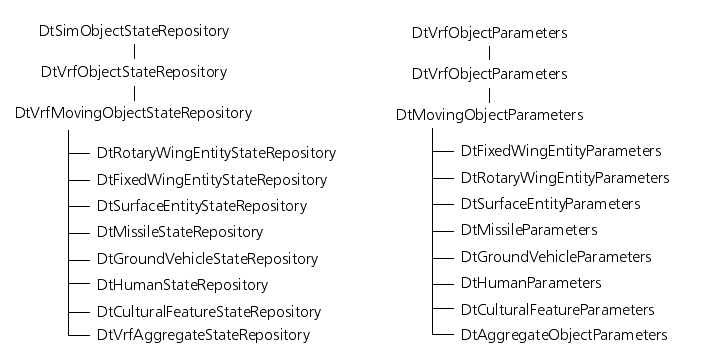
DtVrfObjectParameters derives from DtReaderWriter, allowing instances of a parameter class to be read or written. The parameter classes also use the DtReaderWriter capability to indicate whether or not a value was specified for a given member.
DtVrfObjectParameters provides the necessary infrastructure for working with the parameter factory. As with most classes that use factories, the type() member function returns the class type string, as found in paramTypes.h.
Each parameter class provides accessors and mutators for the parameters it supports, as well as supplying a default value for each parameter in the constructor.
Parameters have a parameter type string. This string is used by the Object Manager to create the proper parameters class when it creates a simulation object. The parameter type should match the state repository type specified for the simulation object. For example, a simulation object with the state repository type ground-entity-state-repository needs certain parameters that are specific to ground vehicles, and therefore expects parameters that are of parameter type ground-vehicle-param or a type derived from ground-vehicle-param. To see the type string for a state repository class, please see the type() member frunction for that class.
As discussed in Object Parameters, a database of all the parameter information is maintained within the Simulation Manager. The data is stored in ASCII format, so you can edit it.
Parameters use the factory system, so it is easy to create new parameter types for your models to use. You can create simulation object-wide parameters, or parameters for specific components. Parameters for components are specified within the component descriptors, which are then used to indicate which components to include with a simulation object.
Certain components in the system need so much data that it is worth the effort it takes to store the data in a separate file to organize it better. The DtReaderWriterFile (rwFile.h) class, makes this easy to do for any parameters you may need to represent. DtReaderWriterFile lets you give a DtReaderWriter (rdrWritr.h) a derived object and a file name, and it handles opening, reading, writing, and closing the file automatically.
For more information about parameters, please see Object Parameters and Simulation Object Parameters.
Member variables for which no value has been specified can inherit values from other instances of parameter classes that are logical ancestors within the parameter class hierarchy. This is done using two virtual member functions, inheritValues() and inheritValuesFromThisType(). If you derive a new parameters class from an existing one, you need to override these two member functions.
The inheritValues() member function takes a pointer to another parameter object that it may inherit from. The type passed is a DtVrfObjectParameters*, although the actual parameter object may be a derived form. Using the parameter argument’s type() member function and its own type() member function, inheritValues() determines if the argument passed in has the same exact type as the type of the object doing the inheriting. If it does, it calls inheritValuesFromThisType(). For the DtSimObjectParameters::inheritValues() member function, if the type does not match, the function returns. For all others, though, if the type does not match, then inheritValues() calls the inheritValues() member function of the type that it derives from, thus passing the parameter argument up the class derivation tree.
All versions of inheritValues() (except for DtSimObjectParameters::inheritValues()) look the same except for the invocation of the base class’s inheritValues() member function.
The following example shows the implementation of inheritValues() for the DtGroundVehicleParameters class, which is derived from DtMovingObjectParameters.
The inheritValuesFromThisType() member function is passed the same parameter argument received by inheritValues(). It checks each member to determine if a value has already been specified for it. If no value has been specified for the member, and a value has been specified for the corresponding member in the parameter argument, the value from the parameter argument’s member is copied to the local member. After this has been done for each member, inheritValuesFromThisType() calls the inheritValuesFromThisType() member function of the class it derives from.
All the derived parameters classes function similarly. Each provides accessors and mutators for all the simulation object parameters specified for that type. They all override the type() and creator() member functions as required for all classes using the factory scheme. They also override inheritValues() and inheritValuesFromThisType(), as discussed in the previous paragraph.
DtVrfObjectParameters includes the lists of component descriptors specifying the components to be used for a simulation object type. The inheritValuesFromThisType() member function treats the list as a whole unit. If any component descriptors are found on a list, no inheritance takes place. If no component descriptors are specified on a list, then the parameter object can inherit an ancestor’s entire list.
DtGroundVehicleParameters includes a list of soil factor (DtSoilFactors) entries. Unlike the component descriptors in DtVrfObjectParameters, these individual entries may be inherited from an ancestor, even if other entries already exist. For example, a parameter entry might only specify a soil factor entry for one soil type that it wishes to change. Entries for other soil types from an ancestral entry would be inherited in inheritValuesFromThisType().