 |
VR-Forces 5.0.2 Developer's Guide
|


All Classes Namespaces Files Functions Variables Typedefs Enumerations Enumerator Properties Friends Macros Groups Pages
|
VR-Forces 5.0.2 Developer's Guide
|
The VR-Forces GUI is built upon the VR-Vantage architecture for the visualization of network (DIS or HLA) beased simulations.
On top of this foundation, the VR-Forces GUI adds functionality to allow the user to communicate with a VR-Forces back-end to run and generate these simulations.
The gui is separated into two main components, the network thread and the visualization thread.
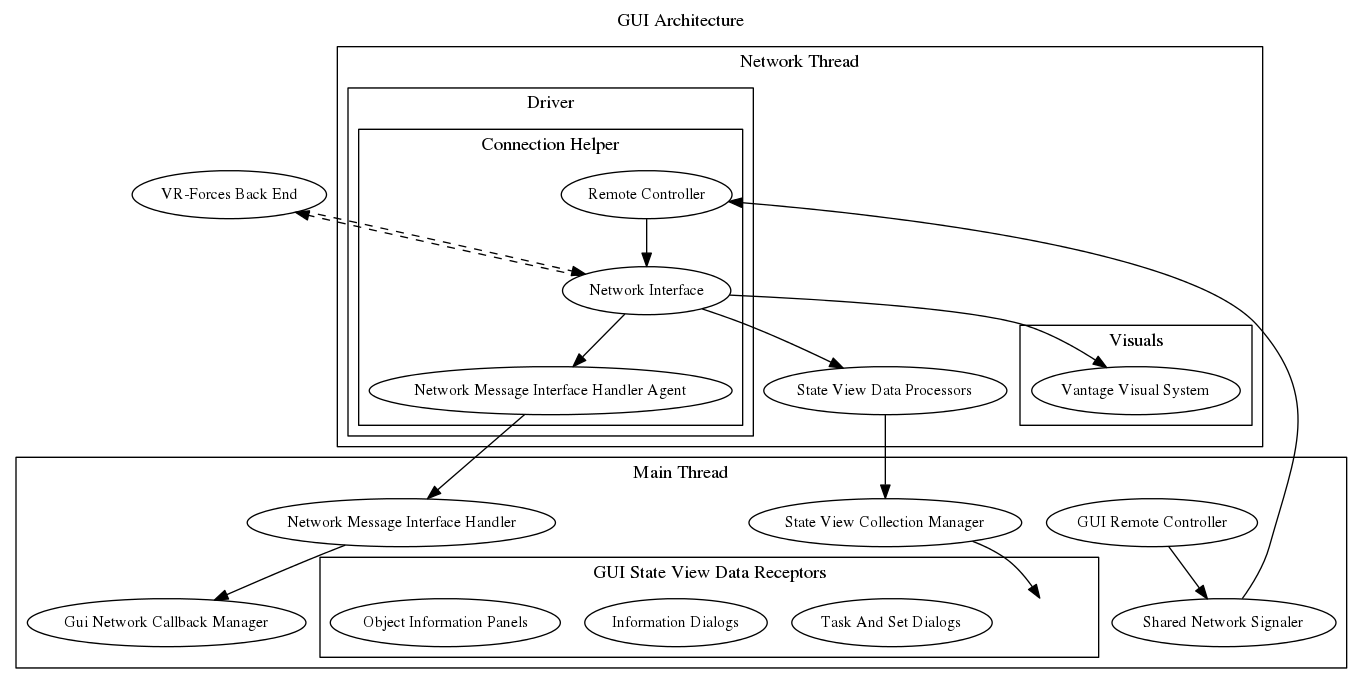
The VR-Forces GUI is extended by creating plugins that can subclass and replace VRF-GUI classes and use hooks to create extensions. Each section below will describe how to add a particular piece of this functionality, however, you will not need to start from scratch. You are either going to be subclassing and replacing existing classes to extend (or modify) existing functionality, or you will be creating new classes that can be added into the existing structure. In general, the network side of the GUI is of the type of subclass and replace. The visualization part of the GUI is more of the adding in functionality as new classes derived from existing classes.
The VR-Forces GUI goes through a number of steps at startup. Each step is available for addition or modification via a plugin, and, depending on what you want to override, it is important to make sure your code is added at the appropriate place. The following sub sections will describe the order of GUI startup.
The first order of operation is parsing the command line. There are command line options that are specific to each protocool (–dis, –hla13, –hla1516, –hla1516e) and general to each protcool (for example, –showCOnsole). When the protocol dependent arguments are parsed, the end result will be the creation of a temporary driver file that will automatically get loaded to start the particular protocol dependent driver (The Network Component). The main application (makVrf::DtVrfGuiApplication) will then be initialized with the general command line arugments used for visualization. The driver will be started in its own network thread, and the visualization will happen in the main thread. Each thread is initialized in parallel, however, the network thread will not fully start until the visualization thread has completed its initialization.
On initialization of the makVrf::DtVrfGuiApplication, plugins are loaded (both protocol independent and dependent), the interface is created (see VR-Forces GUI Classes), managers are initialized and key maps are created:
Once the initialization is complete, the signal_vrfApplicationInitialized will be sent. This will give plugins a final opportunity to replace and initialization any functionality necessary before the application main window is shown. When the main window is shown the application will enter into an event loop. This loop will process until the application is exited. This application loop will handle all communication from the user via the input devices, the network thread (both from and to) as well as updates to entity and terrain visualization. This operation is known as a makVrv::DtDe tick. The best way to be notified of tick activity is to connect to the makVrv::DtDe signal_preTick (called before any loop processing begins) or the signal_postTick (after all processing has been done). Each manager and step int the tick process will also have their own signals sent so you can override or introduce functionality.
The plugin architecture is what is used to extend functionality in VR-Forces. Plugins in the GUI are loaded either from the command line or by loading and parsing xml files (located in appData) to point to the local of the plugin module to load. If the myLoad flag is 1, then, the plugin specified will be loaded. Plugins have three main entry point.
The first entry for plugins the the initializeCommandLineArguments function. This function is called to allow for the addition of command line arguments to be processed in the application
This will allow the developer to add command line arguments that can be used by the user on the command line.
The initDeModule entry point is called during initialization. This is the place where code can be placed to manipulate the menu, pages and toolbars with either different path configurations or replacing functionality
The exception to this is the task, set and create menus. Those menus are also set up when loading a Simulation Model Set. There are xml configuration files that are loaded during SMS load, and, a signal sent when they are loaded to give the developer a chance to modify the task, set or create menu:
The postInitDeModule method is called after the application has been initialized. This gives the user an opportunity to replace anything that has been already set into the system or to check on initial states of managers.
Plugin extension for protocol plugins has a few more entry point. See Adding Protocol Functionality
Throughout the front-end you will see a reference to a makVrv::DtDe. This class is a singleton in the system that you can register (or retrieve) instances of managers and other objects that are registered with the makVrv::DtDe. This is a very powerful tool for you to be able to create your own managers and assign them to the makVrv::DtDe and reference them throughout your code. For example, if you know an object is registered with the makVrv::DtDe, you can reference it as
If you wanted to create your own class that can be instanced, you must first subclass it from makVrv::DtVirtualBaseClass
And implement a method to get the instance
The key part of the code is
All items that are a subclass of makVrv::DtVirtualBaseClass can be added as an instance to the makVrv::DtDe. If there is already an implementation registered for a particular class, when you re-register the old class will be deleted and the new class take precedence. This is how instanced classes are replaced in plugins (see Plugin Architecture).