 |
VR-Forces 5.0.2 Developer's Guide
|


All Classes Namespaces Files Functions Variables Typedefs Enumerations Enumerator Properties Friends Macros Groups Pages
|
VR-Forces 5.0.2 Developer's Guide
|
Components exchange data with one another through ports. Ports are anonymous connections; that is, a component does not have to know what component, if any, is connected to its inputs and outputs. This allows components to be constructed and assembled into systems without modifying other components. In addition, the output ports of multiple components can be connected to a single input port (and vice versa). At run time, the highest priority port puts data on the input port (see below).
There are two types of ports: DtOutputPorts (outputPort.h) and DtInputPorts (inputPort.h). Components that provide data have one or more DtOutputPorts as data members. Components that accept data as input have one more or more DtInputPort data members. Components’ output ports are connected to input ports by the Component Manager at runtime, when a simulation object is created. Each tick, data can flow from one component to another, through those ports that are connected.
For example, the DtGroundAutoControllerComponent (and its subclasses) has a DtAnalogOutputPort throttle port member, on which it sets the throttle value it computes for ground vehicle each tick. The DtAutomotiveActuatorComponent has a DtAnalogInputPort throttle port data member, from which it gets throttle input values each tick. The Component Manager connects the ground auto controller’s throttle output port with the automotive actuator’s throttle input port, enabling data to effectively flow from the controller to the actuator.
Port groups are collections of ports. They are useful for creating logical groupings of related ports. Port groups can be used to simplify the code in components when you want to treat the entire set of ports in the same way. Port groups are divided into types: DtInputPortGroup (inputPortGroup.h) and DtOutputPortGroup (outputPortGroup.h). For example, the DtAutomotiveActuatorComponent has a DtInputGroup member, myAutomotiveControlPortGroup. This group contains the throttle, steering, and brake input ports. The automotive actuator expects to receive all three inputs each tick in order to work properly. It would not make sense to provide steering inputs without throttle. The fact that these ports are placed inside of a port group suggests that some relationship exists between the ports.
Port groups provide a convenient way to set up connections in the object parameter database file. They also provide a convenient way to test or set the activation state of a collection of ports. You can query and set the activation state for all ports in a group, and you can query a group to determine if any of the ports in a group are active.
Use of port groups is optional. A component that has port groups still has to create the individual ports in the group, and you can still directly manipulate them.
The Component Manager connects components to one another through their ports, port groups, or both. It uses information in the component descriptor that specifies how the components should be connected (which output port should be connected to which input port).
The base simulation object parameter class has-a new connection list member. The Component Manager uses this list of connections to construct the new connections between ports and port groups. Connections are created in the createConnections() call in the Component Manager. It creates connections for each entry in the parameter connection list and sets up the connection endpoints specified in the connection list entry. It uses the "component name:port name" combination to look up the actual port endpoints, and configures the connection with this data. (It does a similar lookup for "component name:port group name".)
The figure illustrates the role of ports and port groups. DtGroundCollisionAvoidanceController and DtGroundMoveToControllerComponent are both derived from DtGroundAutoControllerComponent. Therefore, they both have throttle, steering, brake, and parking brake ports, and an automotive control output port group. The output port group is a container that holds pointers to the individual output ports and provides an interface to manage them collectively, rather than individually.
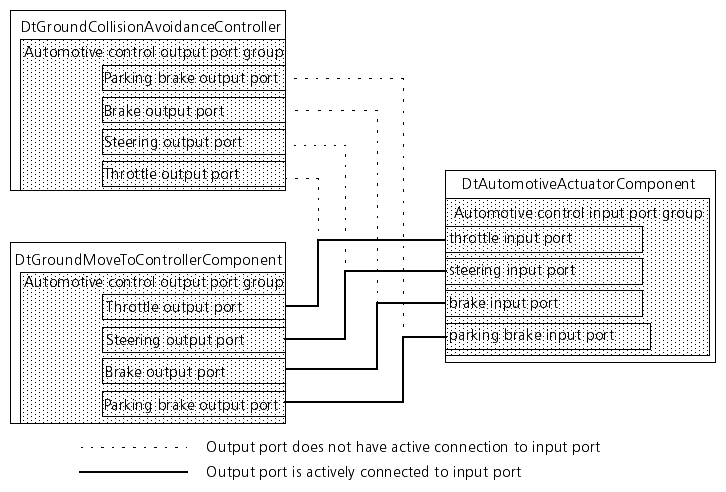
The DtAutomotiveActuatorComponent uses throttle, steering, brake, and parking brake values to model the behavior of ground vehicles. It gets these inputs from any of the DtGroundAutoControllerComponent subclasses. Rather than managing them individually, it creates an input port group (DtInputPortGroup) to manage them as a group. (Conceptually, this is similar to plugging several power cords into a power strip and plugging the power strip into a single electrical outlet, rather than plugging each cord into an individual outlet. The power strip is the equivalent of the port group.)
Each simulation frame, those components whose next tick time is less than or equal to the current (clock) time are ticked in priority order, highest to lowest. If the DtGroundCollisionAvoidanceController is ticked and it detects a possible collision that must be avoided, it attempts to connect its output ports to the automotive actuator component’s input ports. The priority of the collision avoidance controller is the priority of the individual port connections. See Setting the Priority of Components.
If it can get connected (if the input ports are not already attached to another component with a higher priority), it connects and provides its control data to the actuator. It retains control of the input ports even after the actuator has processed the control data. This prevents any other component whose priority is lower than DtGroundCollisionAvoidanceController (such as DtGroundMoveToController) from connecting to the input ports until that connection is explicitly released. This prevents lower priority components from connecting to the input ports while the collision avoidance maneuver is in progress (possibly over several simulation frames), even if DtGroundCollisionAvoidanceController is not being ticked every simulation frame. (Please see Ticking Components, for information about ticking components at intervals other than every simulation frame.)
When the DtGroundCollisionAvoidanceController determines that the collision avoidance maneuver is completed, it calls its automotive control output port group’s allowDeactivation() member function. This keeps its output ports connected to the actuator’s input ports, but moves it to the lowest possible priority so that another component, such as the move to controller, can connect to the component. (Its last data values are latched until some other component successfully connects to the input ports.)
In the previous figure, the DtGroundMoveToController has control of the port group.
Each tick, components that provide data through an output port typically perform some or all of the following steps:
Attempt to activate the connection.
The first step in sending data through an output port is to call its attemptToActivate() member function. This operation turns on any outgoing connections if the priority of those connections is sufficient. If attemptToActivate() returns false, this indicates that no DtInputPorts are connected to this port. In this situation no one is listening for data, so it is not necessary to calculate new values. See also Setting the Priority of Components.
Place the data value on the port.
If the call to attemptToActivate() returns true, then the next step is to call setValue() to set the data on the output port. Optionally, a component can follow this with a call to the port's sendData() member function. This sends data to the receiver (the input port on the other end of the connection). Call the sendData() member function every time the data producer has provided new values to the port and wants those values to be sent.
Deactivate the port (disconnect).
When the user of an output port determines it no longer wants to produce output, it should call either its deactivate() or allowDeactivation() member functions.
Calling deactivate() on an output port immediately severs the connection between the output port and the input port. This allows other components that have an output port connected to the same input port to potentially activate their connection.
Calling allowDeactivation() on the output port keeps the connection active, but moves it to the lowest possible priority. When any other component attempts to provide data to the same input port, the connection from this output port is deactivated.
Each tick, components that receive data through an input port typically perform some or all of the following steps:
Retrieve the data: If there is an active connection and new data available on the input port, the component retrieves the data by calling the port’s value() member function.
DtOutputPortGroup has member functions that are similar to those in DtOutputPort: attemptToActivate(), sendData(), deactivate(), and allowDeactivation(). These calls operate on the entire set of DtOutputPorts in the DtOutputPortGroup.
DtInputPortGroup has member functions that are similar to those in DtInputPort: newData() and dataReceived(). DtInputPortGroup also provides anyPortsActive() and allPortsActive() member functions, enabling callers to check if any or all of its input ports are active.
The DtOutputPort and DtInputPort are abstract base classes that provide interfaces for sending data, receiving data, and managing the connections between ports. They do not specify the kinds of data transmitted over the ports. Specific port types are represented by derived classes. There are input and output port classes for conveying integers, real values, simulation object identifiers, and so on.
DtSimComponents have-a list of DtInputPorts and DtOutputPorts. Derived component classes that have input port members, output port members, or both, create them in their createPorts() member function, and then add them to the appropriate list.
If want to extend existing components and add new ports, port groups, or both to the component, you must override createPorts() or createPortGroups() as appropriate.
A component’s ports are created in the createPorts() member function, and its port groups are created in createPorts().
In the createPorts() function, ports are created with a string name. This name is used in the entity’s object parameter database entry to specify how an entity’s components get connected (which ports get connected to which). This name must be unique within the component. Similarly, any port groups owned by a component are created in createPortGroups(). They also have a string name that must be unique within the component.
After a port is created, it must be added either to one of the component’s port lists (it maintains a list of input ports and a list of output ports), or to a port group owned by the component. For example, in the DtAutomotiveActuatorComponent, the steering input port is created and added to its automotive control input group:
After a port group is created, it must be added to the appropriate port group list owned by the component. (It maintains a list of input port groups and output port groups). For example, the DtAutomotiveActuator has an automotive control input port group, which it creates and adds to its list of input port groups: