
VR-Forces 5.0.3 Developer's Guide
 All Classes Namespaces Files Functions Variables Typedefs Enumerations Enumerator Properties Friends Macros Groups Pages
exampleSceneRootPlugin

Table of Contents

Overview

This example shows how to add nodes to the scene graph via a renderer. The plugin loads a geometry file in OpenFlight format and inserts it directly into the scene. Of particular interest in this example is how to gain access to the scene graph in order to insert a node.
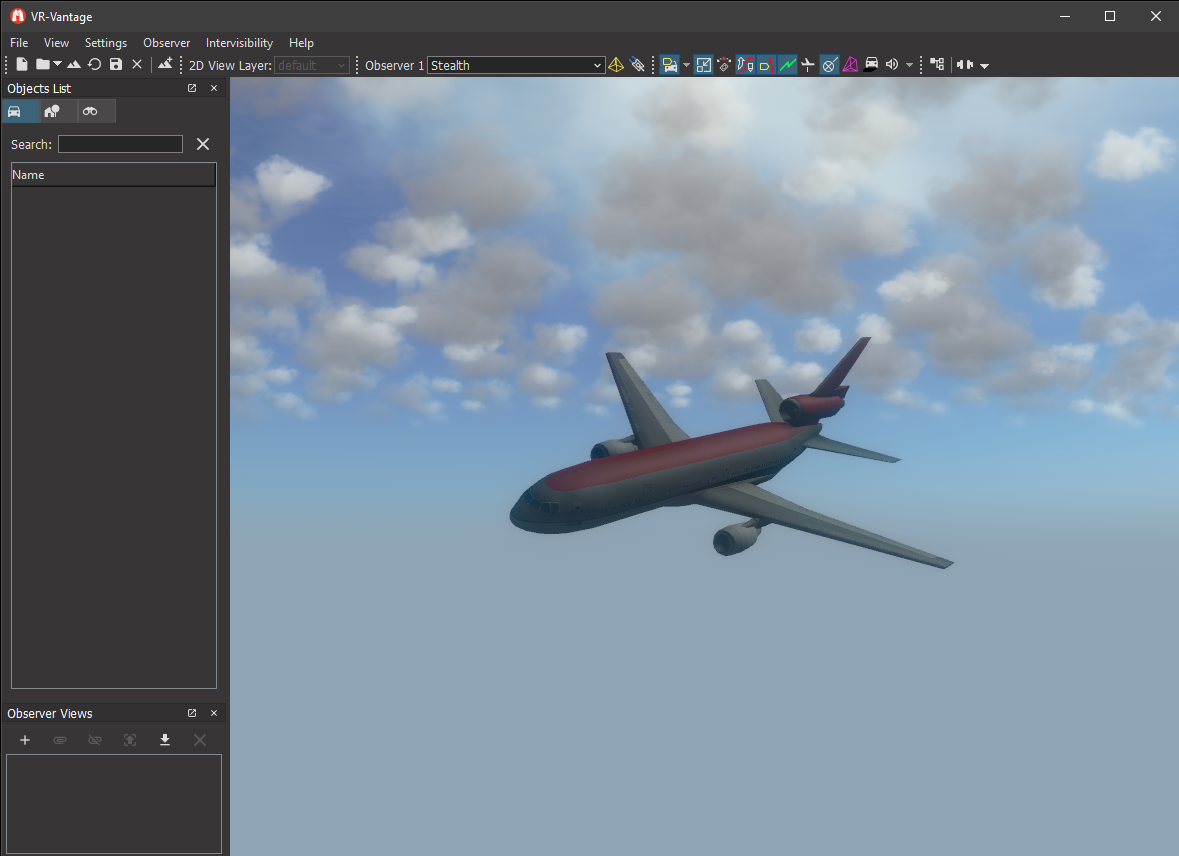
Expected Result

exampleSceneRoot2.png
Scene Root Result

Example details

The content that this example application displays is a geometry file in OpenFlight format. This application implements a helper function to load the geometry and add the geometry to the scene-graph.

void loadGeometryAndAddToSceneGraph(DtDe* de)

The function accepts a pointer to a display engine (DtDe) where the scene renderer can be found. The display engine passed to this function is passed in by the plugin manager when the plugin is loaded.

The geometry to display is in a file on disk. When the application loads the geometry, a small scene-graph branch is created with a transform node at its root so the geometry can be moved in the scene.

osg::ref_ptr<osg::Node> model = osgDB::readNodeFile( sharedDataPath + "/ModelData/Vehicles/FixedWing/DC-10_RED_V7.0/DB_DC10_RED_V7.0.medf" );
new osg::PositionAttitudeTransform();
pat->addChild(model.get());

To add the geometry into the VR-Vantage scene, the renderer is retrieved from the display engine and the root-node of the geometry is added to a root of the scene.

DtOsgRenderer& renderer = (DtOsgRenderer&)de->renderer();
renderer.addNodeToRoot(pat, renderer.propRoot());

In this example, the geometry is placed under the 'propRoot' of the renderer. The renderer is responsible for managing how the scene is rendered. As such, the renderer defines several 'root domains' such as Environment, Terrain, Prop, ModelSets, etc. These domains separate the one scene into 'logical' divisions or groupings. The renderer provides access to these different groupings using an API that abstracts the logical purpose of the geometry from the detailed implementation of the scene-graph.

Building the Example

VR-Vantage includes pre-built versions of the example plug-in. To build it yourself, follow the instructions at Building VR-Vantage Examples, Applications, and Plug-ins.

Running the Example

This example is a plug-in. You can run it by running ./bin64/exampleSceneRootPlugin_stealth.bat (on Windows from cmd.exe) or ./bin64/exampleSceneRootPlugin_stealth.sh (on Linux). For more information about running examples, please see Running Applications and Examples.

Learn More

Example Source Files


exampleSceneRootPlugin.h

/******************************************************************************
** Copyright (c) 2021 MAK Technologies, Inc.
** All rights reserved.
******************************************************************************/
#pragma once
// Get proper local export symbol
#ifndef exampleSceneRootPlugin_H_
#define exampleSceneRootPlugin_H_
#ifdef _WIN32
#ifdef EXAMPLESCENEROOTPLUGIN_EXPORTS
#define DT_DLL_EXAMPLESCENEROOTPLUGIN __declspec ( dllexport )
#else
#define DT_DLL_EXAMPLESCENEROOTPLUGIN __declspec ( dllimport )
#endif
#else
#define DT_DLL_EXAMPLESCENEROOTPLUGIN
#endif
#endif
// Setup proper plugin export symbol
#define DT_DE_PLUGIN_EXPORT_MACRO DT_DLL_EXAMPLESCENEROOTPLUGIN
// Export plugging function bool initDeModule(DtDe* de);
namespace makVrv
{
class DtDe;
}

exampleSceneRootPlugin.cxx

/******************************************************************************
** Copyright (c) 2022 MAK Technologies, Inc.
** All rights reserved.
******************************************************************************/
#include <vrvCore/DtDe.h>
#include <osgDB/ReadFile>
#include <osg/PositionAttitudeTransform>
{
return true;
}
// All VR-Vantage classes are in the same namespace.
namespace makVrv
{
// This is a helper method to load a geometry file and add it to the scene-
// graph. The geometry file is loaded directly with osgDB::loadNodeFile() and
// added as a child to the prop-root node in the renderer.
void loadGeometryAndAddToSceneGraph(DtDe* de)
{
// disconnect from signal
de->signal_postInitialize.disconnect(
boost::bind(&loadGeometryAndAddToSceneGraph, de));
// Load the model
std::string sharedDataPath = de->dePathConfiguration().sharedDataPath();
// Load a geometry file from disk and get its root node.
osg::ref_ptr<osg::Node> model = osgDB::readNodeFile( sharedDataPath + "/ModelData/Vehicles/FixedWing/DC-10_RED_V7.0/DB_DC10_RED_V7.0.medf" );
// Create a transform to move the model away from the origin.
// The default observer starts at 0,0,0. Move the transform, 100 units
// away and rotate it to look nice.
new osg::PositionAttitudeTransform();
pat->setPosition(osg::Vec3(0, 100, 0));
pat->setAttitude(osg::Quat(
osg::DegreesToRadians(-10.0f), osg::Vec3(1.0f, 0.0f, 0.0f),
osg::DegreesToRadians(-30.0f), osg::Vec3(0.0f, 1.0f, 0.0f),
osg::DegreesToRadians(150.0f), osg::Vec3(0.0f, 0.0f, 1.0f)));
// Add the root node of the model to the transform.
pat->addChild(model.get());
// Add the transform to the prop-root of the renderer.
DtOsgRenderer& renderer = (DtOsgRenderer&)de->renderer();
renderer.addNodeToRoot(pat, renderer.propRoot());
}
void init(DtDe& de)
{
// Do nothing if running the plugin on a slave display engine
if (de.isInMasterMode())
{
// load geometry and add it to the scene graph AFTER the
// display engine is initialized
de.signal_postInitialize.connect(
boost::bind(&loadGeometryAndAddToSceneGraph, &de));
}
}
}

[<< Examples] [Home] [Top of Page]


Document ID: Generated on Thu Jun 1 17:58:13 EDT 2023 from SVN revision 255404
Copyright © 2005-2021 MAK Technologies. All Rights Reserved (www.mak.com)