 |
VR-Forces Developer's Guide
|


All Classes Namespaces Files Functions Variables Typedefs Enumerations Enumerator Properties Friends Macros Groups Pages
|
VR-Forces Developer's Guide
|
Every object simulated by VR-Forces is represented by a DtLocalObject instance in the simulation engine. Each DtLocalObject has a set of managers that control its interaction with other objects in the simulation and provide internal infrastructure for configuring and executing models. The different types of simulated objects (entities, units, and control objects) are not distinguished by the classes used to instantiate them. For example, there is no control object class or ground vehicle class. Instead, object types are distinguished by the managers, interfaces, and state repository that they have. A diagram of the architecture of a typical local object is shown below.
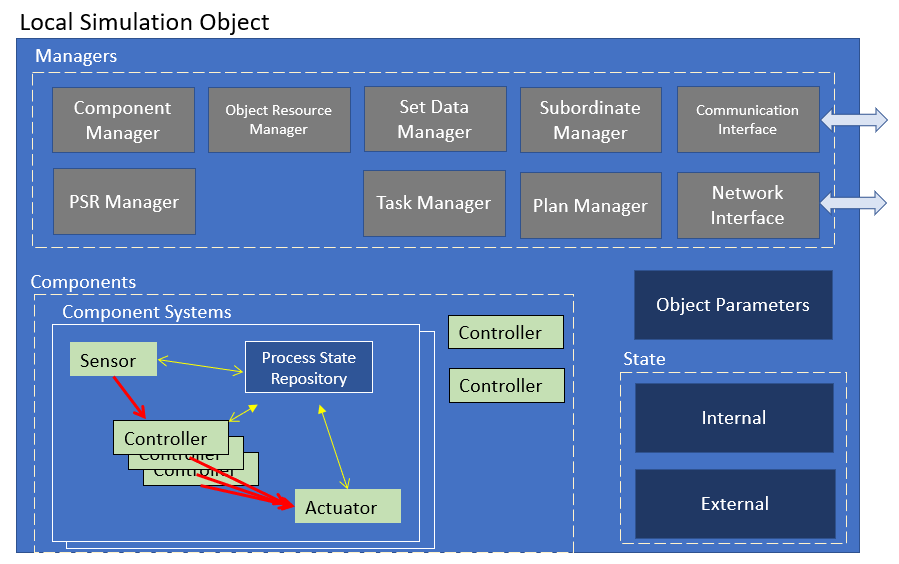
The key parts of a DtLocalObject are:
These parts are discussed below.
The sim engine stores the current state of all objects in the simulation, whether they are locally simulated or have been received over the network from remote applications using DIS or HLA. Each object uses its own state and the state of other objects in the simulation in order to simulate its own behavior each tick. The current state of a sim object is most easily accessed through a DtSimObject. The sim engine creates a DtSimObject for every sim object in the simulation. The full list of DtSimObject instances is maintained by the DtSimObjectManager, which can be accessed through the DtSimulationServices. Accessing a DtSimObject through the DtSimObjectManager is read-only, and thus the returned DtSimObject instances are const pointers. This is both for thread-safety, as multiple sim components may be reading this state simultaneously, and because these objects may be simulated by other applications.
When simulating a sim object owned by the sim engine, the state is instead accessed through a DtLocalObject. The DtLocalObjectManager maintains the list of local sim objects and can be accessed through the DtSimulationServices. The use of the DtLocalObjectManager is discouraged unless you are specifically using this to manipulate local objects in a thread-safe way (i.e. outside of the object manager's tick method). Sim components, subclasses of DtSimComponent, will have access to the DtLocalObject instance for the sim object they are simulating through DtSimComponent::entity() method.
An instance of DtLocalObject provides access to the current frame data, which is read-only, and the next frame data, which is updated each tick as the sim components for the object simulate its behavior and change its state. For more on this double buffering of object state, see Doubled Buffered State.
Objects are highly parameterized. The core parts of any object are the external state and the network interface; these let the object exist in a distributed simulation. Some objects in a VRF simulation may have few of the above modules in them. For example, a Scenario Event is a simulation object; it uses a simple state class and a basic network interface, and has one controller component, but not a task manager or a plan manager. The framework for defining what is in an object, and for constructing different objects at run time, is specified by the object parameter database class for the entity. The parameter data for this database is provided by reading a platform file.
For information on the parameter database classes, see Object Parameters.
Platform files are data files that are read by VR-Forces at run time when objects are created. The platform files define core parameter values and components that are common to a "category" of entity types. A category is an informally defined grouping of types created for convenience. The categories are fairly broad; examples include Ground Vehicles, Fixed Wing Aircraft, Rotary Wing Aircraft, and Human. Platforms files can be created for smaller groups though. VR-Forces includes a Fixed Wing Tanker platform file that is the same as the Fixed Wing platform except that it refers to a special Set Data controller, adds special State Properties relevant for refueling, and specifies a TankerAircraft HLA FOM class. In most cases, however, new entity types can use one of the platforms already defined in VR-Forces.
Platform files have an .ope extension and are located in a Simulation Model Set in the vrfSim/platforms directory. You can view these files in the base SMS and the EntityLevel SMS to see the platforms that are available by default in VR-Forces. The object parameters typically specified in the platform files include the following:
Many of these parameters are relevant to other software modules that model object behavior. For example, navigation and kinematic parameters are important for movement-related components, and state properties for skill level or AI may be relevant to task controllers.
In some cases, the platform parameters have default or "null" values because they are not relevant for a category of object. For example, objects that don't move themselves don't have a need for kinematic parameters; objects that aren't units don't have subordinates; objects that are not lifeforms do not use DI-Guy parameters.
Platform files typically have numerous variables in them, indicated with a '$' character in front of a name. These variable values are filled in from the *.entity* files found in the vrfSim directory of a Simulation Model Set. The .entity files define characteristics of a specific entity type within a category defined by a platform file.
Every simulation object has multiple types of state:
The External State of a simulation object is any state data that can be accessed by other objects in the simulation. Most of this state is very similar to the data that is sent in standard entity state updated in DIS or HLA RPR FOM, however it also includes many VR-Forces specific extensions.
Some examples of external state include:
External state in VR-Forces is all double buffered, meaning there are two copies. These are known as Current Frame State and Next Frame State.
Current frame state is a copy of the external state of an object that is constant, and has values for the start of the frame that is currently executing. This copy of the state is available to all objects. This means that sensors on one object can access the current frame state of another object to determine whether it is in range to be detected. Becuase this state is constant for the entire frame, access to this state data is allowed from all threads durring the Object Tick and Network Tick sections of the frame without any locking.
Current frame state is accessable on both DtSimObject and DtLocalObject instances.
Next frame state is the copy of the external state of an object which is being updated during frame execution. This state holds the state data for the object at the end of the currently executing frame. This state data is not accessable to any object except the owner of the state. Since it is being updated during the frame, it is not safe for other threads to access it. At the end of the frame, the Advance Frame section of the frame execution will move this data to Current Frame State for the next frame.
Next frame state is accessable on DtLocalObject instances.
DtSimObject has functions for accessing Current Frame State for the object. For example:
DtLocalObject inherits DtSimObject, so it has the same functions for accessing Current Frame State and additionally has functions for both accessing and setting Next Frame State. For example:
External state is also commonly accessed using SimObject and LocalObject Facade Classes.
VR-Forces state properties provide a simple way to add new external state without writing a plug-in. For more details, see User-Created State Properties.
Internal state is data that is private to a particular simulation object and cannot be safely accessed by other simulation objects directly. This data is typically not shared over the simulation network.
Some examples of interal state include:
Internal state is single buffered, so only one copy exists. Since it is only accessable to components owned by the simulation object that also owns the state, and a single entity is always ticked serially in a single thread, there is no need to double buffer or lock when accessing this data.
Internal state is stored in two kinds of state objects. Object State Repositories contain information that is available to any manager or component in the object. Process State Repositories, on the other hand, are private to a single component system. Both types of state are saved and restored during a scenario save and load.
Each sim object may have multiple managers which help it to manage its resources and behaviors. Not all object types may have all of these manager types. For instance, control objects may not have a Task Manager, and can therefore not perform tasks.
These interfaces allow communication to, from, and about this object to other applications and sim objects.
The Sim Object Network Interfaces (DtSimObjectNetInterface) are not owned by the sim objects and the sim object do not interact with them directly. In fact, multiple network interfaces may exist to publish data related to a single sim object's state data. The Sim Object Network Interfaces are created and owned by a DtNetworkManagerInterface, which is in turn owned and managed by the DtNetworkInterfaceManager.
The Object Communication Interface allows the object to send and receive both simulated and internal messages (See Object Messages for more details).
Simulation objects are composed of a number of managers, of state components (both described previously), and simulation components. Components are modules of code that implement models of physical interactions, sensors, controllers, actuators, subsystems, capabilities, and complex behaviors.
The following sections describe how the Local Object Manager and Sim Object Manager create and maintain local and remote object represenations, and how the construction of these objects is based on the object type and its configured object parameters.
Objects act based on the tasks and sets that are given to them in a scenario. These tasks and sets can then be assembled into plans or used scripts to produce more complex, higher-level tasks.