Sensing and Acquisition
Simulation objects in VR-Forces are configured with sensors to determine what other objects they are able to detect and interact with. Sensing is modeled in several different domains, such as visual, radar, infrared, and sonar. The sensor models simulate not only signal detection in the sensors, but any signal processing and human interpretation that occurs in the man-machine system. The output of a sensor is a contact list with a Combat Identification Level (detected, recognized, identified, etc.) and appropriate identifying data associated with each contact.
Sensing Objects
The DtObjectSensor is the base class for all the sensors in VR-Forces. It detects things purely on whether the object is within its sensor geometry (DtSpatialFilterEvaluator).
The process of detecting other entities begins in the sensor's tick function.
-
The sensor updates its list of object types to detect. It checks its DtObjectSensor::myObjectsToDetectInputPort to see if the type of objects it should be detecting has changed. Other components use this port to let the sensor know they are interested in detection of particular object types. The target selection controller is one of the components that passes this data to the sensor.
-
The sensor checks the status of previously detected objects. Once the list of detectable types is updated, it calls processObjects. processObjects calls continueDetectingObject, which checks to see if objects that were detected in the last tick are still detected. If an object is still detected, it updates its information. If it is no longer detected, it is removed from the list.
-
The sensor checks for new objects. It calls detectObject, which iterates through a list of all the objects in the simulation that meet the sensor's detection criteria to determine if there are any new detections.
Both continueDetectingObject and detectObject follow a similar process. They check to see if the object is destroyed and whether this sensor detects destroyed objects or not. Then they call objectWithinSensorGeometry, which checks to see if the object falls within the sensor's geometry. If it does, a DtRwSensorContactInfo is created for newly detected objects or updated for previously detected objects.
-
The contact information is added to DtObjectSensor::myDetectedObjectsListPort.
-
Once all of the objects that might be detectable have been checked, DtObjectSensor::updateDetectedObjectsListPort is called to pass the detected objects' information to other components that are connected to this output port. This is usually a DtContactFusionController that will merge all the contacts from the various sensor sources into one combined list in the entity's state repository
Sensing Object Signatures
The majority of object sensing in VR-Forces uses a signature model. The signature model is based on the following concepts:
-
A sensor domain is a particular class of sensor, such as visual, radar, sonar, infrared, and so on. You can add new sensor domains by editing configuration files.
-
A sensor signature is a number that represents the ease of being sensed in a particular sensor domain. The higher the signature value, the easier it is to sense a simulation object in that domain. In the RADAR domain, the signature is related to the target radar cross section.
-
An absolute signature is the sensor signature of a particular simulation object, in a particular domain, at a particular time, independent of the observer. This is a property of the simulation object being sensed.
-
An apparent signature is the sensor signature of a particular simulation object, in a particular domain, from a specific viewpoint. This is the absolute signature corrected for the distance and obstructions between the simulation object being sensed and the viewpoint.
The sensor model is implemented through the following parameter blocks in the object parameter database and configuration files:
-
Target object - Each object that is potentially observable produces an absolute signature value for any sensor domain in which is it detectable. Entries in the object parameter database set the base signature value, and optionally, some rules about how that signature is altered based on the state of the simulation object.
-
Signature propagation - Each sensor domain has a global propagation model. The global propagation model applies to all simulation objects using sensors in a given sensor domain. These models modify absolute signatures from target objects to correct for the viewer's location, as well as any environmental effects, such as being obscured by terrain, and return the relative signature. These models are registered and configured in the ./data/simulationModelSets/<model_set>/physicalWorldParams.mtl file.
-
Sensor - The sensor component configured on a simulation object that is doing the sensing takes the relative signature returned from the propagation model and determines probability of detection. Sensor parameters are configured in the descriptor for each sensor in the object parameter database.
Target Signature
Every object type in VR-Forces can be configured with sensor signature values for any of the sensor domains. These are configured in the object parameter database entry for the object type, and apply both to local objects and remote objects. For each domain, an object has a base signature, and a set of modifiers. The base signature is a single value that represents the signature for that domain. The modifiers specify multipliers for that base value based on the current state of the object. For example, a simulation object might have a base value of 5.0 for its visual signature, and a modifier of 1.5 when moving. This means the signature of the simulation object will be 7.5 when moving and 5.0 when not moving. Signature modifier rules can be placed in an external file, and referenced from many different object types.
The absolute signature values configured in the target object have no units. When used with the default propagation model and a default sensor, the absolute signature is the maximum distance (in kilometers) from which the object can be spotted. However, in general, the absolute signature is not necessarily expressed in units of distance. It is a function of the combination of a particular propagation model and sensor models.
Absolute signatures are specified separately for each sensor domain, and are completely independent of each other.
Signature Propagation
The signature propagation portion of the sensor system models the spatial relationship between the sensor and the target and the effects of the environment on detection. This is modeled by converting the absolute signature calculated by the target object into the relative signature given an observer position.
Signature propagators are configured for each of the sensor domains in the physical world parameter file. Each domain can use a different propagation model, or have its models configured differently.
The VR-Forces standard signature propagator, which is used by default for all sensor domains, returns a relative signature equivalent to the absolute signature * 1000 / range between observer and target. Optionally, the standard propagator can be configured to check for terrain or simulation objects blocking the direct line-of-sight between the target and observer, and return a relative signature of 0 when there is an obstruction.
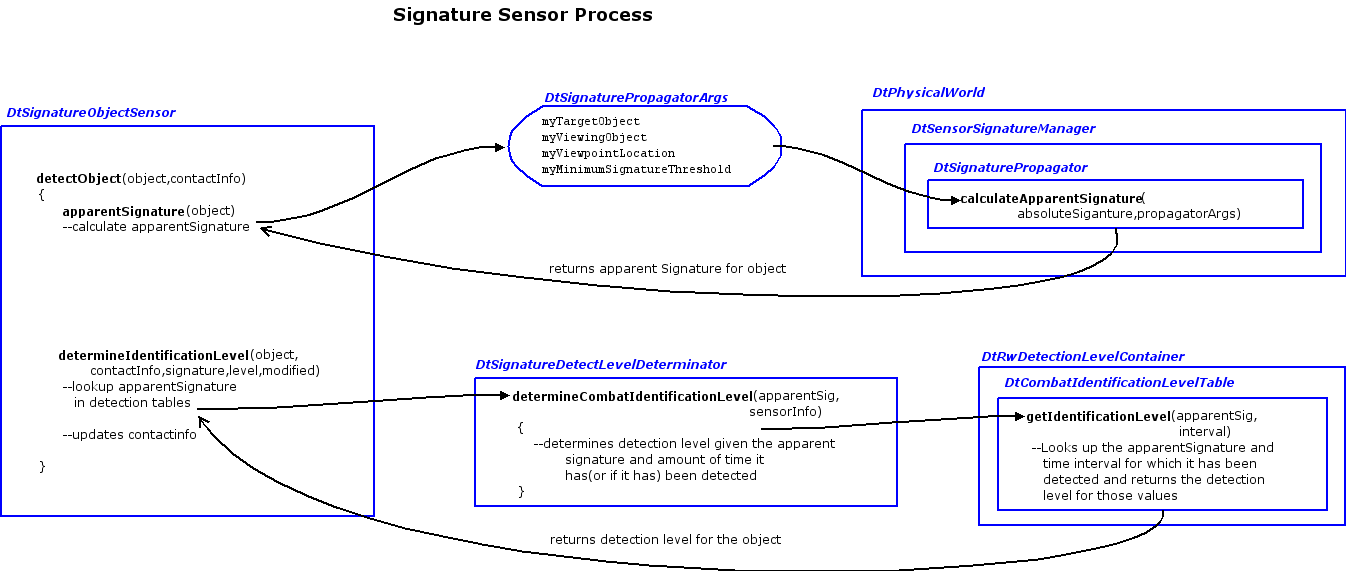
The DtSignatureObjectSensor is the class that computes object detection using target signatures and signature propagators. It is derived from the DtObjectSensor. The signature object sensor takes into account effects from the physical world (how the physical world affects how the sensor sees the object). Both detectObject and continueDetectingObject have been overridden the same way:
-
They call up to the base class versions for quick sensor geometry exclusion checks described previously.
-
They modify the sensitivity of the sensor based on battlefield intelligence, using the sensorModificationFactor method of the DtIntelCollectionAreaManager which is accessed through Simulation Services.
-
Next they call apparentSignature which creates a DtSignaturePropagatorArgs to be passed to the apparentObjectSignature method of the DtSignatureSensorManager. This manager is accessed through the Physical World via simulation services. The DtSensorSignatureManager has a list of DtSignaturePropagator instances. The apparent signature method queries the object for its current absolute signature. It finds the propagator that is appropriate for the sensor domain passed in. It then passes the absolute signature of the object and the propagator arguments into the propagator's calculateApparentSignature method.
-
The apparent signature is used along with the time that the target has been under observation to determine the Combat Identification Level of the target. This determination uses detection tables in the simulation model set.
Currently there are two types of propagators:
-
DtSignaturePropagator checks for line of sight if specified in its descriptor (configured in the physicalWorldParams.mtl file) and degrades the apparent signature based on the range of the object from the sensor. This is used by the sonar, radar, and infra-red domains.
-
DtVisualSignaturePropagator is derived from DtSignaturePropagator. This propagator takes into consideration visibility reduction, such as time of day or weather conditions. It queries the DtEnvironmentalStateManager for the current visibility conditions which can further reduce the apparent signature. This propagator also checks to see if line of sight is blocked by any smoke clouds that come between the object and the sensor. Only the visual domain currently uses this propagator.
VR-Forces provides a radar sensor, which is a specialized version of the signature object sensor. It has all the same functionality of the signature object sensor, plus it publishes an emitter system and one or more emitter beams, which are configured though the descriptor for the sensor.
Adding Sensor Domains
Sensor domains are specified using a string name of the domain, such as "visual." To work, the sensor domain must be listed in all three of the sensor system's components - the target object configuration, the propagator configuration, and the sensor itself. By default, VR-Forces has includes sensor domains for "visual", "radar", "infrared", and "sonar". You can add new sensor domains by choosing a new unique sensor domain name and adding it to the configuration files. For example, to add a new acoustic sensor to a simulation object, so that it could hear nearby simulation objects:
-
For all simulation object types that would potentially be detected by the acoustic sensor, add a new entry to the "sensor-signatures" block in the object parameter database entry with the name "acoustic" and the base signature value. Modifiers could be added as well.
-
In the physicalWorldParams.mtl configuration file, add a new entry for an acoustic propagator, using "acoustic" as the signature name.
-
Add a signature-object-sensor to the sensors list in the object parameter database entry for the simulation object that will detect objects this way. It would specify "acoustic" as its sensor-domain.
If the standard propagator model, or the signature rules defined by VR-Forces are not sufficient, new ones can be defined and added though factories.