 |
VR-Link JAVA API Documentation
|
|
VR-Link JAVA API Documentation
|
To inform other simulation applications about the state of locally-simulated entities, you must:
The tick() function ensures that any needed information is sent to the other participants through the exercise connection.
VR-Link has versions of DtEntityPublisher for HLA and DIS, defined in entityPublisherHLA.h and entityPublisherDIS.h respectively. Rather than include both, you can include entityPublisher.h, which includes the appropriate version based on the presence of DtHLA=1 in your compile line.
Although the two versions of DtEntityPublisher are defined separately, most of the public member function names and prototypes have the same names, so you can make most of these calls regardless of which protocol you are using.
You can create an instance of DtEntityPublisher in a protocol-independent manner using a constructor that takes a DtExerciseConn and DtEntityType as arguments, for example:
The DtExerciseConn is the connection through which the publisher sends its updates.
The DtEntityType (defined in entityType.h) represents a seven-component enumeration defined by the DIS protocol and reused by DIS-based FOMs like the RPR FOM. It is used in outgoing entity state PDUs and in HLA updates (if you are using a FOM that includes this concept), and also determines which HLA object class is used to represent the entity in an HLA exercise. In the previous example, the entity type is that of an M1A1 tank. For a comprehensive list of valid entity types, please see the DIS Enumerations Document.
DtEntityPublisher has a second protocol-independent constructor that takes as arguments three attributes of an entity that are not likely to change during a simulation:
DtEntityPublisher has protocol-specific constructors that allow you to specify parameters such as the HLA object class to represent the object. These are described in the chapters on the protocol-specific interfaces.
All versions of the DtEntityPublisher constructor have an optional final argument that lets you choose an identifier for the entity. Object identification is handled differently in DIS and HLA. For more information about the different ways of identifying objects, please see 4.7 - Identifying Objects.
In HLA, the identifier that you are allowed to choose is the object name – an arbitrary character string that can be used to refer to an entity in inter-federate communications. If you omit the name argument to the DtEntityPublisher constructor, as in the example on the previous page, the RTI chooses one for you. The object handle, another form of object identification is always chosen by the RTI.
In the RTI 1.3. API, you can choose a name for an object at any time. In the RTI 1516 API, if you want to provide a name for an object, you must reserve the name before you create the object. If you use the VR-Link protocol independent API, VR-Link does this work for you. However, the way that VR-Link handles name reservation is not as efficient as if you do it yourself.
To reserve a name you must make a call to the RTIambassador, as follows:
Then tick the RTI. The RTI then calls the Federate Ambassador to let the federate know if the name reservation succeeded or failed.
VR-Link keeps a list of all names that have been successfully reserved. When you create a publisher for an object and specify a name, VR-Link checks the list of reserved names, if the name is not found, it requests the reservation and ticks the RTI until it gets a response or times out. This can be time consuming, but it provides source code compatibility with previous versions of VR-Link.
You can set the number of times the publisher ticks the RTI, and the duration of the ticks using static methods in DtHlaObjectManager, as follows:
If the publisher does not get a successful name reservation after several tries, it allows the RTI to pick the name.
VR-Link applications can make RTI calls to reserve names before they create publishers. If you want to create multiple objects it would be best to batch these requests. This could greatly improve performance. VR-Link automatically registers to get all name reservation success notifications.
In DIS, the identifier that you are choosing is a DtEntityIdentifier, the three-component identifier that is used both within an application and between applications to identify an entity. If you omit the identifier argument to the DtEntityPublisher, as in the example on the previous page, VR-Link chooses one for you, using DtExerciseConn's nextId() function.
The following example shows how you choose an identifier for HLA and DIS:
If you do not choose an identifier for an object when you create the DtEntityPublisher, you can use the following DtEntityPublisher inspector functions to find out the identifier that was chosen:
You can set a DtEntityPublisher's state through its DtEntityStateRepository (defined in entityStateRepository.h) – a container for an entity's state.
In each iteration of your simulation, update the DtEntityStateRepository of each entity you are simulating locally so that it contains the current state of the entity before calling DtEntityPublisher::tick(). You can get a pointer to a DtEntityPublisher's DtEntity-StateRepository using the member function DtEntityPublisher::entityStateRep(). (You can use esr() as shorthand for entityStateRep().)
DtEntityStateRepository has mutator functions that allow you to set the various components of an entity's state. You can set time, space, and position information with:
You can call these functions with a time argument that specifies the simulation time at which you want to get or inspect the data. The default is the current value of VR-Link simulation time as last set with setSimTime().
You can set components that affect the outward appearance of an entity with functions such as:
For a complete list, please see entityStateRepository.h.
DtEntityStateRepository has similar inspector functions, but these are usually used to inspect a remote entity's state, rather than that of a locally simulated entity.
Some mutator functions take enumerations as arguments. Values for these enumerations are in disEnums.h. Functions that take bool should be passed either true or false.
Positions, velocities, and accelerations must be set in geocentric coordinates, as specified in the DIS Standard and DIS-based FOMs like the RPR FOM. In this coordinate system, the origin represents the center of the earth, the X-Y plane goes through the equator, with the X axis passing through the prime meridian, the Y axis passing through 90 degree east longitude, and the Z axis pointing through the north pole (Geocentric Coordinate System). Use the DtVector class to set coordinates. Coordinates are specified in meters.
Orientation is specified as a DtTaitBryan, a class that represents three angles – successive rotations needed to transform from the geocentric coordinate system to the entity coordinate system (origin at the center of mass, X points out the front, Y points out the right side, Z points out the bottom (as illustrated below)). The specific sequence of rotations is known as the Tait-Bryan sequence, in which you first rotate about Z, then about the new Y, then about the newest X axis. The angles are specified in radians.
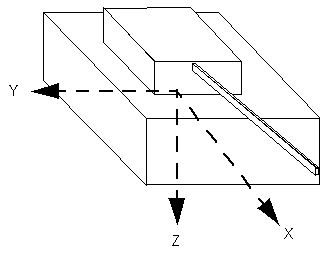
For illustrations of the different coordinate systems, information about converting between rotation matrices and Euler angles, and information about converting among the many different coordinate systems supported by VR-Link, please see 13.3 - Coordinate Conversions.
Alternatively, VR-Link provides various View classes, which let you set data in a
DtEntityStateRepository in other coordinate systems without performing explicit conversions. These are described in 4.9 - Coordinate Views.
The following code sample is an example of using DtEntityStateRepository's mutator functions to set the current state of an entity:
You can use DtEntityStateRepository::printData() to print the current contents of a DtEntityStateRepository in human readable form.
DtEntityPublisher::tick() is the function that does most of the DtEntityPublisher's work. Call it for each DtEntityPublisher once per simulation frame, after the entity's state has been updated using the DtEntityStateRepository's mutator functions.
The tick() function decides what data needs to be sent to the other exercise participants and formats and sends that data through the DtEntityPublisher's exercise connection.
DtEntityPublisher internally maintains a second DtEntityStateRepository representing the way remote applications currently see the entity, based on prior entity state updates and dead-reckoning calculations. VR-Link compares the current state with this lower fidelity representation of state. If position or orientation differences exceed the DtEntityPublisher's thresholds, or if any other attributes have changed at all, data needs to be sent so that remote applications will have the most current information.
Current data is sent whenever:
In the third case, data is sent even if nothing has changed. (This DIS rule is sometimes known as an entity heartbeat.) If data needs to be sent, an Entity State PDU is sent to the exercise containing current values for all fields.
An attribute update is sent containing values for only those attributes whose update conditions (as specified by the FOM) have been met. The update condition for most attributes is any change since the attribute was last sent. However, in the RPR FOM, position, velocity, acceleration, orientation, and angular velocity are always updated together based on a single update condition – when the current position or orientation differs from the value that would be computed by dead-reckoning exceeds thresholds, as described earlier in this section.
Position and orientation thresholds are used to determine when position and orientation data needs to be sent to other exercise participants (as described in ). The DtThresholder class (defined in thresholder.h) holds threshold values. DtThresholder has a set of global threshold values that are shared among all entities that have not overridden them. To change the global threshold values, use DtThresholder's static mutator functions.
You can override global thresholds on a per-entity basis through the mutator functions of each entity's thresholder object, which can be obtained using DtBaseEntityStateRepository::thresholder(). DtEntityPublisher has setDfltThreshold() member functions for compatibility with older releases of VR-Link, but the DtThresholder member functions should be used instead. A DtThresholder has a DtArtPartThresholder (available through the artPartThresholder() member function) through which you can set and inspect articulated parts thresholds. DtArtPartThresholder is defined in artPartThresh.h.
The translation threshold is specified in meters, and defaults to 1.0. The rotation threshold is specified in radians and defaults to the radian equivalent of 3.0 degrees.
For DIS, there is an additional time threshold that defaults to 5.0 seconds. Time is specified in seconds.
Deleting a DtEntityPublisher removes an entity from the exercise.
In HLA, the DtEntityPublisher destructor calls the deleteObjectInstance RTI service.
In DIS, the DtEntityPublisher destructor sends a final Entity State PDU with the FinalPdu appearance bit (bit 23) set. If you do not want a DtEntityPublisher to send this final PDU on destruction, pass an argument of false to its sendFinalPduOn-
Destruction() member function at some point before deleting it.
[<< Working with Entities] [Home] [Top of Page] [Working with Remote Entities >>]

