 |
VR-Link JAVA API Documentation
|
|
VR-Link JAVA API Documentation
|
This section describes how VR-Link implements the following simulation and programming concepts:
The VR-Link toolkit maintains the concept of VR-Link simulation time for use in dead-reckoning of remote entities and thresholding of local entities. Typically, VR-Link simulation time is set once during each iteration of the application's main simulation loop so that all entities are dead-reckoned based on the same value of current time.
Usually, you will want to advance VR-Link simulation time each frame, in proportion to the amount of real time that has elapsed since the previous frame, so that it becomes a discrete approximation to (possibly scaled or offset) real time.
The class DtClock (defined in vlTime.h) implements a VR-Link simulation clock. DtClock has member functions such as setSimTime(), simTime(), and absRealTime(). Typically, you do not have to explicitly create an instance of DtClock, because the DtExerciseConn constructor creates one for you. A pointer to DtExerciseConn's clock is available through the clock() member function.
In a fixed frame rate application, like VR-Link's f18 example, VR-Link simulation time can be managed as follows:
In a floating frame rate application – where you go on to the next frame as soon as you are done with the previous one – you can pass the current time to setSimTime() each frame:
DtObjectPublishers and DtReflectedObjects use their DtExerciseConn's clock when performing dead-reckoning, thresholding, and so on. In rare cases where you are creating an instance of an entity or aggregate state repository yourself outside of the context of a publisher or reflected object, you will need to tell the repository what clock to use if you want dead-reckoning to occur properly. Do this using the repository's setClock() function.
For more information, please see 2.7.6 Timestamps.
One concept that HLA and DIS handle fairly differently is object identification.
In DIS, entities are identified by a triplet (site, application, entity) known as an Entity Identifier. Other types of objects are usually identified using the IDs of their host entities plus a single additional ID number.
In HLA, objects have several different identifiers, including:
For more information about the various types of identifiers, and to see how VR-Link accounts for these differences, please see 4.7 - Identifying Objects.
Callback functions are functions that you write that enable your application to respond to events. You register a callback with VR-Link by passing a pointer to the function as an argument to a callback registration function. VR-Link calls your function in response to a specified event.
There are several places in VR-Link where callback functions are necessary to take advantage of certain functionality. For example, in order to process incoming interactions or DIS PDUs of a certain kind, a user registers an interaction callback or PDU callback with the appropriate VR-Link interaction class or PDU class. This is accomplished using the class's addCallback() static member function. Subsequently, whenever VR-Link reads that type of interaction or PDU from the RTI or DIS network, VR-Link calls your callback function, passing it a copy of the relevant interaction or PDU. In most cases, including this one, the callback gets called from within DtExerciseConn::drainInput() – the VR-Link function that causes input to be read from the exercise.
Other ways that callback functions are used in VR-Link include the following:
Because callback functions are passed as regular function pointers to VR-Link's callback registration functions, the callback functions themselves cannot be non-static member functions of a class. They can be global (C-style) functions, or static class members. In order to have a non-static member function of a class be executed as a result of some VR-Link event, you can call the member function from within your callback.
VR-Link callback functions have strict function signatures, but most types of VR-Link callback functions have a trailing void* argument that is usually called usr. Corresponding callback registration functions also have a trailing usr argument. This lets you register an arbitrary pointer with VR-Link along with your callback function. When VR-Link executes your callback function, the pointer that you registered is passed to your function as usr.
Often, the usr argument passes a pointer to an object on which you want to call a member function. Simply cast usr back to the object's type within the callback. For example:
In cases where you want to pass more than one object to your callback, you must create a simple structure consisting of pointers to your objects, then pass a pointer to the structure as usr.
By default, DtEntityStateRepository works with geocentric coordinates. VR-Link has coordinate conversion routines that let you convert incoming and outgoing entity information to other coordinates systems. VR-Link also has coordinate views that allow you to use various coordinate systems without explicitly calling coordinate conversion routines. The view classes support:
For more information about views and coordinate conversion, please see 4.9 - Coordinate Views, and 13.3 - Coordinate Conversions.
To represent the behavior of entities in between state updates, VR-Link uses dead-reckoning, a process of estimating the location of an entity based on its acceleration and velocity. When updated location information arrives, VR-Link must move the simulated entity to its actual position. To ensure that transitions from an entity's dead-reckoned position to its actual position are not so abrupt as to be visually disconcerting, VR-Link implements smoothing. The figure illustrates the difference between a smoothed transition and a non-smoothed transition.
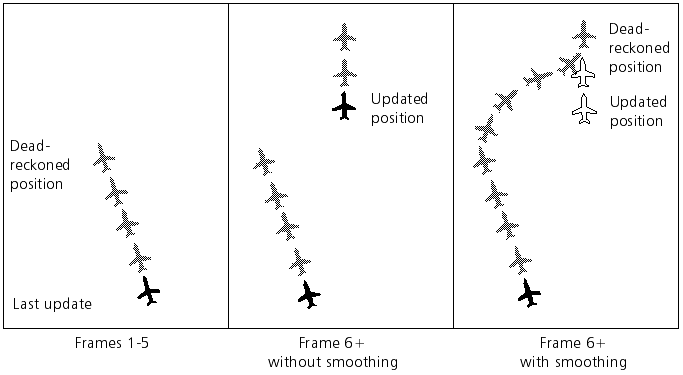
For more information, please see 4.6.5 Dead-Reckoning.
When interactions or object state updates are sent through a DtExerciseConn using sendStamped(), a timestamp is sent with (or within) the message.
A DIS or RPR FOM timestamp indicates only a time (in seconds) past a particular hour at which the data in the message is supposed to be valid. However, it contains no information about what particular hour the sender had in mind. (DtPdu, DtInteraction, and DtStateMessage all have a member function called guessTimeValid() that makes a guess at the full time the sender had in mind by returning the time closest to a reference time such that the number of seconds past the hour equals the value specified in the timestamp.)
In addition to the timestamp, DIS and HLA RPR FOM messages contain a timestamp type indicator, which indicates a type of either "relative" or "absolute". Despite the confusion that these terms have generated in the DIS/HLA world, these terms only indicate whether or not the clock the sender used to obtain its timestamp is synchronized to some global exercise clock. A timestamp type of "absolute" means that the sender's clock is synchronized with the clocks of any other applications that claim to be using absolute timestamping. A timestamp type of "relative" means that the sender's clock is not necessarily synchronized with anyone else's clock.
Participants in a DIS or HLA exercise do not have to synchronize their clocks. In fact, in most exercises, clocks are not synchronized. If participants choose to synchronize their clocks, they do so using a method outside the scope of both DIS and HLA. (The HLA RTI has a set of time management services, but synchronizing clocks is not what they do.)
When a sender and a receiver are both using absolute timestamping, that is, their clocks are synchronized, the receiver can immediately make sense of the sender's timestamp. In this case, VR-Link uses the timestamp of incoming entity state updates in dead-reckoning calculations. If one or both are using relative timestamping, then the sender's timestamp is meaningless to the receiver unless he can determine the time difference between the two clocks (which is again, outside the context of DIS and HLA). In this case, like most DIS/HLA applications, we ignore the timestamp, and use the time of receipt in dead-reckoning calculations.
[<< Managing Information about Events] [Home] [Top of Page] [Big and Little Endian Wire Formats >>]

