
VR-Vantage 2.6 API Documentation
 All Classes Namespaces Files Functions Variables Typedefs Enumerations Enumerator Friends Macros Groups Pages
exampleMultipleChannels

Table of Contents

Overview

This example shows how to create multiple windows and channels from a plug-in. It demonstrates the use of multiple windows with multiple channels each rendering the same scene, however each channel renders the scene differently.
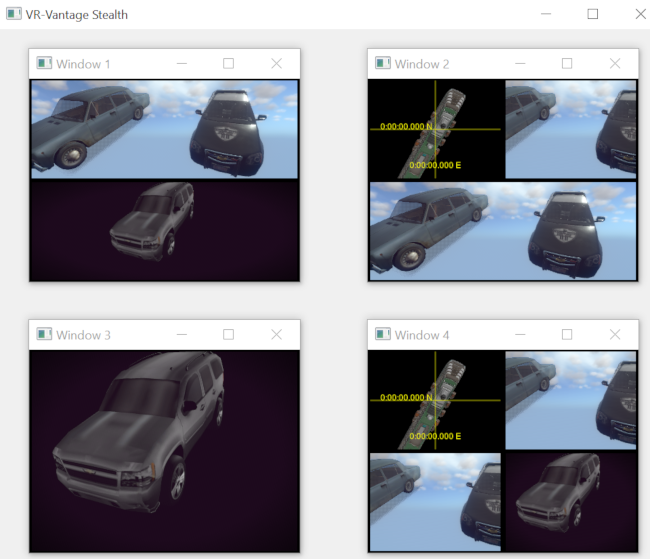
Expected Result

exampleMultipleChannels2.png
Multiple Channels Result

Example details

A VR-Vantage application displays one or more windows: floating, embedded or full-screen. Each window is composed of one or more channels. Each channel renders a view into the scene. Each channel has its position, orientation, and other parameters controlled by an observer.

Channels can share observers to display the same view within the scene. However, to render different views into the same scene, different observer instances per channel are required. For this example, to demonstrate how to render different model sets in each channel, multiple channels are created, each with its own observer mode configuration. When creating an observer for a channel, the observer mode is a collection of settings assigned to an observer that will ultimately be used the the channel to render the scene (such as 3-D or 2-D perspective). Among other attributes defined by the observer mode is the model set to be rendered. A model set is a collection of models that are consistent with a given projection mode (2-D or 3-D) and style (out the window or XR, e.g.). Each channel is configured with an observer mode and the observer mode defines which model set is rendered in the channel.

When models are added into the scene, they are generally added to a scene object that manages the model for use as part of one model set. The scene object positions and orients the model in the scene. It is the scene object that defines the model set for the model. When a channel is rendering the scene objects in the scene, the channel's observer will cull out scene objects that do not have a matching model set for the channel. For example, if a channel is configured with the '3-D' observer mode, the channel will only render scene objects with model set 'ModelSet_3D' (0). Scene objects with other model sets will not be rendered within that channel.

The default observer mode configurations are read from a file named 'default_ObserverModes.omcx' located in the '.../appData/settings/stealth' directory.

The two important steps to rendering different scene objects in different channels are:

  1. Configure the channel with an observermode.
  2. Specify the model set in the scene object.

This example uses four helper functions to configure the display into multiple windows with multiple channels, each with a different observer (and different observer modes).

makVrv::DtDe& de, double left=0, double right=100, double bottom=0,
double top=100);
makVrv::DtDe& de, int x, int y, unsigned int numChannels=1);
makVrv::DtDe& de, const std::string& name = "My Display Configuration");
const makVrv::DtDisplayConfiguration& displayConfig);

The helper function to create the channel configurations creates a configuration for each channel with a unique channel name.

std::string cName = DtChannelConfiguration::DefaultChannelString;
DtChannelConfiguration channelConfig(cName);

The channel's viewport is also defined.

channelConfig.setViewport(left, right, bottom, top);

return channelConfig;

The helper function to create the windows first creates a window configuration with a unique window name.

std::string wName = DtWindowConfiguration::DefaultWindowString;
DtWindowConfiguration windowConfig(wName);

Then the type of window, size, and position are set in the window's configuration.

windowConfig.setWindowType(DtWindowConfiguration::Window);
windowConfig.setPosition(x, y);
windowConfig.setSize(400, 300);

For each channel that the window displays, the window configuration is given a channel configuration by calling the helper function for channels.

DtChannelConfigurations& channelConfig = windowConfig.channelConfigurations();
return windowConfig;

The helper function to create the display configuration just creates a configuration and for each window displayed, and is given a window configuration by calling the helper function for windows.

DtDisplayConfiguration dc;
dc.setName(name);
dc.windowConfigurations().add(makeWindowConfiguration(de, 100, 100, 2));
dc.windowConfigurations().add(makeWindowConfiguration(de, 600, 100, 3));
dc.windowConfigurations().add(makeWindowConfiguration(de, 100, 500, 1));
dc.windowConfigurations().add(makeWindowConfiguration(de, 600, 500, 4));
return dc;

The helper function to create the observer configurations iterates through all of the channel configures created above. For each channel configuraiton, it first a creates an observer configuration with a unique observer name.

oName = DtObserverConfiguration::ObserverConfigurationString;
DtObserverConfiguration observerConfig(oName);

The observer mode is defined in the observer configuration. The mode is a string matching one of the default observer modes read in at application configuration time. Then the configuration is added to the input driver's configuration (which will create all the observers based on the configuarations supplied).

observerConfig.setObserverMode(mode);

This example uses three helper functions to load the geometry files into models and assign those models to scene objects, each for a different model set.

std::string registerModelDefinition(DtDe& de, const std::string& dataFile)
void addModelToTheScene(DtDe& de, const std::string& modelName)
void loadTheScene(DtDe& de)

The helper function to register the model definitions takes the name of a model geometry file, creates a definition with a unique name, and registers the definition with the display engine.

DtModelDefinition md(modelName.str());
md.setParameter("filename", dataFile);
de.sharedState().addModelDefinition(md);
return modelName.str();

The helper function to load a model into the scene creates a scene object with a unique ID, assigns a model set to the scene object, and adds a model to the scene object. The model is created with a previously registered model definition.

DtSceneObject* sceneObj = new DtSceneObject(de, id);
sceneObj->setModelSet(modelSet);
DtOsgSimpleModel* model = new DtOsgSimpleModel(de, id);
sceneObj->addModel(model, 0);
model->setModelDefinition(modelName);

When the model is added to the scene object, the model is loaded from disk using the model configuration.

The helper function to load the scene just iterates over a list of filenames for models, registering their definitions and generating scene objects for each.

std::vector<std::string>::const_iterator iter(modelFiles.begin());
std::vector<std::string>::const_iterator endr(modelFiles.end());
for (; iter != endr; ++iter)
{
std::string modelName = registerModelDefinition(de, *iter);
addModelToTheScene(de, modelName);
}

This example creates a plug-in that will create a custom display layout with multiple windows and overwrites the initialized default.

It is important to note that the custom display configuration must be created and registered after the default application initialization of these configurations but before they are realized. There are two places that this can happen: either a post-plug-in transform or a post-assemble plug-in. After plug-ins are loaded, the post-plug-in transforms are run; after that, the GUI is assembled; then the post-assemble transforms are invoked. The display configurations are realized after the GUI is assembled, so either transform type will work. This example uses a post-plug-in transform (which is also the appropriate place to make changes to the GUI configuration before assembly.

The post-plug-in transform creates the display configurations; removes the default configurations created during application initialization; adds the new display configurations to the application configuration; and then creates and registers a new display engine initializer that will be used actually create the displays.

The plug-in also connects to the boost signal signal_postInitialize, which will fire after the display engine has completed its initialization (including the creation of the new display/windows/channels. The method connected to the post initialize signal will call the helper function loadTheScene(de). It then connects a postTick function to the signal signal_postTick. The post tick function will call inspectDisplayWindows(de), which prints information about the windows and channels (and their observers) to the console. This is called after the first tick to guarantee that the observers have been created and assigned to the channels (postInitialize would have been too soon for that).

Building the Example

VR-Vantage includes prebuilt versions of the example application. To build it yourself, follow the instructions at Building VR-Vantage Examples, Applications, and Plug-ins.

Running the Example

This example is an plugin. You can run the VR-Vantage Stealth with this plug-in included by running ./bin64/exampleMultipleChannels.bat (on Windows) or ./bin64/exampleMultipleChannels (on Linux). For more information about running examples, please see Running Applications and Examples.

Learn More

Example Source Files


exampleMultipleChannelText.cxx

/*****************************************************************************
* Copyright (c) 2019 MAK Technologies, Inc.
* All rights reserved.
*****************************************************************************/
#include <vrvCore/DtDe.h>
#include <string>
#include <sstream>
#include <iostream>
// Use the VR-Vantage namespace. All classes in VR-Vantage are in this namespace.
using namespace makVrv;
// postTick will run on the first tick after the DE has been initialized. At this point
// we can be sure that all windows, channels, and observers have been created.
void postTick(DtDe& de)
{
// Make sure you disconnect from postTick, or this will run every frame!
de.signal_postTick.disconnect(boost::bind(&postTick, boost::ref(de)));
// Just print some information to verify that the correct windows and channels have been created.
// Of course, you can also determine this by opening and inspecting the Display Configuration Editor Panel
}
void postInitialize(DtDe& de)
{
// Disconnect from the postInitial signal; it's no longer needed
de.signal_postInitialize.disconnect(boost::bind(&postInitialize, boost::ref(de)));
// Load all the models into the scene.
// Connect to the postTick signal to rin inspectDisplayWindows()
de.signal_postTick.connect(boost::bind(&postTick, boost::ref(de)));
}
void postPluginTransform(DtDeInitializer& deInit, DtDe& de,
{
// Create the display configuarations for all the windows and channels
// Iterate through all to configurations, create a new observer configuration for each
// channel, and use those to maek a new DtInputDriverConfiguration
makeObserverConfigurations(config, de, dc);
// Remove the existing display configuration from the app configuration
// Add the new display configuration to the app configuration
// Tell VR-Vantage to use this new display configuration
config.setDisplayEngineName(dc.name());
// Now generate a new version of the De Initializer (that will include all our new configurations
DtDeInitializer newInitializer = config.buildInitializer();
// Tell the De to use this new initializer.
de.setDeInitializer(newInitializer);
// Suppress the startup dialog for loading a terrain (optional)
}
void init(DtDe& de)
{
// Ensure that init only gets called once
// (not strictly necessary here, but this is good practice in general)
// We only want to create the configuration if we're running in master mode:
if (de.isInMasterMode())
{
// We need to get access to the application object so we can register a post plugin transform
if (app)
{
// Set up the post plugin transform. A post assemble plugin would work here as well. The
// Application initializer runs post plugin transforms after plugins are loaded but before the
// GUI is assembled. It then runs the post assemble transforms; and then initializes the DE.
// We need to get our new configurations in place before the DE is initialized.
DtVrvApplication::ApplicationTransform functor = boost::bind(&postPluginTransform, _1, _2, _3);
// Install our application transform after the plug-ins are loaded and before the GUI is assembled.
app->installPostPluginTransform(functor, "postPluginTransform");
// After the DE is initialized, this will add some models into the scene, and connect to a
// post-tick signal to run the code that prints to the console all the window and channel names
// that have been created, as well as modelset info about each observer
de.signal_postInitialize.connect(boost::bind(&postInitialize, boost::ref(de)));
}
}
}
{
// initDeModule is the symbol the plugin loader finds and executes to initialize the plugin.
// We put the actual initialization code in an init() function.
init(*de);
return true;
}

multipleChannelTextUtilities.h

/*****************************************************************************
* Copyright (c) 2019 MAK Technologies, Inc.
* All rights reserved.
*****************************************************************************/
#pragma once
#include <string>
namespace makVrv
{
class DtDe;
class DtVrvApplicationConfiguration;
}
makVrv::DtDe& de, double left=0, double right=100, double bottom=0,
double top=100);
makVrv::DtDe& de, int x, int y, unsigned int numChannels=1);
makVrv::DtDe& de, const std::string& name = "My Display Configuration");
const makVrv::DtDisplayConfiguration& displayConfig);
extern std::string registerModelDefinition(
makVrv::DtDe& de, const std::string& dataFile);
extern void addModelToTheScene(makVrv::DtDe& de, const std::string& modelName);

multipleChannelTextUtilities.cxx

/*****************************************************************************
* Copyright (c) 2019 MAK Technologies, Inc.
* All rights reserved.
*****************************************************************************/
#include <sstream>
#include <iostream>
#include <matrix/vlTaitBryan.h>
#include <matrix/vlVector.h>
#include <vrvCore/DtDe.h>
// Use the VR-Vantage namespace. All classes in VR-Vantage are in this namespace.
using namespace makVrv;
// This is a list of mode-names and model-set values. Mode-names define the
// rendering modes (2D/3D), model-sets, and other attributes. These mode-names
// are standard modes used in VR-Vantage. They are defined (and can be found)
// in the configuration files that are loaded when an application is
// initialized. These mode-names and model-sets were taken from the file:
// ...\appData\settings\stealth\default_ObserverModes.omcx.
//
// This example gives each channel a different mode (and model-set) in order to
// demonstrate a scene with multiple scene-objects can render the same scene-
// graph differently in each channel. For this example, each channel should
// render only one of the multiple scene-objects in the scene.
typedef std::pair<std::string, int> ModeToModelSet;
const std::vector<ModeToModelSet> modesAndSets =
StdVectorCreator< ModeToModelSet >
(ModeToModelSet("3D", 0))
(ModeToModelSet("XR", 1))
(ModeToModelSet("Plan View", 5))
(ModeToModelSet("OTW", 0))
// (ModeToModelSet("Inset", 0))
;
// This is a list of file names. All files are loaded into the scene-graph,
// however each channel will render only one of the models.
const std::string vehicles("$(DATA_DIR)/Vehicles/Wheeled/");
const std::string boats("$(DATA_DIR)/Vehicles/Surface/");
const std::string trees("$(DATA_DIR)/Vegetation/Trees/");
const std::vector<std::string> modelFiles = StdVectorCreator< std::string >
(vehicles + "Fiat_124/Fiat_124.medf")
(vehicles + "ChevroletTahoeSilver/ChevroletTahoeSilver.medf")
(boats + "Cruise Ship/CruiseShip.medf")
(vehicles + "ChevyCaprisPolice/Chevy_Capris_Police.medf")
;
DtDe& de, double left, double right, double bottom, double top)
{
// Id value to make the channel and observer names unique
static DtUniqueID id(1);
std::stringstream idName;
idName << " " << id;
// Create a channel, giving it a unique name.
cName += idName.str();
DtChannelConfiguration channelConfig(cName);
// Set the viewport for this channel (where it will render within a window).
// The default is to fill the entire window.
channelConfig.setViewport(left, right, bottom, top);
// return the configuration for this channel.
++id;
return channelConfig;
}
DtDe& de, int x, int y, unsigned int numChannels)
{
// Id value to make the window name unique
static DtUniqueID id(1);
std::stringstream idName;
idName << " " << id;
// Create a window, giving it a unique name.
wName += idName.str();
DtWindowConfiguration windowConfig(wName);
// Set the type and position for this window.
windowConfig.setPosition(x, y);
windowConfig.setSize(400, 300);
// Create the channel-configurations for this window.
// Note: channels are configured slightly less then window sizes
// to display a visible (black) boarder around each channel.
DtChannelConfigurations& channelConfig = windowConfig.channelConfigurations();
switch (numChannels)
{
case 2:
channelConfig.add(makeChannelConfiguration(de, 1, 99, 51, 99));
channelConfig.add(makeChannelConfiguration(de, 1, 99, 1, 49));
break;
case 3:
channelConfig.add(makeChannelConfiguration(de, 1, 49, 51, 99));
channelConfig.add(makeChannelConfiguration(de, 51, 99, 51, 99));
channelConfig.add(makeChannelConfiguration(de, 1, 99, 1, 49));
break;
case 4:
channelConfig.add(makeChannelConfiguration(de, 1, 49, 51, 99));
channelConfig.add(makeChannelConfiguration(de, 51, 99, 51, 99));
channelConfig.add(makeChannelConfiguration(de, 1, 49, 1, 49));
channelConfig.add(makeChannelConfiguration(de, 51, 99, 1, 49));
break;
default:
channelConfig.add(makeChannelConfiguration(de, 1, 99, 1, 99));
break;
}
// return the configuration for this window.
++id;
return windowConfig;
}
const DtDisplayConfiguration& displayConfig)
{
DtUniqueID id(1);
std::stringstream idName;
std::string oName;
// Clean out the old observers first, as makeDisplayConfiguration() will create new ones for each channel
// If you don't do this, you can't start with an ID of 1 (VR-Vantage will throw an exception if you
// try to add an observer configuration for an observer that already exists
// Iterate through all the channel configs, adding a new observer configuration for each
for ( ; wcIter != wcEndIter; ++wcIter )
{
DtWindowConfiguration* const winConfig = *wcIter;
for ( ; ccIter != ccEndIter; ++ccIter )
{
DtChannelConfiguration* channelConfig = *ccIter;
idName.str("");
idName << " " << id++;
oName += idName.str();
DtObserverConfiguration observerConfig(oName);
// Give each observer a different mode.
const std::string& mode(modesAndSets.at((id - 1) % modesAndSets.size()).first);
observerConfig.setObserverMode(mode);
// Register the observer-configuration for the channel to use later.
// Set the observer that the channel will use.
channelConfig->setObserverName(oName);
}
}
}
{
// Configure a display with two windows containing two or three channels.
dc.setName(name);
return dc;
}
{
// For each window in the display...
std::cerr << std::endl;
const DtWindowManager::WindowList& windows =
for (DtWindowManager::WindowList::const_iterator witer(windows.begin());
witer != windows.end(); ++witer)
{
// Print the window's name.
const DtWindow* win(*witer);
std::cerr << "***** WINDOW : ["
<< win->configuration().name() << "]" << std::endl;
// For each channel in the window...
const DtChannelManager::ChannelMap& cm(win->channelManager().channels());
for (DtChannelManager::ChannelMap::const_iterator citer(cm.begin());
citer != cm.end(); ++citer)
{
// Print the channel's name and the name of its observer.
const DtChannel* chan(citer->second);
const DtObserverObject* obs(chan->findObserver());
std::cerr << "----- CHANNEL : ["
<< chan->configuration().name() << "]\t";
if (obs)
{
std::cerr << "Model-Set : " << obs->modelSet();
}
else
{
std::cerr << "No observer at this time.";
}
std::cerr << std::endl;
}
std::cerr << std::endl;
}
}
std::string registerModelDefinition(DtDe& de, const std::string& dataFile)
{
// Id value to make the model name unique
static DtUniqueID id(1);
std::stringstream modelName;
modelName << "model " << id;
// Create a model definition describing the model to load.
// The DtModelDefinition class is used to describe several attributes about
// the model. This example just specifies the name of the geometry file to
// load.
DtModelDefinition md(modelName.str());
md.setParameter("filename", dataFile);
// Retrieve the DtDeSharedState from the display engine and register the
// definition. The DtDeSharedState contains a model definition manager.
// When registering with the DtDeSharedState, all distributed applications
// are notified to register the same model definition.
// return the unique name for the model definition.
++id;
return modelName.str();
}
void addModelToTheScene(DtDe& de, const std::string& modelName)
{
// Id value to make the scene-object name unique
static DtUniqueID id(1);
// Create a DtSceneObject to hold the model. DtSceneObjects provide an
// an API to 'group' multiple models together into a single association.
// The scene-object can then be used to manipulate all the associated
// models as a single entity. Among other features like positioning and
// orientating the associated models, the DtSceneObject also provides the
// ability to add models to the scene-graph and channels for rendering.
// This example creates a single DtSceneObject for each channel and
// positions its models away from the eye-point in the scene.
DtSceneObject* sceneObj = new DtSceneObject(de, id);
if (id == 1)
{
sceneObj->setPosition(0, DtVector(-2.5f, 5.0f, 0.0f));
}
else if (id == 2)
{
sceneObj->setPosition(0, DtVector(0.0f, 5.0f, 0.0f));
}
else if (id == 3)
{
sceneObj->setPosition(0, DtVector(0.0f, 0.0f, 100.0f));
}
else if (id == 4)
{
sceneObj->setPosition(0, DtVector(2.5f, 5.0f, 0.0f));
}
sceneObj->setOrientation(0, DtTaitBryan(
osg::DegreesToRadians(-150.0f),
osg::DegreesToRadians(-30.0f),
osg::DegreesToRadians(-10.0f)));
// Tell each DtSceneObject to use a different model-set. For this example
// we are using the mode-sets defined for each mode that is loaded during
// application configuration time.
int modelSet(modesAndSets.at((id - 1) % modesAndSets.size()).second);
sceneObj->setModelSet(modelSet);
// Create a model and set its definition to a preregistered definition.
// A DtModel (in this case a DtOsgSimpleModel) is a managing container for
// a single model-instance. It provides rendering attributes about the
// model-instance, such as the visualizer-type for choosing which channel
// the model will render in. Each model requires a unique id. Since this
// is just an example, arbitrarily pick the same id as the scene-object.
DtOsgSimpleModel* model = new DtOsgSimpleModel(de, id);
// Associate the model with the scene-object. When a model is associated
// with a scene-object, the scene-object automatically inserts the model-
// instance (within the model) into the scene-graph of the renderer in the
// appropriate channel.
sceneObj->addModel(model, 0);
model->setModelDefinition(modelName);
++id;
}
void loadTheScene(DtDe& de)
{
std::vector<std::string>::const_iterator iter(modelFiles.begin());
std::vector<std::string>::const_iterator endr(modelFiles.end());
for (; iter != endr; ++iter)
{
std::string modelName = registerModelDefinition(de, *iter);
std::cerr << "Adding Model: [" << modelName << "] " << *iter << std::endl;
addModelToTheScene(de, modelName);
}
}

[<< Examples] [Home] [Top of Page]


Copyright © 2005-2020 MAK Technologies. All Rights Reserved (www.mak.com)