
VR-Vantage 2.7 API Documentation
 All Classes Namespaces Files Functions Variables Typedefs Enumerations Enumerator Friends Macros Groups Pages
exampleEmbeddedSlave

Table of Contents

Overview

This example shows how to create your own QT application and embed a VR-Vantage slave display engine in it. Use any master VR-Vantage application (VR-Vantage XR, VR-Vantage Stealth or VR-Vantage IG for example) to control the visuals embedded in this application.
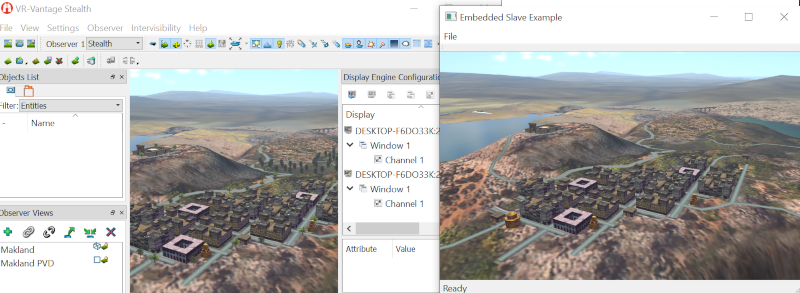
Expected Result

exampleEmbeddedSlave2.png
Embedded Slave Result

Example details

Create and show the main application:

QApplication app(argc, argv);
mainWindow.showMaximized();

Run the application:

return app.exec();

The example application has a GUI derived from QMainWindow. This is a very common way of building QT applications.

The main window class owns some key VR-Vantage objects. It owns a DtDe (display engine), which is the core component for adding visualization to any application. It also owns a DtPluginManager, which is responsible for loading all the VR-Vantage plug-ins.

The OpenGL graphics context needs to be owned and managed by the QT main window. We connect it the VR-Vantage display engine (and consequently OSG) via the DtOsgAdapterQtWidget.

In addition, main window owns some QT widgets for menus and toolbars.

The real work begins in the constructor of the main window.

First, create the display engine, prepare it to be put into slave mode, create a plug-in manager, and then initialize load the plug-ins.

{
DtDeInitializer init;
// Configure DtDeInitializer
init.setDeMode(DtDeInitializer::SlaveMode);
myDe = new DtDe();
myDe->setDeInitializer(init);
//create the log once we get the DeInitializer since we need this as early as possible
myDe->createDebugLog(init.logFileName(), init.notifyLevel());
myPluginManager = new DtPluginManager(*myDe);
myPluginManager->initializePlugins();
}

Now we create the GUI. The interesting thing here is the DtQtIgTickerProvider. This provides us with a "ticker" that ticks the display engine as fast as the QT GUI will go. The rest of the function just sets up menus, toolbars, and the other things that would be part of this application.

{
// Create an IG ticker to tick during Qt's idle time.
DtQtDeTickerProvider& tickerProvider = DtQtDeTickerProvider::instance(*myDe);
tickerProvider.ticker(this);
setWindowTitle(tr("Embedded Slave Example"));
setWindowIcon(QIcon(":/images/Mak-de.png"));
}

During the call to preDisplayEngineInitialize(), we override the functionality set up by plug-ins. We want to create to use a DtOsgAdapterQtWidget to own the DtEmbeddedOsgWindow and we do that by installing a new creator with the DtWindowFactory.

// Set the display window creator function to create use the Adapter widget.
DtWindowFactory::instance(*myDe).setCreator(
DtWindowConfiguration::EmbeddedWindow,

We have to tell our application framework not to try and create a QApplication, which already exists. We also have to tell it not to create a main window, since that already exists too.

// Register the qApp with the DtQApplicationProvider.
DtQApplicationProvider::instance(*myDe).setQAppInstance(qApp);
// Register null with the DtIgMainWindowProvider so that no main window
// is ever created. This DtDe instance is embedded in a QMainWindow already.
DtDeMainWindowProvider::registerInstance(*myDe, NULL);

Finally, everything is all set up and we can initialize the display engine:

Building the Example

VR-Vantage includes pre-built versions of the example application. To build it yourself, follow the instructions at Building VR-Vantage Examples, Applications, and Plug-ins.

Running the Example

This example is an application. You can run it by running ./bin64/exampleEmbeddedSlave.exe (on Windows) or ./bin64/exampleEmbeddedSlave (on Linux). Start Vantage separatly, load MakLand terrain, connect the remote display engine by first enabling from the menu "view->Display Engine Configuration Editor Panel". In the "Display Engine Configuration Editor Panel" click on "Connect To Display Engine", set the host name (leave it to localhost if you are running both on the same PC), click connect. For more information about running examples, please see Running Applications and Examples.

Example Source Files


exampleEmbeddedSlaveMain.cxx

/******************************************************************************
** Copyright (c) 2019 MAK Technologies, Inc.
** All rights reserved.
******************************************************************************/
// Include this header before any Qt header.
#include <QtWidgets/QApplication>
int main(int argc, char *argv[])
{
//
// This example illustrates how to embed a slave display engine into a preexisting
// application.
//
QApplication app(argc, argv);
mainWindow.showMaximized();
//
// Notice how the preexisting applications event loop wasn't changed.
//
return app.exec();
}

exampleEmbeddedSlaveMainWindow.h

/******************************************************************************
** Copyright (c) 2019 MAK Technologies, Inc.
** All rights reserved.
******************************************************************************/
#ifndef exampleEmbeddedSlaveMainWindow_H
#define exampleEmbeddedSlaveMainWindow_H
// Include this header before any Qt header.
#include <vrvCore/DtDe.h>
#include <vrvCore/DtWindow.h>
#include <QtWidgets/QMainWindow>
#include <osg/Group>
#include <osg/Node>
class QAction;
class QMenu;
{
Q_OBJECT
public:
// The adapter widgets. These will become owned and
// deleted by MainWindow.
public slots:
protected:
void buildGui();
virtual void closeEvent(QCloseEvent *event);
void createActions();
void createMenus();
protected:
};
{
public:
{
myWindow = window;
}
protected:
};
#endif

exampleEmbeddedSlaveMainWindow.cxx

/******************************************************************************
** Copyright (c) 2019 MAK Technologies, Inc.
** All rights reserved.
******************************************************************************/
// Include this header before any Qt header.
#include <vrvOsg/vrvOsg.h>
#include <QtWidgets/QApplication>
#include <QtWidgets/QtWidgets>
#include <osg/Group>
#include <osgDB/ReadFile>
#include <osgGA/TrackballManipulator>
using namespace makVrv;
, myPluginManager(0)
, myDe(0)
, myMainOSGWidget(0)
{
createDisplayEngine();
buildGui();
preDisplayEngineInitialize();
initializeDisplayEngine();
postDisplayEngineInitialize();
}
{
if (myMainOSGWidget)
{
myMainOSGWidget = 0;
}
delete myDe;
myDe = 0;
myPluginManager = 0;
}
{
// Configure DtDeInitializer
init.setDeMode(DtDeInitializer::SlaveMode);
myDe = new DtDe();
myDe->setDeInitializer(init);
//create the log once we get the DeInitializer since we need this as early as possible
myDe->createDebugLog(init.logFileName(), init.notifyLevel());
myPluginManager = new DtPluginManager(*myDe);
#ifndef _WIN32
// DI-Guy links in Qt 3, which is incompatible with Qt 4 based applications.
// The following code will exclude the DI-Guy plugin for Linux:
std::list<std::string> excludePlugins;
excludePlugins.push_back("../plugins/release/libvrvDiGuyPlugin.so");
myPluginManager->setExcludedPluginFiles(excludePlugins);
#endif
myPluginManager->initializePlugins();
}
{
// Create an IG ticker to tick during Qt's idle time.
DtQtDeTickerProvider& tickerProvider = DtQtDeTickerProvider::instance(*myDe);
tickerProvider.ticker(this);
setWindowTitle(tr("Embedded Slave Example"));
setWindowIcon(QIcon(":/images/Mak-de.png"));
}
{
// Override Display Engine Functionality
// Set the display window creator function to create use the Adapter widget.
DtWindowFactory::instance(*myDe).setCreator(
DtWindowConfiguration::EmbeddedWindow,
vrvOsg::init(*myDe);
// Register the qApp with the DtQApplicationProvider.
DtQApplicationProvider::instance(*myDe).setQAppInstance(qApp);
// Register null with the DtIgMainWindowProvider so that no main window
// is ever created. This DtDe instance is embedded in a QMainWindow already.
DtDeMainWindowProvider::registerInstance(*myDe, NULL);
}
{
myDe->initialize();
}
{
}
{
event->accept();
}
{
DtEmbeddedOsgWindow* pWindow = 0;
DtOsgAdapterQtWidget* pAdapter = 0;
osg::GraphicsContext* sharedContext = 0;
if(de.display())
{
if(windows.size() > 0)
{
DtOsgWindow* osgView = dynamic_cast<DtOsgWindow*>(windows.front());
if(osgView)
{
sharedContext = osgView->graphicsContext();
}
}
}
osg::ref_ptr<osg::GraphicsContext::Traits> traits = new osg::GraphicsContext::Traits();
traits->sharedContext = sharedContext;
const DtDeInitializer& deInit = de.deInitializer();
traits->doubleBuffer = deInit.doubleBuffer();
traits->vsync = deInit.vsync();
traits->depth = deInit.numDepthBits();
traits->stencil = deInit.numStencilBits();
traits->alpha = deInit.numAlphaBits();
unsigned short level = deInit.antiAliasingLevel();
if (level == 2 || level == 4 || level == 8 || level == 16 || level == 32)
{
traits->sampleBuffers = 1;
traits->samples = level;
}
else
{
traits->sampleBuffers = 0;
traits->samples = 0;
}
if(wc.name() == "Window 1")
{
// Set the main OSG widget as the central widget.
DtOsgAdapterQtWidgetCreator::instance( de ).create( de, traits.get(),
DtOsgAdapterQtWidget::createFormatFromTraits(traits.get()),myWindow );
myWindow->setCentralWidget(myWindow->myMainOSGWidget);
}
if(pAdapter)
{
pWindow = new DtEmbeddedOsgWindow(de, wc, pAdapter);
if(pWindow)
{
pAdapter->setView(pWindow);
}
}
return pWindow;
}
{
myExitAction = new QAction(QIcon(":/images/exit.png"),tr("E&xit"), this);
myExitAction->setStatusTip(tr("Exit the application"));
connect(myExitAction, SIGNAL(triggered()), this, SLOT(close()));
}
{
myFileMenu = this->menuBar()->addMenu(tr("&File"));
myFileMenu->addAction(myExitAction);
}
{
myFileToolBar = this->addToolBar(tr("File"));
}
{
this->statusBar()->showMessage(tr("Ready"));
}

[<< Examples] [Home] [Top of Page]


Copyright © 2005-2021 MAK Technologies. All Rights Reserved (www.mak.com)