 |
VR-Vantage 2.7 API Documentation
|


All Classes Namespaces Files Functions Variables Typedefs Enumerations Enumerator Friends Macros Groups Pages
|
VR-Vantage 2.7 API Documentation
|
This example shows how VR-Vantage uses meta files and related code to animate the flag on the Arleight Burke ship.
The Arleigh Burke model was modified to include specific nodes for the flag at the back of the ship. The flag has three overlapping models for the three wind states (no wind, low wind, and high wind). Figure 1 illustrates the flag models:
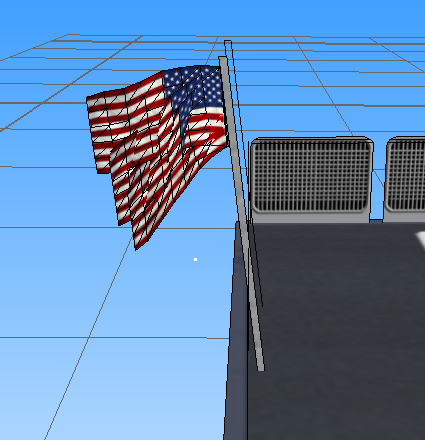
Figure 2 illustrates the structure of the specific nodes for the flag in Creator.
html vrv_flagnodes.png "Figure 2. Node Structure for the Flags"
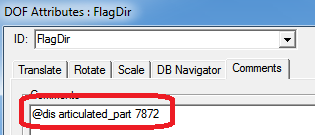
The node named 'FlagDir' is a DoF (degree of freedom) node. The FlagDir node rotates the flag to fly in the wind direction. The FlagDir node also has an annotation as seen in Figure 3. This annotation is used in the meta file to find the FlagDir node in the scene graph when Vantage traverses it.
The node named sw2 is used to set the flag state in this example. sw2 is a switch node that has 3 states (nodes g323, g323_1, g325). While FlagDir is for orientation, the sw2 node is for making the flag appear upright when the wind is high. The node has an annotation as seen in Figure 4.
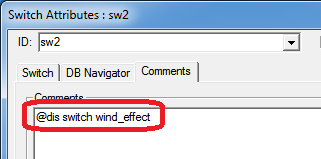
For matching a node, either the node name or the annotation (or both) can be provided. Any node that matches either criterion will be processed. For the flag state, both the node name and annotation are used for matching criteria.
The Arleigh Burke meta file is in the data directory: data\Vehicles\Surface\ddg51_arleigh-burke_navy\1407007162_arleigh-burke_ddg51_arleigh-burke_navy.meta. The meta file for the Arleigh Burke flag is as follows:
The NodeName and AnnotationName fields match the node name and comments in the model. This is the link between the asset and the meta file.
FeatureName is the link between the meta file and the code. Each specific FeatureName corresponds to a particular class in the Vantage code.
For the meta file to influence the runtime visuals, new code must be written. The flag code class hierarchy is shown in Figure 4.
html vrv_arleighburkeflagclasshierarchy.png "Figure 4: The Classes Related to the Flag Orientation and State"
Look at DtShipFlagSwitchTickable in Figure 4. Since the flag on the ship may change state on every frame, DtShipFlagSwitchTickable inherits from DtTickable. DtDynamicFeatureTickable includes common elements for all the terrain flags and ship flags.
The object needs a creator class for dynamic construction. The following classes are derived from DtMetaObjectCreator:
In Vantage, there is a DtMetaObjectFactory, which produces the objects based on the FeatureName string. The FeatureName is the link between the meta file and the code (via the DtMetaObjectFactory). The creator constructor has many arguments. However, not every meta object needs to use all the arguments.
RapidJSON is used to parse the configuration parameters for the object. DtShipFlagSwitchTickable.cxx contains an example of code for parsing in the configuration data. The following code demonstrates the use of RapidJSON to extract information out of a JSON document. VR-Vantage uses the RapidJSON library to parse the meta file. The RapidJSON library is well-documented, so it is straightforward to find other examples of parsing more complicated parameters.
Since DtShipFlagSwitchTickable is a DtTickable element, it is registered with the DtTickableManager so that its update function is called every frame as follows:
If your object is not updated every frame, this step is optional.
The DtShipFlagSwitchTickable::Update function is called every frame, so update tries to return early if parameters have not changed since the last frame. The flag also has a smoother so that the direction does not change drastically frame to frame.
If your object does not need to be udpated, this step is optional.
In order for the DtShipFlagSwitchTickable object to be available to VR-Vantage, it needs to be registered with the DtMetaObjectFactory. This occurs in vrvOsg.cxx file in the init function. However, you can register objects in their own files as well:
In this code, theShipFlagSwitchFeatureName refers to the string "ShipFlagSwitch", which matched the FeatureName in the meta file. This is how the connection between the code and the meta file is established.
You must attach the code to matching nodes. The matching is done through a traversal, which in DtOsgArticulatedModel and DtOsgTerrainPatch is done in a function called applyMetaFile. applyMetaFile relies on the DtMetaFileVisitor which is used as follows:
A function similar to applyMetaFile would be needed in custom classes to associate the meta file objects with the nodes in the scene graph.
You can incorporate instancing into a meta object. An example of handling instanced data is provided in the update functions. Ships are not instanced, but flags on terrain can be instanced. The instanced path for an update function is as follows:
The instancing path needs specific code that mirrors code in DtOsgArticulatedModel. In this example, the node is set normally and then the state is read back to update the instanced data.
[<< Transforming Nodes Programmatically] [Home] [Top of Page] [VR-Vantage Shader Architecture >>]