VR-Vantage 2.8 API Documentation
 All Classes Namespaces Files Functions Variables Typedefs Enumerations Enumerator Friends Macros Groups Pages
exampleDynamicDraw

Table of Contents

Overview

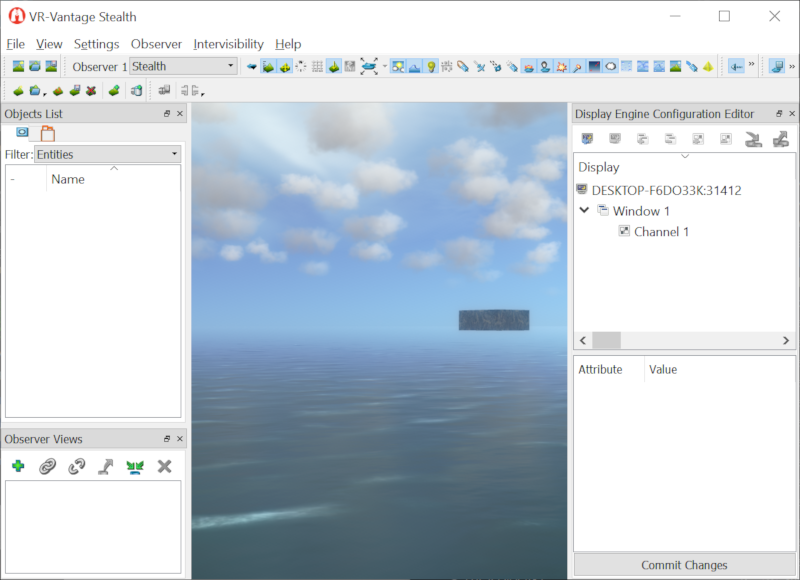
This example shows how to create an object with custom geometry, attach the buoyancy model to it, and dynamically modify it in real time.

Expected Result

exampleDynamicDraw.png
Dynamic Draw Result

Example details

DtExampleModelManager is responsible for creating the objects, processing events to resize the objects, and call updateSize on them every frame. DtExampleModel is the DtModel derived object that creates the model instances for the example model. DtExampleModelInstance is the actual model and contains the node and geometry for the object. It also updates the geometries vertices.

Building the Example

VR-Vantage includes pre-built versions of the example plug-in. To build it yourself, follow the instructions at Building VR-Vantage Examples, Applications, and Plug-ins.

Running the Example

This example is a plug-in. You can run it by running ./bin64/exampleDynamidDraw_stealth.bat (on Windows) or ./bin64/exampleDynamicDraw_stealth.sh (on Linux). This example is intended to be run without a terrain. When VR-Vantage starts close the startup dialog. Add a dynamic ocean layer using the Terrain Editor Panel (can be shown via the View->Terrain Editor Panel menu). Press 'f' to add cubes. Press 'r', 'R', 't', and 'T' to resize the cubes. Press 'h' and 'H' to change the animation rate of the cubes. For more information about running examples, please see Running Applications and Examples.

Example Source Files


DtExampleModel.cxx

// /******************************************************************************
// ** Copyright (c) 2019 MAK Technologies, Inc.
// ** All rights reserved.
// ******************************************************************************/
#include "DtExampleModel.h"
namespace makVrv
{
// constructor for the example model object. Creates the example model instance that goes with this model based
// on the inputs to this constructor
DtExampleModel::DtExampleModel(DtDe& de, DtUniqueID id, double halfLength, double animateRate) : DtModel(de, id)
, mySceneConnector( new DtOsgSceneConnector( de ) )
, mySceneObjectId(0)
{
//create the model instance for this model
DtExampleModelInstance *exampleModelInstance = new DtExampleModelInstance(de, halfLength, animateRate);
//attach the model instance to this model
setModelInstance(exampleModelInstance); // DtModel will handle the deletion of the model instance
}
DtExampleModel::~DtExampleModel()
{
//cleanup the scene connector
delete mySceneConnector;
mySceneConnector = 0;
}
//required function for DtModel derrived classes.
void DtExampleModel::setSolid(bool isSolid) {};
//This is needed after moving upto VR-Vantage 2.0.1
void DtExampleModel::setIsSupportModel( bool isSupport )
{
mySceneConnector->setSupportFlags( isSupport );
}
//set the position of the example model
void DtExampleModel::setPosition( int vtx, const DtVector& position )
{
//scene connector will handle moving the object to the correct position
mySceneConnector->setPosition( position );
}
//set the orientation of the model
void DtExampleModel::setOrientation( int vtx, const DtTaitBryan& orientation )
{
mySceneConnector->setOrientation( orientation );
}
//set whether the model is visible or not
void DtExampleModel::setVisible(bool isVisible)
{
DtModel::setVisible(isVisible);
if(visible() == isVisible)
{
mySceneConnector->setVisible( isVisible );
mySceneConnector->setConnectedWhileHidden( ! isVisible );
}
}
//set whether to scale the model or not
void DtExampleModel::setModelScalingEnabled( bool b )
{
mySceneConnector->setModelScalingEnabled( b );
}
//set whether to locally scale the model or not
void DtExampleModel::setLocalModelScalingEnabled( bool enabled )
{
mySceneConnector->setLocalModelScalingEnabled( enabled );
}
//set how much to locally scale the model
void DtExampleModel::setLocalModelScalingAmount( float localScl )
{
mySceneConnector->setLocalModelScalingAmount( localScl );
}
void DtExampleModel::addToScene( const DtUniqueID& sceneObjectId,
int modelSet, int visualizerType )
{
DtOsgModelInstance* osgModelInstance =
dynamic_cast<DtOsgModelInstance*>( modelInstance() );
if ( osgModelInstance )
{
//scene connector will handle adding the instance to the scene graph
mySceneConnector->addToScene( osgModelInstance,
sceneObjectId, modelSet, visualizerType );
mySceneConnector->setVisible( visible() );
mySceneObjectId = sceneObjectId;
}
}
void DtExampleModel::removeFromScene()
{
DtOsgModelInstance* osgModelInstance =
dynamic_cast<DtOsgModelInstance*>( modelInstance() );
if ( osgModelInstance )
{
mySceneConnector->removeFromScene( osgModelInstance );
}
}
}

DtExampleModel.h

/******************************************************************************
** Copyright (c) 2019 MAK Technologies, Inc.
** All rights reserved.
******************************************************************************/
#pragma once
namespace makVrv
{
class DtExampleModel : public DtModel
{
public:
// create an example model and example model instance object with the specified id, halfLength, and animateRate
DtExampleModel(DtDe& de, DtUniqueID id, double halfLength, double animateRate);
virtual ~DtExampleModel();
//required function for DtModel derrived classes
virtual void setSolid(bool isSolid);
//set the is support model flag for the model
virtual void setIsSupportModel( bool isSupport );
//set the position of the model
virtual void setPosition( int vtx, const DtVector& position );
//set the orientation of the model
virtual void setOrientation( int vtx, const DtTaitBryan& orientation );
//set whether the model is visible or not
virtual void setVisible(bool isVisible);
//set whether to scale the model or not
virtual void setModelScalingEnabled( bool b );
//set whether to locally scale the model or not
virtual void setLocalModelScalingEnabled( bool enabled );
//set how much to locally scale the model
virtual void setLocalModelScalingAmount( float localScl );
protected:
// called by DtSceneObject to add the model to the scene
virtual void addToScene( const DtUniqueID& sceneObjectId,
int modelSet, int visualizerType );
// called by DtSceneObject to remove the model from the scene
virtual void removeFromScene();
protected:
//used to connect model instances to the scene
DtOsgSceneConnector* mySceneConnector;
};
}

DtExampleModelInstance.cxx

// /******************************************************************************
// ** Copyright (c) 2019 MAK Technologies, Inc.
// ** All rights reserved.
// ******************************************************************************/
#include <osg/Geode>
#include <osg/Geometry>
#include <osg/Material>
#include <vrvCore/DtDe.h>
namespace makVrv
{
DtExampleModelInstance::DtExampleModelInstance(DtDe& de, double halfLength, double animateRate) : DtOsgModelInstance(de)
, myMinSize(halfLength - animateRate * 120.0, halfLength - animateRate * 120.0, halfLength)
, myMaxSize(halfLength + animateRate * 120.0, halfLength + animateRate * 120.0, halfLength)
, myCurrentSize(halfLength, halfLength, halfLength)
, myAnimateRate(animateRate, animateRate, 0.0)
{
createCubeGeode();
}
void DtExampleModelInstance::createCubeGeode()
{
DtOsgFileCache* osgFileCache = dynamic_cast<DtOsgFileCache*>(myDe.fileCache());
osg::ref_ptr<osg::Texture> iceTex = NULL;
if(osgFileCache)
{
std::string iceTexFilename("../examples/exampleDynamicDraw/ice_texture.png");
DtFileCache::LoadFileOptions lfo = myDe.fileCache()->defaultOptions();
iceTex = osgFileCache->getTextureInstance(iceTexFilename,
osg::Texture::LINEAR_MIPMAP_LINEAR,osg::Texture::LINEAR_MIPMAP_LINEAR,osg::Texture::REPEAT,osg::Texture::REPEAT,
lfo);
}
// create an array of normals. One entry for each face of the cube.
// order must match the order the quads are described in the vertex array.
osg::ref_ptr<osg::Vec3Array> normals = new osg::Vec3Array;
normals->push_back(osg::Vec3(0.0f,-1.0f,0.0f));
normals->push_back(osg::Vec3(0.0f,1.0f,0.0f));
normals->push_back(osg::Vec3(1.0f,0.0f,0.0f));
normals->push_back(osg::Vec3(-1.0f,0.0f,0.0f));
normals->push_back(osg::Vec3(0.0f,0.0f,-1.0f));
normals->push_back(osg::Vec3(0.0f,0.0f,1.0f));
// create an array of colors. One entry for each face of the cube.
// order must match the order the quads are described in the vertex array.
osg::ref_ptr<osg::Vec3Array> colors = new osg::Vec3Array;
colors->push_back(osg::Vec3(1.0f, 1.0f, 1.0f));
osg::Geometry* cubeGeom = new osg::Geometry();
float dx = myCurrentSize.x();
float dy = myCurrentSize.y();
float dz = myCurrentSize.z();
// create Cube
{
// create Geometry object to store all the vertices for the cube.
// this time we'll use C arrays to initialize the vertices.
// note, anticlockwise ordering.
// note II, OpenGL polygons must be convex, planar polygons, otherwise
// undefined results will occur. If you have concave polygons or ones
// that cross over themselves then use the osgUtil::Tessellator to fix
// the polygons into a set of valid polygons.
//create the cube vertex coordinates
osg::Vec3 myCoords[] =
{
//Side 1
osg::Vec3(-dx, -dy, dz),
osg::Vec3(-dx, -dy, -dz),
osg::Vec3(dx, -dy, -dz),
osg::Vec3(dx, -dy, dz),
//Side 2
osg::Vec3(dx, dy, dz),
osg::Vec3(dx, dy, -dz),
osg::Vec3(-dx, dy, -dz),
osg::Vec3(-dx, dy, dz),
//Side 3
osg::Vec3(dx, -dy, dz),
osg::Vec3(dx, -dy, -dz),
osg::Vec3(dx, dy, -dz),
osg::Vec3(dx, dy, dz),
//Side 4
osg::Vec3(-dx, dy, dz),
osg::Vec3(-dx, dy, -dz),
osg::Vec3(-dx, -dy, -dz),
osg::Vec3(-dx, -dy, dz),
//Bottom
osg::Vec3(dx, dy, -dz),
osg::Vec3(dx, -dy, -dz),
osg::Vec3(-dx, -dy, -dz),
osg::Vec3(-dx, dy, -dz),
//Top
osg::Vec3(dx, dy, dz),
osg::Vec3(-dx, dy, dz),
osg::Vec3(-dx, -dy, dz),
osg::Vec3(dx, -dy, dz),
};
//create the texture coordinates
osg::Vec2 myTexCoords[] =
{
//Side 1
osg::Vec2(0, 0),
osg::Vec2(0, 1),
osg::Vec2(1, 1),
osg::Vec2(1, 0),
//Side 1
osg::Vec2(0, 0),
osg::Vec2(0, 1),
osg::Vec2(1, 1),
osg::Vec2(1, 0),
//Side 1
osg::Vec2(0, 0),
osg::Vec2(0, 1),
osg::Vec2(1, 1),
osg::Vec2(1, 0),
//Side 1
osg::Vec2(0, 0),
osg::Vec2(0, 1),
osg::Vec2(1, 1),
osg::Vec2(1, 0),
//Side 1
osg::Vec2(0, 0),
osg::Vec2(0, 1),
osg::Vec2(1, 1),
osg::Vec2(1, 0),
//Side 1
osg::Vec2(0, 0),
osg::Vec2(0, 1),
osg::Vec2(1, 1),
osg::Vec2(1, 0)
};
int numCoords = sizeof(myCoords)/sizeof(osg::Vec3);
//create an osg array so we can pass the array to the geometry
osg::Vec3Array* vertices = new osg::Vec3Array(numCoords,myCoords);
// pass the created vertex array to the points geometry object.
cubeGeom->setVertexArray(vertices);
//do the same with the texture coords
osg::Vec2Array* texCoords = new osg::Vec2Array(numCoords,myTexCoords);
cubeGeom->setTexCoordArray(0, texCoords);
// and the normal array
cubeGeom->setNormalArray(normals.get(), osg::Array::BIND_PER_PRIMITIVE_SET);
cubeGeom->setColorArray(colors.get(), osg::Array::BIND_PER_PRIMITIVE_SET);
// This time we simply use primitive, and hardwire the number of coords to use
// since we know up front,
cubeGeom->addPrimitiveSet(new osg::DrawArrays(osg::PrimitiveSet::QUADS,0,numCoords));
}
cubeGeom->setInitialBound(osg::BoundingBox(osg::Vec3(-dx, -dy, -dz), osg::Vec3(dx, dy, dz)));
// Create a sphere with specified radius at the specified location
osg::ref_ptr<osg::Geode> geode = new osg::Geode;
// add the points geometry to the geode.
geode->addDrawable(cubeGeom);
//get the statesset so we can setup the openGL state for the geometry
osg::StateSet *ss = cubeGeom->getOrCreateStateSet();
//attach the ice texture to the stateset
ss->setTextureAttributeAndModes(0,iceTex.get());
//turn on lighting
ss->setMode(GL_LIGHTING,osg::StateAttribute::ON);
//create the material properties for the cube
osg::Material* material = new osg::Material;
material->setAmbient(osg::Material::FRONT, osg::Vec4(1.0f, 1.0f, 1.0f, 1.0f));
material->setDiffuse(osg::Material::FRONT, osg::Vec4(0.8f, 0.8f, 0.8f, 1.0f));
material->setSpecular(osg::Material::FRONT, osg::Vec4(0.8f, 0.8f, 0.8f, 1.0f));
material->setEmission(osg::Material::FRONT, osg::Vec4(0.0f, 0.0f, 0.0f, 1.0f));
material->setShininess(osg::Material::FRONT, 40.0f);
ss->setAttribute(material);
//Important step!
// Generate the shaders for this geometry.
// VR-Vantage has custom shaders and in order to properly texture the object
// we need to generate the texturing shaders so run a shader generation pass.
DtOsgShaderManager& shaderManager = DtOsgShaderManager::instance(myDe);
shaderManager.generateShaders(geode, "DtExampleModelInstance");
//attach the geode to this model instance.
setRootNode((osg::Node*)geode);
}
void DtExampleModelInstance::setVisible(bool isVisible) {}
//change the size of a side. Increases or Decreases the half length of the side by deltaChange amount.
// side of 0 == x coordinate
// side of 1 == y coordinate
void DtExampleModelInstance::changeSideSize(int side, double deltaChange)
{
//adjust the current size but don't go negative
if(side == 0 && (myCurrentSize.x() + deltaChange > 0.0))
{
myCurrentSize.x() += deltaChange;
}else if(side == 1 && (myCurrentSize.y() + deltaChange > 0.0))
{
myCurrentSize.y() += deltaChange;
}
//adjust the min and max sizes based on the current size.
myMinSize.x() = std::min(myCurrentSize.x(), myMinSize.x());
myMinSize.y() = std::min(myCurrentSize.y(), myMinSize.y());
myMaxSize.x() = std::max(myCurrentSize.x(), myMaxSize.x());
myMaxSize.y() = std::max(myCurrentSize.y(), myMaxSize.y());
}
//update the verticies of the cube based on the current size adjusted by animation rate * animation scale
void DtExampleModelInstance::updateSize(double animationScale)
{
osg::Geode *geode = dynamic_cast<osg::Geode*>(rootNode());
if(animationScale > 0.0)
{
//adjust the current size based on the animation rate.
osg::Vec3 animateRate = myAnimateRate * animationScale;
myCurrentSize += animateRate;
if(myMaxSize.x() != myMinSize.x())
{
if(myCurrentSize.x() > myMaxSize.x())
{
myAnimateRate.x() *= -1.0;
myCurrentSize.x() = myMaxSize.x() - animateRate.x();
}
if(myCurrentSize.x() < myMinSize.x())
{
myAnimateRate.x() *= -1.0;
myCurrentSize.x() = myMinSize.x() - animateRate.x();
}
}
if(myMaxSize.y() != myMinSize.y())
{
if(myCurrentSize.y() > myMaxSize.y())
{
myAnimateRate.y() *= -1.0;
myCurrentSize.y() = myMaxSize.y() - animateRate.y();
}
if(myCurrentSize.y() < myMinSize.y())
{
myAnimateRate.y() *= -1.0;
myCurrentSize.y() = myMinSize.y() - animateRate.y();
}
}
}
if(geode)
{
osg::Geometry *geom = dynamic_cast<osg::Geometry*>(geode->getDrawable(0));
osg::Array* vertArray = geom->getVertexArray();
osg::Vec3* vertVecs = (osg::Vec3*)(vertArray->getDataPointer());
double dx = myCurrentSize.x();
double dy = myCurrentSize.y();
double dz = myCurrentSize.z();
//create new vertex locations based on the current size
//these values could be adjusted however often you need to.
// for example a network packet could come in with a new size and then
// update the geometry based on that instead of updating it every frame.
vertVecs[0] = osg::Vec3(-dx, -dy, dz);
vertVecs[1] = osg::Vec3(-dx, -dy, -dz);
vertVecs[2] = osg::Vec3(dx, -dy, -dz);
vertVecs[3] = osg::Vec3(dx, -dy, dz);
vertVecs[4] = osg::Vec3(dx, dy, dz);
vertVecs[5] = osg::Vec3(dx, dy, -dz);
vertVecs[6] = osg::Vec3(-dx, dy, -dz);
vertVecs[7] = osg::Vec3(-dx, dy, dz);
vertVecs[8] = osg::Vec3(dx, -dy, dz);
vertVecs[9] = osg::Vec3(dx, -dy, -dz);
vertVecs[10] = osg::Vec3(dx, dy, -dz);
vertVecs[11] = osg::Vec3(dx, dy, dz);
vertVecs[12] = osg::Vec3(-dx, dy, dz);
vertVecs[13] = osg::Vec3(-dx, dy, -dz);
vertVecs[14] = osg::Vec3(-dx, -dy, -dz);
vertVecs[15] = osg::Vec3(-dx, -dy, dz);
vertVecs[16] = osg::Vec3(dx, dy, -dz);
vertVecs[17] = osg::Vec3(dx, -dy, -dz);
vertVecs[18] = osg::Vec3(-dx, -dy, -dz);
vertVecs[19] = osg::Vec3(-dx, dy, -dz);
vertVecs[20] = osg::Vec3(dx, dy, dz);
vertVecs[21] = osg::Vec3(-dx, dy, dz);
vertVecs[22] = osg::Vec3(-dx, -dy, dz);
vertVecs[23] = osg::Vec3(dx, -dy, dz);
//force the update since we modified the vert array
vertArray->dirty();
//reset the bounding box based on the new vertex array
geom->setInitialBound(osg::BoundingBox(-myCurrentSize, myCurrentSize));
geom->dirtyBound();
}
}
}

DtExampleModelInstance.h

/******************************************************************************
** Copyright (c) 2019 MAK Technologies, Inc.
** All rights reserved.
******************************************************************************/
#pragma once
namespace makVrv
{
//derive from the OsgModelInstance so we can use the OsgSceneConnector in the example model object
class DtExampleModelInstance : public DtOsgModelInstance
{
public:
DtExampleModelInstance(DtDe& de, double halfLength, double animateRate);
virtual void setVisible(bool isVisible);
//adjust the current size based on the side and deltaChange passed in.
virtual void changeSideSize(int side, double deltaChange);
//update the verticies of the geometry to match the current size of the cube.
virtual void updateSize(double animationScale);
protected:
//create the cube geode and geometry
protected:
osg::Vec3 myMinSize;
osg::Vec3 myMaxSize;
osg::Vec3 myCurrentSize;
osg::Vec3 myAnimateRate;
};
}

DtExampleModelManager.cxx

// /******************************************************************************
// ** Copyright (c) 2020 MAK Technologies, Inc.
// ** All rights reserved.
// ******************************************************************************/
#include "DtExampleModel.h"
namespace makVrv
{
: myDe(de)
, myModelInstances()
, myAnimateScale(1.0)
{
//Connect the tick function up to the post tick signal so it happens once per frame.
&DtExampleModelManager::tick, this));
}
DtExampleModelManager::~DtExampleModelManager()
{
}
//Function for modifing the size of one side of every cube
void DtExampleModelManager::changeSideSize(int side, double deltaChange)
{
//loop over all the cubes and modify their current size
std::list<DtExampleModelInstance*>::iterator it = myModelInstances.begin(), nd = myModelInstances.end();
for(; it != nd; ++it)
{
(*it)->changeSideSize(side, deltaChange);
}
}
//Function for modifying the rate the cubes are animated
void DtExampleModelManager::changeAnimateScale(double deltaChange)
{
myAnimateScale += deltaChange;
//keep the animation scale at or above 0
if(myAnimateScale < 0)
{
myAnimateScale = 0;
}
}
//Function for creating a cube at a random location with a random size.
void DtExampleModelManager::createRandomCube()
{
double cubeX = rand() % 2000;
double cubeY = rand() % 2000;
double cubeZ = rand() % 2000;
double cubeHalfLength = rand() % 20 + 10;
double heading = rand() % 360;
createCube(cubeX, cubeY, cubeZ, cubeHalfLength, heading);
}
//Function for creating a cube at the specified location and size
void DtExampleModelManager::createCube(double x, double y, double z, double halfLength, double heading)
{
// Create a DtSceneObject to hold the model. DtSceneObjects provide an
// an API to 'group' multiple models together into a single association.
// The scene-object can then be used to manipulate all the associated
// models as a single entity. Among other features like positioning and
// orientating the associated models, the DtSceneObject also provides the
// ability to add models to the scene-graph and channels for rendering.
// This example creates a single DtSceneObject and uses it to add the models
// to the scene graph.
DtSceneObject* sceneObj = new DtSceneObject(myDe, 3);
//Model set 0 is the 3D object model set which is what we want for our cubes
sceneObj->setModelSet(DtObserverMode::ModelSet3dModels);
sceneObj->setPosition(0, DtVector(x, y, z));
sceneObj->setOrientation(0, DtTaitBryan(heading, 0.0, 0.0));
sceneObj->setBoundingBoxSize(-halfLength,-halfLength,-halfLength,halfLength,halfLength,halfLength);
//create the triton water clamping updater. This will clamp the cube's to the ocean and give them a simple buoyancy model.
// If you want a more complicated buoyancy model create a derived class of this updater.
DtTritonWaterClampingUpdater *waterUpdater = new DtTritonWaterClampingUpdater(myDe, uid);
waterUpdater->setSceneObject(sceneObj);
waterUpdater->setInputPosition(DtVector(x, y, z));
waterUpdater->setInputOrientation(DtTaitBryan(heading, 0.0, 0.0));
//set the buoyancy LOD distance to -1.0 so it effects all cubes.
//This can be set to a distance to improve performance by only
// applying the buoyancy model to models less than the distance from the camera
waterUpdater->setLOD(-1.0);
//DtExampleModel handles the creation of a DtExampleModelInstance and adding it to the scene graph
DtExampleModel* model = new DtExampleModel(myDe, uid, halfLength, 5.0 / 60.0);
//Keep a local list of all the model instances so we can modify them later.
myModelInstances.push_back(dynamic_cast<DtExampleModelInstance *>(model->modelInstance()));
// Associate the model with the scene-object. When a model is associated
// with a scene-object, the scene-object automatically inserts the model-
// instance (within the model) into the scene-graph of the renderer in the
// appropriate channel.
sceneObj->addModel(model, 0);
return;
}
//Callback for the postTick signal so we can modify the cubes
void DtExampleModelManager::tick()
{
//Loop over all the model instances and update their size.
std::list<DtExampleModelInstance*>::iterator it = myModelInstances.begin(), nd = myModelInstances.end();
for(; it != nd; ++it)
{
(*it)->updateSize(myAnimateScale);
}
}
}

DtExampleModelManager.h

// /******************************************************************************
// ** Copyright (c) 2019 MAK Technologies, Inc.
// ** All rights reserved.
// ******************************************************************************/
#ifndef DtExampleModelManager_H_
#define DtExampleModelManager_H_
#include <vrvCore/DtDe.h>
namespace makVrv
{
class DtExampleModelInstance;
class DtExampleModelManager
{
public:
virtual void createCube(double x, double y, double z, double halfLength, double heading);
virtual void createRandomCube();
virtual void changeSideSize(int side, double deltaChange);
virtual void changeAnimateScale(double deltaChange);
void tick();
protected:
DtDe& myDe;
//Amount to scale the animation rate of the cubes.
//list of all the example model instances created
std::list<DtExampleModelInstance *> myModelInstances;
};
}
#endif

exampleDynamicDrawPlugin.cxx

/******************************************************************************
** Copyright (c) 2019 MAK Technologies, Inc.
** All rights reserved.
******************************************************************************/
#include <vrvCore/DtDe.h>
#include <boost/bind.hpp>
using namespace makVrv;
void init(DtDe& de)
{
// Ensure that init only gets called once
// (not strictly necessary here, but this is good practice in general)
// We only want to create the example driver if we're running in master mode:
if (de.isInMasterMode())
{
// The driver must be created after the DE's initialization is finished,
// to make sure all the objects it uses exist.
}
}
{
// Setup the plugin. Normally, the init function and functionality
// should be in its own library.
init(*de);
return true;
}
{
// We're done with the signal, so disconnect from it
// Create the manager that will manage the DtExampleModels and DtExampleModelInstances
DtExampleModelManager* modelManager = new DtExampleModelManager(*de);
// Add a key binding that calls the example model manager's function:
// The input driver responds to input events by calling key functions. To
// bind a key to an arbitrary function, there are two steps:
// 1. Create a KeyFunction that calls the desired function and add it
// to the input driver
// 2. Add a key binding from some key to the KeyFunction defined in step 1
// to the keymap
// Create the KeyFunction
DtInputDriver& inputDriver = de->driverManager().inputDriver();
keyMapManager.addKeyFunction( "Draw Cube", boost::bind(
keyMapManager.addKeyFunction( "Inc Side 1", boost::bind(
keyMapManager.addKeyFunction( "Inc Side 2", boost::bind(
keyMapManager.addKeyFunction( "Dec Side 1", boost::bind(
keyMapManager.addKeyFunction( "Dec Side 2", boost::bind(
keyMapManager.addKeyFunction( "Inc Animation Scale", boost::bind(
keyMapManager.addKeyFunction( "Dec Animation Scale", boost::bind(
// Bind the above key functions to some keys in the default
// ("Observer Frame") key map
DtKeyMap* obsFrame = keyMapManager.findKeyMap( "Observer Frame" );
if ( obsFrame )
{
//draws a cube with the 'f' key is hit
inputDriver.addKeyBinding( obsFrame, DtKeyState::KEY_F, "Draw Cube" );
//map functions for modifying the size and animation rate of the cubes.
inputDriver.addKeyBinding( obsFrame, DtKeyState::KEY_R, "Inc Side 1" );
inputDriver.addKeyBinding( obsFrame, DtKeyState::KEY_T, "Inc Side 2" );
inputDriver.addKeyBinding( obsFrame, DtKeyState::KEY_R, "Dec Side 1", DtKeyState::SHIFT_MODIFIER );
inputDriver.addKeyBinding( obsFrame, DtKeyState::KEY_T, "Dec Side 2", DtKeyState::SHIFT_MODIFIER );
inputDriver.addKeyBinding( obsFrame, DtKeyState::KEY_H, "Inc Animation Scale" );
inputDriver.addKeyBinding( obsFrame, DtKeyState::KEY_H, "Dec Animation Scale", DtKeyState::SHIFT_MODIFIER );
}
}

exampleDynamicDrawPlugin.h

/******************************************************************************
** Copyright (c) 2019 MAK Technologies, Inc.
** All rights reserved.
******************************************************************************/
#ifndef exampleDynamicDrawPlugin_h_
#define exampleDynamicDrawPlugin_h_
// Get proper local export symbol
#ifdef _WIN32
#ifdef EXAMPLEDYNAMICDRAW_EXPORTS
#define DT_DLL_EXAMPLEDYNAMICDRAW __declspec ( dllexport )
#else
#define DT_DLL_EXAMPLEDYNAMICDRAW __declspec ( dllimport )
#endif
#else
#define DT_DLL_EXAMPLEDYNAMICDRAW
#endif
// Setup proper plugin export symbol
#define DT_DE_PLUGIN_EXPORT_MACRO DT_DLL_EXAMPLEDYNAMICDRAW
// Declare & export the plugin initialization function (bool initDeModule(DtDe* de))
using namespace makVrv;
// Work function for the plugin initialization
// Callback to create the DtExampleModelManager which handles cube creation
#endif

[<< Examples] [Home] [Top of Page]


Copyright © 2005-2021 MAK Technologies. All Rights Reserved (www.mak.com)