 |
VR-Vantage 2.8 API Documentation
|


All Classes Namespaces Files Functions Variables Typedefs Enumerations Enumerator Friends Macros Groups Pages
|
VR-Vantage 2.8 API Documentation
|
This tutorial shows how to extend an existing dialog-page to add new functionality by deriving from the existing GUI and logic classes.
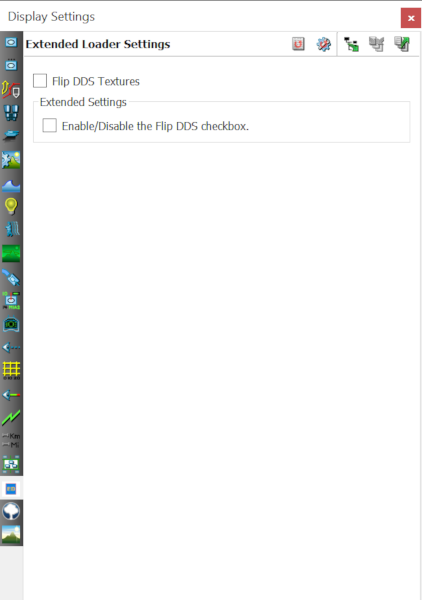
There are several ways to add or extend functionality to an existing dialog in VR-Vantage; one method is to get a handle to a page in a dialog and then insert new GUI elements, another is to derive a new GUI from an existing one. The decision as to which method to use is dependent on the needs of the developer. If the developer simply wishes to add a few more widgets to perform a few more actions, the former method (inserting new GUI elements) might be the way to go. If the task requires interacting with or augmenting the behavior of an existing dialog, even hiding or replacing existing GUI elements, then possibly the latter method (deriving a new GUI) is the proper way.
This tutorial demonstrates how to derive a new GUI from an existing dialog page. For an example of simply adding new GUI elements see exampleExtendDialogByAddition. This tutorial has chosen the makVrv::DtLoaderSettingsPage as the target dialog-page to extend. The makVrv::DtLoaderSettingsPage is a dialog-page located in the Display Settings dialog found in the Settings menu (Settings->Display...). The page sits near the bottom of the page-list in the dialog. The makVrv::DtLoaderSettingsPage is a very simple dialog-page. It has a single texture setting checkbox, Flip DDS Textures. This tutorial will extend the dialog-page to include a second checkbox which, when set, will disable the existing checkbox. This is certainly a simple example that might now warrant deriving a new GUI, however, this example demonstrates how a more complex task can be achieved through derivation.
The Loader Settings dialog-page manages a widget object containing all the GUI elements and a logic object providing functionality. This tutorial will derive a new widget class from the existing widget to add more GUI elements, and will derive a new logic class from the existing logic to receive input from the new GUI elements. This is to demonstrate how the extended GUI can interact with the original GUI through an extended logic object. Simply put, the new checkbox sends its state to the logic, and the logic uses that state to enable or disable the old checkbox.
The existing widget, makVrv::DtLoaderSettingsWidget, is derived from an interface class, makVrv::DtLoaderSettingsInterface, which the logic, makVrv::DtLoaderSettingsLogic, communicates through. This tutorial will create a second interface, ExtraDialogInterface, and derive a new widget, DerivedDialogWidget, from both the existing widget and this new interface. A new logic, DerivedDialogLogic, is derived from the existing logic and requires a reference to both the existing and new interfaces for communication to with the widget.
To manage the new widget and logic, a new dialog-page is created, ReplacementDialogPage, which replaces the original page, makVrv::DtLoaderSettingsPage. The new dialog-page could have been derived from the existing page, however, most, if not all, of the functions would have to be overwritten to provide a new icon, a new title and content management. This tutorial decided nearly the same amount of code would be needed either way so why not create a completely different dialog-page. One important association the ReplacementDialogPage has with the makVrv::DtLoaderSettingsPage is that it returns the same class name in its static thePageClassName() function. This is important because the string returned from this function is used to register this page's creator with the page-assembler. When VR-Vantage is initialized, the creator for makVrv::DtLoaderSettingsPage is first registered using this string, then the creator for the ReplacementDialogPage is registered with the same string, thus replacing the original. When the page-assembler builds the dialog-page, the new page will be created instead of the original page.
Finally the dialog-page and the extended widget and logic for this tutorial are all bundled up in a new exampleExtendDialogByDerivation plug-in. It is when this plug-in gets loaded that the original dialog-page is replaced with the new extended dialog-page. This tutorial does not demonstrate how to make the extended GUI element values persistent (saving and reloading state). See the exampleDialogPage example for more information on making dialog settings persistent.
To run the example, run one of the exampleExtendDialogByDerivation_xr batch or script files found in the bin64 directory for the project.
For this tutorial, the task to perform is pretty simple; extend an existing dialog-page with a new checkbox that enables/disables an existing checkbox. The original widget is extended to add a new checkbox. The original logic is extended to do the enabling and disabling of a GUI element. To keep the logic independent of how the widget is implemented, the logic only communicates with the widget through a Non-GUI interfaces. That means a new interface is required for the logic to perform new tasks with the widget. The interface is declared as an abstract class in the ExtraDialogInterface.h file.
The interface class declares two new functions: a pure virtual setFlipDdsEnabled() and a boost signal signal_enableFlagSet. The setFlipDdsEnabled() is an input to the widget that the logic calls in order to enable or disable the checkbox. The signal_enableFlagSet signal is the output from the widget which tells the logic do the enabling or disabling. The widget is declared in the DerivedDialogWidget.h file.
Since the widget derives from makVrv::DtLoaderSettingsWidget it inherits from both QWidget (making it a GUI object) and makVrv::DtLoaderSettingsInterface. It also derives from ExtraDialogInterface so the widget has two different interfaces, the original and the new extension.
The widget must implement the pure virtual function inherited from the new interface base class. The implementation of this function just sets the existing checkbox enabled or disabled.
The widget inherits a boost signal from the new interface, but it also has its own Qt slot for catching Qt signals from the new checkbox. The implementation of this slot simply re-emits the checkbox signal as a boost signal.
Last, the widget keeps a handle to the new checkbox just so it can update the label giving the user feedback.
During construction of the widget object, the widget creates the new checkbox, and then connects the checkbox's stateChanged() Qt signal to the widget's own on_enableFlagChanged() Qt slot.
To actually extend the GUI the widget adds the new checkbox to a group and inserts the group into the main layout that was created by the base class makVrv::DtLoaderSettingsWidget.
When the Qt slot of the widget receives a signal that the user clicked on the new checkbox, the slot just turns around and sends the checkbox state out the boost signal.
When the widget is called to enable or disable the original checkbox, it set the enabled state on the checkbox and updates label of the new checkbox to give user feedback. When the base class makVrv::DtLoaderSettingsWidget was created, it saved a protected-handle to the original checkbox for derived classes to use.
The logic is derived from the makVrv::DtLoaderSettingsLogic class so it must receive a makVrv::DtLoaderSettingsInterface interface in its constructor. It must also receive an ExtraDialogInterface interface in its constructor so it can communicate with the extended portion of the widget. The logic has a function that gets connected to the new interface's boost signal to process the checkbox signals. Because the DerivedDialogLogic is derived from a makVrv::DtLoaderSettingsLogic it inherits from makVrv::DtSignalConnectionManager. makVrv::DtSignalConnectionManager is only used to automatically disconnect the logic's slot from the interface's boost signal. Without the connection-manager, the logic class would need to manually disconnect from the interface when the logic is destroyed.
During construction the logic object is given both interfaces to connect with. The makVrv::DtLoaderSettingsInterface is passed to the base-class constructor, and the ExtraDialogInterface is saved locally in this class. The boost signal in the interface is connected to the 'slot' function of this logic.
When signaled from the interface, the logic object simply calls back to the interface to set enabled state of the original checkbox.
As stated in the Overview, the page for the extended dialog was created in its entirity to replace the original page. See exampleExtendDialogByAddition for an example on how to derive from an existing page. Whether creating an entirely new page or extending through derivation, the important factor is to replace the original when the dialog is constructed. Each page is derived from an abstract makVrv::DtPage class in the vrvCoreQt library. The template creator makVrv::DtPageCreatorTemplate requires that each makVrv::DtPage implement the static function thePageClassName(). This function is used to get the name of the class when registering the creator to the makVrv::DtQtPageAssembler. Returning the same name from the thePageClassName() as an original page will cause the new page to replace the original in the registry. When the makVrv::DtQtPageAssembler constructs the dialogs with their respective pages, the new page is constructed in place of the original.
This tutorial declares its page in the ReplacementDialogPage.h file. The page is used to manage the widget, the logic and a toolbar. The page implements all the virtual functions required by makVrv::DtPage base class. The icon returned is defined in the application.qrc resource file, and the title and class names returned are just strings.
The ReplacementDialogPage.h file also declares a creator for the page using the built in template for creating pages.
The page in this tutorial creates the widget and toolbar within the constructor of the page and adds them to a layout for the page.
When the page is shown, its activate() function is called. When called this page creates a logic object. In the logic object's constructor, the logic is given the widget twice; once so that the logic can connect its base-class boost slot to the widget's base-class boost signal, and again to connect the extended-class boost slot to the extended-class boost signal.
When the page is hidden, its deactivate() is called. When called this page destroys the logic object.
To replace the original page with this extended page, the same name as the original must be returned in the static thePageClassName() function. Since the original page has a static function, this page just calls it to return the same name.
Two files are needed to create a plug-in.
The first file, exampleExtendDialogByDerivationPlugin.h, is used to declare the entry point function for the plug-in. All VR-Vantage plug-ins use the same signature for their entry point. The signature is declared in core header file vrvCore/exportPlugin.h. Before including the core header file, the specific symbol, DT_DE_PLUGIN_EXPORT_MACRO, must be defined as the import/export symbol.
A compilation error will occur if the DT_DE_PLUGIN_EXPORT_MACRO symbol is not declared prior to including the core header file. Finally the initializer function for this plug-in is declared.
The second file, exampleExtendDialogByDerivationPlugin.cxx, implements both the plug-in entry point and the initializer function. All the entry point function does is call the initializer.
The plug-in initializer is more interesting. It starts by registering itself with the display engine using a standard VR-Vantage macro.
This macro ensures that the plug-in module is registered with the display engine once and only once. Next the core Qt is initialized.
When the vrvCoreQt is initialized, many types of assemblers are created and the default menus, dialogs and panels are registered. At this time the creator for the original makVrv::DtLoaderSettingsPage is also registered with the page assembler. After initializing vrvCoreQt, the new ReplacementDialogPage is then registered with the assembler using the same name so that it replaces the original.
Since the assembler is already configured to create a dialog, loading a page from a creator with the given name, the new ReplacementDialogPage gets installed in the same location that the original makVrv::DtLoaderSettingsPage would have been.
When the application is run, the Settings menu in the main menu bar pops up the same dialogs as before. When the Display... is selected the same Display Settings dialog is opened. In the same location that the makVrv::DtLoaderSettingsPage was, the new ReplacementDialogPage exists. And on that page is a new checkbox.
VR-Vantage includes pre-built versions of the example plug-in. To build it yourself, follow the instructions at Building VR-Vantage Examples, Applications, and Plug-ins.
This example is a plug-in. You can run it by running ./bin64/exampleExtendDialogByDerivation_stealth.bat (on Windows) or ./bin64/exampleExtendDialogByDerivation_stealth.sh (on Linux). Go to menu "Settings->Display...", click on the "Loader Settings" tab (third from the bottom), the next section and checkbox added is there. For more information about running examples, please see Running Applications and Examples.
[<< Examples] [Home] [Top of Page]