
VR-Vantage 2.8 API Documentation
 All Classes Namespaces Files Functions Variables Typedefs Enumerations Enumerator Friends Macros Groups Pages
examplePostProcessorPlugin

Table of Contents

Overview

This example shows how to create a custom post processor for VR Vantage.
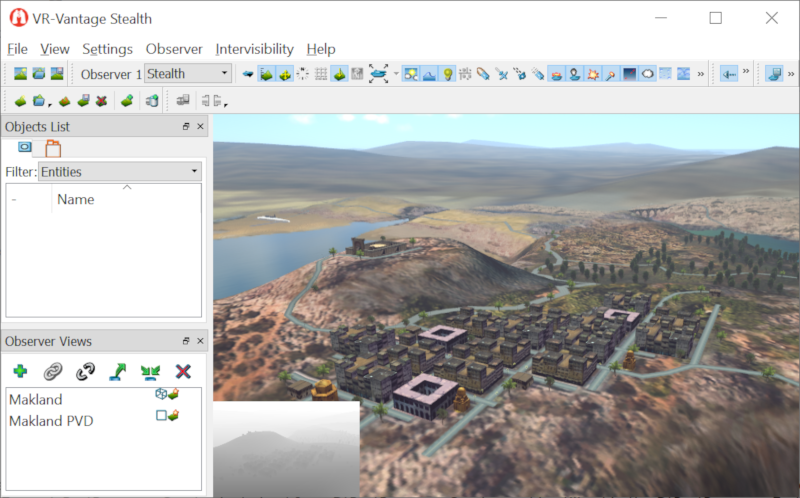
Expected Result

examplePostProcessor.png
Post Processor Result

Example Details

The example creates two derived classes. ExamplePostProcessor derives from DtPostProcessor and implements the constructor and update function for the new custom post processor. The class ExamplePostProcessorCreator is derived from DtPostProcessorCreator and is utilized in the DtPostProcessorFactory.

The plugin's init function sets the order of the post processor (placed before "camera_fx" runs) and registers the post processor effect with a user defined ObserverSetting enumeration value.

The update function demonstrates how to retrieve the depth buffer from the render to texture camera and link it to the shader state for the post processor. It also shows how to send variables such as time to the shader.

The shader for the post procesor is in examples\examplePostProcessor\example_ps.glsl. It draws the depth buffer in the lower left corner of the screen and applies a since wave distortion on the render to texture camera color buffer.

Please see the comments in the code as well since it describes the post processing system.

Building the Example

To build the plugin, follow the instructions at Building VR-Vantage Examples, Applications, and Plug-ins.

Running the Example

This example is a plug-in. You can run it by running ./bin64/examplePostProcessor_stealth.bat(on Windows) or ./bin64/examplePostProcessor_stealth.sh (on Linux). Load Makland.mft terrain. For more information about running examples, please see Running Applications and Examples.

Example Source Files


examplePostProcessorPlugin.cxx

/******************************************************************************
** Copyright (c) 2020 MAK Technologies, Inc.
** All rights reserved.
******************************************************************************/
#include <vrvCore/DtDe.h>
#include <boost/bind.hpp>
using namespace makVrv;
//Create a setting id that will be different than all the VR-Vantage setting id's
static const int observerSettingId = DtObserverSettingsManager::USER_START + 1;
class ExamplePostProcessor : public DtPostProcessor
{
public:
ExamplePostProcessor(DtDe& de)
: DtPostProcessor(de, "example", false)
{
// The false in DtPostProcessor constructor indicates that it is not
// activated in 2D orthographic views
// Fragment shader has access to a texture of the camera's color buffer and
// can get at the depth buffer as a texture as well
setFragmentShaderFile("../examples/examplePostProcessor/example_ps.glsl");
// A post processor has a type (i.e. name) as well as one or more effects
// Usually the type() is used to get the DtPostProcessor* from the
// DtPostProcessManagerInterface
// The effects are stored as (string, bool) pairs as and can be turned
// on or off with enableEffect or disableEffect.
// The string supplied should match the effect name in registerEffect.
// In the update function you can check if an effect is enabled with
// bool effectActive = effectEnabled("myeffect") and do some extra code
// However, usually a post processor has just one effect which may
// not even be checked in the update function (as in this example).
addEffect("example_effect");
}
virtual bool update(DtChannel* channel)
{
osg::Camera* cam = cameraForChannel(channel);
if (cam)
{
// Shader parameters are set via the osg::StateSet
// and then referenced in the shader
osg::StateSet* ss = cam->getOrCreateStateSet();
osg::Uniform* timeUfrm = ss->getOrCreateUniform("vrv_time", osg::Uniform::FLOAT);
timeUfrm->set((float)myDe.simulationTime());
// Get the depth as a texture and feed it to the shader
// uniform sampler2D depthTex
osg::Texture* depthTexture = 0L;
DtOsgChannel* osgChannel = dynamic_cast<DtOsgChannel*>(channel);
if(osgChannel != NULL)
{
depthTexture = osgChannel->getDepthTexture();
}
if(depthTexture != 0L)
{
// Make the texture available in the shader at texture unit 1
cam->getOrCreateStateSet()->
getOrCreateUniform("vrv_depthTex", osg::Uniform::INT)->set(1);
cam->getOrCreateStateSet()->
setTextureAttributeAndModes(1, depthTexture);
return true;
}
}
return false;
// Note: If you have multiple post processors that all utilize alpha
// run vrvIG or vrvStealth with "--alphaBits 8" to allow alpha channel
// in the RTTCamera
}
};
// For DtPostProcessFactory
class ExamplePostProcessorCreator : public DtPostProcessorCreator
{
public:
DtPostProcessor* create(DtDe& de, const std::string&)
{
return new ExamplePostProcessor(de);
}
};
void slot_postInit(DtDe& de)
{
de.signal_postInitialize.disconnect(boost::bind(&slot_postInit, boost::ref(de)));
// vrvStealth uses "Stealth" for 3D
// vrvIG would use "Out-the-Window"
// default the settings to enabled
int stealthMode = DtObserverModeManager::instance(de).lookupObserverModeKey("Stealth");
DtObserverModeManager::instance(de).setObserverSetting(stealthMode, observerSettingId, true);
}
void initializeToolbar(DtDe& de)
{
//setup the text in the menu and the tooltip for the toolbar button
QString qTemp = QObject::tr("Custom Effect");
setDisplayName( observerSettingId, DtUnicode::fromQString<QString>( qTemp ) );
qTemp = QObject::tr("Show/Hide Custom Effect");
setToolTip( observerSettingId, DtUnicode::fromQString<QString>( qTemp ) );
}
void init(DtDe& de)
{
// Ensure that init only gets called once
DtPostProcessorFactory::instance(de).addCreator("example", new ExamplePostProcessorCreator);
// You can see the final order of the post processors with
// DtPostProcessorFactory::instance(de).printAllPostProcessors();
if (!DtPostProcessorFactory::instance(de).addPostProcessorBefore("example", "camera_fx"))
{
}
// Associate a post processor effect with an observer setting
// When slot_observerSettingChanged is called, it will check the ObserverSetting passed
// in and add or remove the post processor effects associated with that ObserverSetting
DtPostProcessorFactory::instance(de).registerEffect("example", "example_effect",
//initialize default state is when tooltips and display names can be set
de.signal_initializeDefaultState.connect(boost::bind(&initializeToolbar, boost::ref(de)));
//post initialize will be used to set the observer setting to enabled by default
de.signal_postInitialize.connect(boost::bind(&slot_postInit, boost::ref(de)));
//register the menu item for the new effect
de, "CustomEffectItem", observerSettingId));
// Register the new visual type to control the custom effect post processor
// assign it a generic Star Icon for now.
DtVisualTypeManager::VisualType("custom_effect", observerSettingId,
"Custom Effect", (de.dePathConfiguration().dataPath() + std::string("/Icons/UtilityStarWhite.svg")),
if ( igApp )
{
//Add a menu item and toolbar button for the new effect
makVrv::DtMenuPath::mainMenu("DtObserverMenu").item("CustomEffectItem"));
igApp->masterModeToolbarConfiguration().addToolbarPath(DtToolbarPath::toolbar("DtObserverSettingsToolbar").item("CustomEffectItem"));
}
}
{
// Setup the plugin
init(*de);
return true;
}

examplePostProcessorPlugin.h

/******************************************************************************
** Copyright (c) 2019 MAK Technologies, Inc.
** All rights reserved.
******************************************************************************/
#pragma once
namespace makVrv { class DtDe; }
// Get proper local export symbol
// Setup proper plugin export symbol
#define DT_DE_PLUGIN_EXPORT_MACRO DT_DLL_EXAMPLEPOSTPROCESSOR
// Declare & export the plugin initialization function (bool initDeModule(DtDe* de))
// Work function for the plugin initialization

[<< Examples] [Home] [Top of Page]


Copyright © 2005-2021 MAK Technologies. All Rights Reserved (www.mak.com)