
VR-Vantage 3.0 API Documentation
 All Classes Namespaces Files Functions Variables Typedefs Enumerations Enumerator Properties Friends Macros Groups Pages
exampleReadVideoShm

Table of Contents

Overview

This example opens, maps, and reads from a shared memory segment created by VR-Vantage that contains streamed video frames.
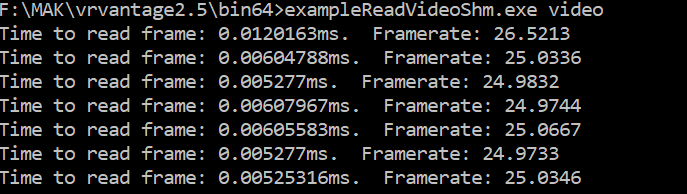
Expected Result

exampleReadVideoShm.png
Read Video Share memory Result

Example details

VR-Vantage creates a shared memory segment with the name specified in the video stream configuration dialog. The segment is organized as a header plus 3 fixed-size video frame buffers. Each buffer is the size specified in the video stream configuration dialog; it should be large enough to hold one video frame (typically your screen dimensions * 3 bytes when using 24bpp).

DtSharedMemoryTaskElement::DtSharedMemoryHeader contains the definition of the sgement header. This can be found in include\vrvVideoStream\DtSharedMemoryTaskElement.h.

The application attempts to open the indicated shared memory segment with read/write permissions.

try
{
sharedMemoryObj = new DtSharedMemoryPoolClient(DtString(sharedMemoryName));
}
catch(...)
{
// Catch exception if the open failed. This happens if the segment can't
// be found
std::cout << "Cannot find the shared memory segment called "
<< sharedMemoryName << std::endl;
return 1;
}

It then maps the entire segment into the application's address space.

// but will probably be needed when you try to do something with
// the video frame
int width, height, format, bpp;
width = header->width;
height = header->height;
format = header->format;
bpp = header->bpp;
// Pre-compute the offsets for the 3 video frame buffers. The buffers are
// fixed size. The video frames they contain may vary.
char* frameOffsets[3];
frameOffsets[0] = (char*)header + sizeof(
DtSharedMemoryTaskElement::DtSharedMemoryHeader );
frameOffsets[1] = (char*)header + sizeof(
DtSharedMemoryTaskElement::DtSharedMemoryHeader ) + header->bufferSize;
frameOffsets[2] = (char*)header + sizeof(
DtSharedMemoryTaskElement::DtSharedMemoryHeader ) + header->bufferSize * 2;
// Create a variable to track the last frame we read. This is used to
// prevent us from re-reading the same frame if running faster than the
// writer
int lastFrame = -1;
int frameCount=0;
DtClock clock;
clock.init();
double frameTime=0.0;
int messageFrameFrequency=30;
double frameRead=0.0;
double timeBetweenFrames=0.0;
// the size of the buffer was a increased to match the right image buffer size
char* buffer = new char[header->bufferSize];
while (true )
{
// Quit the example application with a 'q' or 'Q' key
char *keyPtr = DtPollBlockingInputLine();
if (keyPtr && (*keyPtr == 'q' || *keyPtr == 'Q'))
{
break;
}
// Prevent re-reading frames
int currentFrame = header->currentFrame;
if ( lastFrame == currentFrame )
{
continue;
}

It sets a pointer to a DtSharedMemoryTaskElement::DtSharedMemoryHeader to point to the beginning of the mapped region.

It reads the video frames specs (format, bpp, height, width). These values are not used in the example, but will typically be needed to process / display your video frame.

It fills an array with pointers to each of the 3 fixed frame buffers. At this point, all the parts of the shared memory segment that we will want to access are mapped and references.

The application enters a loop to read video frames. It will continue until a 'q' or 'Q' key is pressed.

It reads the current frame indicator from the shared memory header, and sets the last frame variable (which starts at -1) to prevent re-reading the same frame in the case where the application runs faster than the the writer.

The application now locks the fixed buffer for the current frame so that the writer will not attempt to write to it. (It won't block, it will just skip over it, since we're triple-buffering).

Now that the buffer is locked, it can get the actual size of the image data, allocate a buffer, and read the bytes.

Once the data has been read, the application unlocks the current frame buffer.

Building the Example

VR-Vantage includes pre-built versions of the example application. To build it yourself, follow the instructions at Building VR-Vantage Examples, Applications, and Plug-ins.

Running the Example

This example is an application. You can run it by starting Vantage. Go to Settings -> Video Streams... Then select Compress and Shared Memory click Edit. Note the Shared Memory Names (which is 'video' by default). Click Start. On Windows, the video file will (by default) be created in C: LastBootUpTime from Win32_OperatingSystem Run ./bin64/exampleReadVideoShm.exe "<shared memory name>" (on Windows) or ./bin64/exampleReadVideoShm "<shared memory name>" (on Linux). For more information about running examples, please see Running Applications and Examples.

Example Source Files


exampleReadVideoShm.cxx

/*****************************************************************************
* Copyright (c) 2019 MAK Technologies, Inc.
* All rights reserved.
*****************************************************************************/
#include <vlutil/vlShmPool.h>
#include <vlutil/vlKeyboard.h>
#include <vlutil/vlTime.h>
using namespace makVrv;
int main( int argc, char* argv[] )
{
// Get the name of the shared memory segment. Note that on windows, you may
// need to use ..<segment name> to work around a boost bug.
if ( argc != 2 )
{
std::cout << "Usage: " << argv[0] << "<shared memory name>" << std::endl;
return 1;
}
const char* sharedMemoryName = argv[1];
DtSharedMemoryPoolClient* sharedMemoryObj = 0;
try
{
sharedMemoryObj = new DtSharedMemoryPoolClient(DtString(sharedMemoryName));
}
catch(...)
{
// Catch exception if the open failed. This happens if the segment can't
// be found
std::cout << "Cannot find the shared memory segment called "
<< sharedMemoryName << std::endl;
return 1;
}
// The beginning of the region contains the DtSharedMemoryHeader
// Get the image specs. None of these are used in the current example,
// but will probably be needed when you try to do something with
// the video frame
int width, height, format, bpp;
width = header->width;
height = header->height;
format = header->format;
bpp = header->bpp;
// Pre-compute the offsets for the 3 video frame buffers. The buffers are
// fixed size. The video frames they contain may vary.
char* frameOffsets[3];
frameOffsets[0] = (char*)header + sizeof(
frameOffsets[1] = (char*)header + sizeof(
frameOffsets[2] = (char*)header + sizeof(
// Create a variable to track the last frame we read. This is used to
// prevent us from re-reading the same frame if running faster than the
// writer
int lastFrame = -1;
int frameCount=0;
DtClock clock;
clock.init();
double frameTime=0.0;
int messageFrameFrequency=30;
double frameRead=0.0;
double timeBetweenFrames=0.0;
// the size of the buffer was a increased to match the right image buffer size
char* buffer = new char[header->bufferSize];
while (true )
{
// Quit the example application with a 'q' or 'Q' key
char *keyPtr = DtPollBlockingInputLine();
if (keyPtr && (*keyPtr == 'q' || *keyPtr == 'Q'))
{
break;
}
// Prevent re-reading frames
int currentFrame = header->currentFrame;
if ( lastFrame == currentFrame )
{
continue;
}
lastFrame = currentFrame;
frameCount++;
//timing info
double startRead=clock.elapsedRealTime();
timeBetweenFrames += (startRead - frameTime);
frameTime=startRead;
// Lock the buffer so it doesn't get trampled during the read
header->readingFrame[currentFrame] = true;
// Copy data from current shm frame to our buffer
std::memcpy( buffer, frameOffsets[currentFrame], header->frameSize[currentFrame] );
// Unlock the buffer
header->readingFrame[currentFrame] = false;
double endRead=clock.elapsedRealTime();
frameRead += (endRead - startRead);
//outputting to the console is very expensive, don't do it every frame, show the average
if(frameCount % messageFrameFrequency == 0 )
{
std::cout << "Time to read frame: " << (frameRead / (double)messageFrameFrequency) * 1000.0 << "ms. Framerate: " << 1.0 / (timeBetweenFrames / (double)messageFrameFrequency) << std::endl;
frameRead=0;
timeBetweenFrames=0;
}
}
// Delete the local buffer holding the frame we just read
delete [] buffer;
return 0;
}

[<< Examples] [Home] [Top of Page]


Copyright © 2005-2022 MAK Technologies. All Rights Reserved (www.mak.com)