
VR-Vantage 3.0.3 API Documentation
 All Classes Namespaces Files Functions Variables Typedefs Enumerations Enumerator Properties Friends Macros Groups Pages
exampleCreateObserver

Table of Contents

Overview

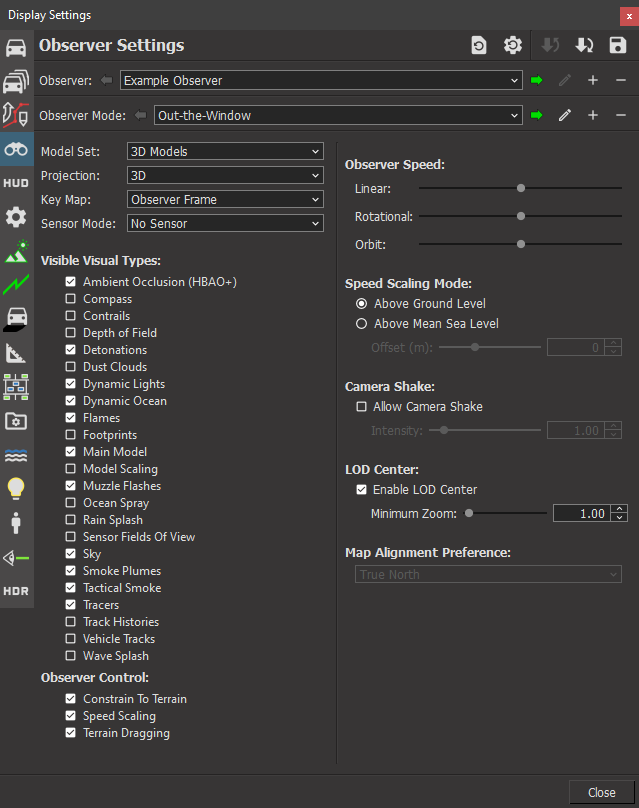
This example shows how to create an observer.
Expected Result

exampleCreateObserver.png
New Observer Result

Example details

To create an observer, you must first create an observer configuration.

// First, create an observer configuration that describes the observer to
// create. For this example, the default values are fine - we just need to
// supply a unique name.
makVrv::DtObserverConfiguration observerConfig("Example Observer");

The configuration is then added to the DtInputDriver, which will realize the observer immediately if the application is running, or realize it on start up.

// Then add the configuration to the input driver. Since we added the
// configuration the input driver will create this observer each time it
// is started.
vantageApp.de().driverManager().inputDriver().addObserverConfiguration(
observerConfig );

Building the Example

VR-Vantage includes pre-built versions of the example application. To build it yourself, follow the instructions at Building VR-Vantage Examples, Applications, and Plug-ins.

Running the Example

This example is an application. You can run it by running ./bin64/exampleCreateObserver.exe (on Windows) or ./bin64/exampleCreateObserver (on Linux). Go in the "menu->Settings->Display Settings->Observer Settings", in the drop down menu "Observer", you should see a new entry "Example Observer". For more information about running examples, please see Running Applications and Examples.

Example Source Files


exampleCreateObserver.cxx

/******************************************************************************
** Copyright (c) 2019 MAK Technologies, Inc.
** All rights reserved.
******************************************************************************/
#include <vrvCore/DtDe.h>
#include <boost/bind.hpp>
int main(int argc, char** argv)
{
// Create the Application.
makVrv::DtVrvApplication vantageApp(config);
makVrv::DtVantageIgCommandLineProcessor vantageCommandLineParser;
vantageApp.installCommandLineProcessor(&vantageCommandLineParser);
// Parse Command Line.
vantageApp.initialize(argc,argv);
// First, create an observer configuration that describes the observer to
// create. For this example, the default values are fine - we just need to
// supply a unique name.
makVrv::DtObserverConfiguration observerConfig("Example Observer");
// Then add the configuration to the input driver. Since we added the
// configuration the input driver will create this observer each time it
// is started.
vantageApp.de().driverManager().inputDriver().addObserverConfiguration(
observerConfig );
// Run.
vantageApp.run();
return 0;
}

[<< Examples] [Home] [Top of Page]


Copyright © 2005-2023 MAK Technologies. All Rights Reserved (www.mak.com)