VR-Vantage 3.0 API Documentation
 All Classes Namespaces Files Functions Variables Typedefs Enumerations Enumerator Properties Friends Macros Groups Pages
exampleEffectsPlugin

Table of Contents

Overview

When VR-Vantage destroys an entity (typically due to a DIS or HLA/RPR event) it does a number of things. It switches the model from its normal state to it's damaged state. It adds / starts a detonation effect (which is a particle system) that looks like an explosion, with pieces of a generic vehicle flying through the air; it makes a previously placed flame effect on the entity visible(also a particle system); and it makes a previously placed smoke plume visible (particle system).

Expected Result
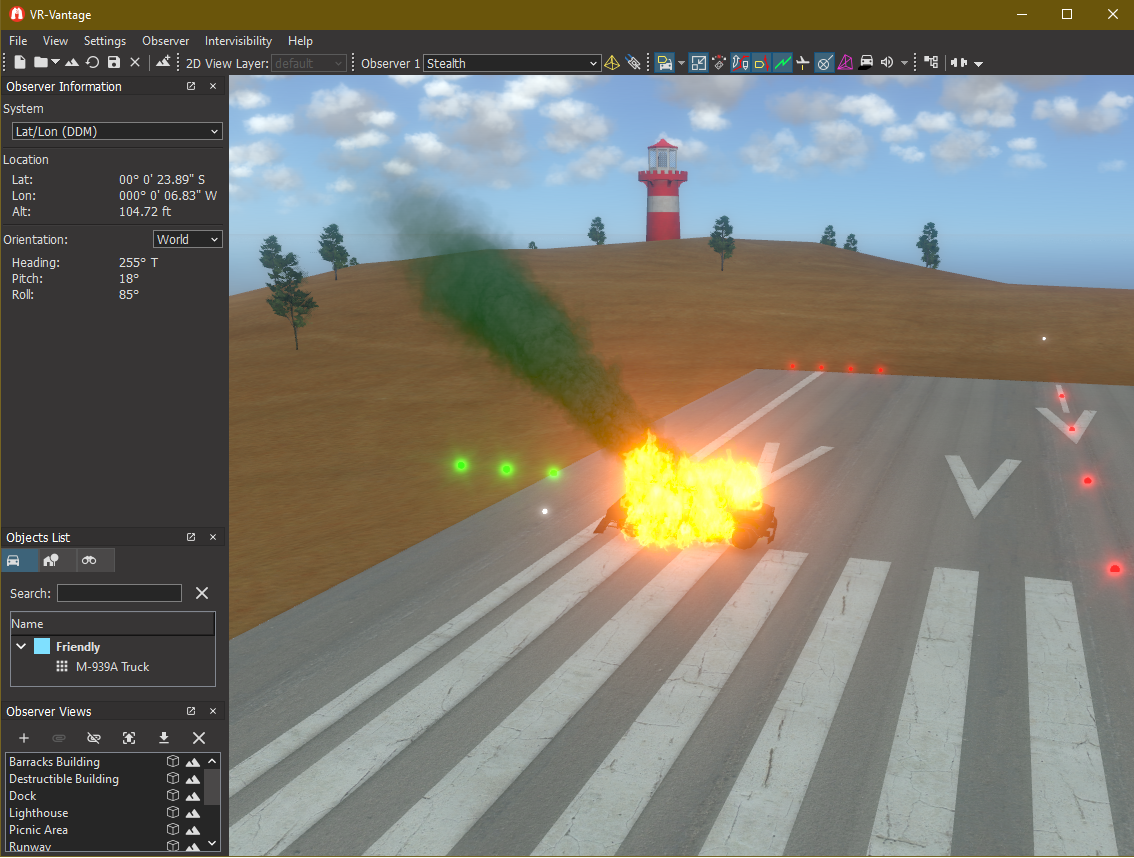
exampleEffectsPlugin.png
Effect Plugin Result

Example details

This example loads a terrain (ground_DB II); creates a truck entity using the DtEntityFacade class; shows how to switch between states in a model; and how to create, add and control the three different effects. It also demonstrates how to extend the DtOsgParticleSystemModel to include the ability to modify the model's color through a shader (using code from exampleCustomShaders). Control of the entity's damage state and the smoke color when displayed are bound to keyboard commands.

The method createEntityFacade() creates and add the three particle systems to the entity; one for the detonation, one for the flames, and one for the smoke plume. The smoke plume uses the extended particle system that allows the color to be changed using a shader (see further down). All the effects are made invisible.

The method toggleDamage() checks the current state, and then makes all the effects visible or invisible to create the destroyed or restored effects. The detonation effect is special since it has a specific start and end rather than just a loop; so it is restarted in toggleDamage() when the entity is destroyed. toggleDamage() also toggles the internal model switch to show its damaged state or normal state. This method is called when the 'x' key is pressed. The key binding is set up in the plugin initialization code (found in exampleEffectsPluginInit.cxx). This assumes that the model has been configured with comments on switch node that controls the damage state using the WRM Specification (Fred, you can point to that).

To add the shader from exampleCustomShader that changes the color of the smoke (and all other particle systems that use the new VR-Vantage particle system system), the DtOsgParticleSystemModel class is extended. This class has a distributed (agent-based) interface and is agent-created; therefore a .ocdx file has to be created for it as well (using the dcgen application). This file is used to generate the related agent classes for the object.

The extended class overrides the setInstance() method in the model to be notified when the model instance is created or destroyed, and uses it to set up the shader manager from the shader example. The changeColorOverride() method is added to its distributed interface (so its defined in the .ocdx file as well) and it calls the shader manager's changeColorOverride() method. By extending the distributed model object in this manner, the color change ability will work on remote displays as well as master displays. A final changeColorOverride() method is added to the DtExampleEffectsDriver, which is bound to several different keys (r, <shift-r>, g, <shift-g>, b, and <shift-b>); it in turn calls the equivalent colorChangeOverride() method in the extended particle system.

Building the Example

VR-Vantage includes pre-built versions of the example plug-in. To build it yourself, follow the instructions at Building VR-Vantage Examples, Applications, and Plug-ins.

Running the Example

This example is a plug-in. You can run it by running ./bin64/exampleEffectPlugin_stealth.bat (on Windows) or ./bin64/exampleEffectPlugin_stealth.sh (on Linux). Use the key "x" to toggle the destroyed state and use the keys r, <shift-r>, g, <shift-g>, b, and <shift-b> to change the color of the smoke

For more information about running examples, please see Running Applications and Examples.

Example Source Files


DtExampleEffectsDriver.cxx

/*****************************************************************************
* Copyright (c) 2022 MAK Technologies, Inc.
* All rights reserved.
*****************************************************************************/
#include <vrvCore/DtDe.h>
// Use the VR-Vantage namespace.
// All classes in VR-Vantage are in this namespace.
using namespace makVrv;
//
// Driver implementation
//
: makVrv::DtDriver( am, "DtExampleEffectsDriver" )
, myEntityFacade( 0 )
, myDamagedFlag( false )
, myFlamesAgent( 0 )
, mySmokePlumeAgent( 0 )
, myDetonationAgent( 0 )
{
}
{
}
{
static std::string name = "DtExampleEffectsDriver";
return name;
}
{
{
{
DtModelSemanticsMapper::States::damage, 0 );
myDamagedFlag = false;
}
else
{
DtModelSemanticsMapper::States::damage, 3 );
// Restart the detonation effect
myDamagedFlag = true;
}
}
}
{
// Load Ground_DB II programatically.
DtScene& sceneDriver = myAgentManager.de().scene();
groundDbPath += "/TerrainData/TerrainConfiguration/Ground_DB II.mtf";
sceneDriver.loadTerrain( groundDbPath );
// Create an element that represents the entity.
DtElementID parentElementId = 0;
std::string entityDisplayName = "M-939A Truck";
reportElementCreated( elementId, parentElementId, DtElementEntry::Entity );
reportElementAttribute(elementId, new DtElementAttributeElementSubtype(DtElementAttributes::Friendly));
reportElementAttribute(elementId, new DtElementAttributeDriverType("Example Effects Driver"));
reportElementAttribute( elementId, new DtElementAttributeDisplayName(entityDisplayName) );
// Instantiate the entity facade.
myEntityFacade = createEntityFacade( myAgentManager, elementId, setsToRealize, true );
myEntityFacade->setPosition( DtVector(-250.0, -750.0, 30.) );
myEntityFacade->setOrientation( DtTaitBryan(0., 0., 0.) );
myEntityFacade->setGroundClampingMode( DtGroundClampingUpdater::GroundClampingMode::ClampPositionAndUpright );
// Attach to entity.
std::vector<DtUniqueID> objects;
objects.push_back( myEntityFacade->elementId() );
inputDriver.currentObserver()->setPrimaryAttachment( objects );
return true;
}
{
{
myEntityFacade = 0;
}
delete myFlamesAgent;
return true;
}
{
return true;
}
{
stop();
start();
}
const DtModelSetRealizationManager::ModelSetRealizations& modelSets, bool distribute )
{
DtEntityFacade* facade = new DtEntityFacade( am,
DtSharedSettingsManager::instance( am.de() ), elementId, modelSets,
distribute );
// Initialize the 3D facade.
DtEntity3dFacade* facade3d = facade->findFacadeFor3d();
if ( facade3d )
{
int modelSet = facade3d->modelSet();
facade3d->setArticulatedModelDefinition("WheeledM-939A25-TonTruck");
// The clean thing to do here would be to extend DtEntityFacade/DtEntity3dFacade
// and add these to it. But for the sake of example its fine to let the driver
// create and own them.
// create the flame effect
myFlamesAgent = DtParticleSystemModelAgent::create( am );
// attach it to the entity
facade3d->sceneObjectAgent().addModel( myFlamesAgent, DtObserverSettingsManager::ShowFire );
// and turn it off by default
// For the smoke plume, we use our extended particle system that will allow us to modify
// its color
mySmokePlumeAgent = MyParticleSystemModelAgent::create( am );
facade3d->sceneObjectAgent().addModel( mySmokePlumeAgent, DtObserverSettingsManager::ShowSmokePlumes );
// and we'll use this for an initial detonation effect
myDetonationAgent = DtParticleSystemModelAgent::create( am );
myDetonationAgent->setModelDefinition( "DetonationEntityImpact" );
facade3d->sceneObjectAgent().addModel( myDetonationAgent, DtObserverSettingsManager::ShowDetonations );
mySceneObjectIds[modelSet] = facade3d->sceneObjectAgent().uniqueId();
}
return facade;
}
void DtExampleEffectsDriver::changeColorOverride(int color, float deltaChange)
{
{
mySmokePlumeAgent->changeColorOverride( color, deltaChange );
}
}

DtExampleEffectsDriver.h

/*****************************************************************************
* Copyright (c) 2019 MAK Technologies, Inc.
* All rights reserved.
*****************************************************************************/
#pragma once
#include <boost/unordered_map.hpp>
#include <matrix/vlTaitBryan.h>
#include <matrix/vlVector.h>
namespace makVrv
{
class DtDe;
class DtEntityFacade;
class DtParticleSystemModelAgent;
class MyParticleSystemModelAgent;
}
{
public:
virtual const std::string& className() const;
virtual bool onStart();
virtual bool onStop();
virtual bool onTick();
virtual void slot_displayEngineAdded( const makVrv::DtDeRecord& igRecord );
virtual void toggleDamage(makVrv::DtDe& de);
// Function for connecting our color-based key bindings to the
// particile system shader manager
virtual void changeColorOverride(int color, float deltaChange);
protected:
protected:
typedef boost::unordered_map<int,makVrv::DtUniqueID> SceneObjectIdsByModelSet;
SceneObjectIdsByModelSet mySceneObjectIds;
makVrv::DtEntityFacade* myEntityFacade;
bool myDamagedFlag;
// Agents for creating the flames, smoke plume, and detonation effects. Note
// that for the smoke plume, we use our extended MyParticleSystemModel, which
// creates a shader to modify the smoke plume color
};

exampleEffectsPlugin.h

/******************************************************************************
** Copyright (c) 2019 MAK Technologies, Inc.
** All rights reserved.
******************************************************************************/
#pragma once
#ifdef _WIN32
#ifdef EXAMPLEEFFECTSPLUGIN_EXPORTS
#define DT_DLL_EXAMPLEEFFECTSPLUGIN __declspec ( dllexport )
#else
#define DT_DLL_EXAMPLEEFFECTSPLUGIN __declspec ( dllimport )
#endif
#else
#define DT_DLL_EXAMPLEEFFECTSPLUGIN
#endif

exampleEffectsPluginInit.cxx

/******************************************************************************
** Copyright (c) 2019 MAK Technologies, Inc.
** All rights reserved.
******************************************************************************/
#include <vrvCore/DtDe.h>
#include <boost/ref.hpp>
{
return true;
}
namespace makVrv
{
namespace vrvExampleEffectsPlugin
{
void installDriverAndKeyBindings(DtDe& de)
{
de.signal_postInitialize.disconnect(boost::bind(
&installDriverAndKeyBindings, boost::ref(de) ));
// Create example comm lines driver.
de.agentManager() );
// The driver is now owned by the display engine. Do not delete it.
de.driverManager().addDriver( driver );
// Start the driver, creating the agent.
de.driverManager().startDriver( driver );
// The input driver responds to input events by calling key functions. To
// bind a key to an arbitrary function, there are two steps:
// 1. Create a KeyFunction that calls the desired function and add it
// to the input driver
// 2. Add a key binding from some key to the KeyFunction defined in step 1
// to the keymap
DtInputDriver& inputDriver = de.driverManager().inputDriver();
DtKeyMapManager& keyMapManager = DtKeyMapManager::instance(de);
// Create the Key Functions
keyMapManager.addKeyFunction( "Toggle Damage", boost::bind(
keyMapManager.addKeyFunction( "Inc Red", boost::bind(
keyMapManager.addKeyFunction( "Inc Green", boost::bind(
keyMapManager.addKeyFunction( "Inc Blue", boost::bind(
keyMapManager.addKeyFunction( "Dec Red", boost::bind(
keyMapManager.addKeyFunction( "Dec Green", boost::bind(
keyMapManager.addKeyFunction( "Dec Blue", boost::bind(
DtKeyMap* obsFrame = keyMapManager.findKeyMap( "Observer Frame" );
// Bind the above key functions to some keys in the default
// ("Observer Frame") key map
if ( obsFrame )
{
// Map function to toggle the entity damage state
inputDriver.addKeyBinding( obsFrame, DtKeyState::KEY_X, "Toggle Damage" );
//map functions for modifying the color of the smoke
inputDriver.addKeyBinding( obsFrame, DtKeyState::KEY_R, "Inc Red" , DtKeyState::NO_MODIFIER, true);
inputDriver.addKeyBinding( obsFrame, DtKeyState::KEY_G, "Inc Green", DtKeyState::NO_MODIFIER, true);
inputDriver.addKeyBinding( obsFrame, DtKeyState::KEY_B, "Inc Blue", DtKeyState::NO_MODIFIER, true);
inputDriver.addKeyBinding( obsFrame, DtKeyState::KEY_R, "Dec Red" , DtKeyState::SHIFT_MODIFIER, true);
inputDriver.addKeyBinding( obsFrame, DtKeyState::KEY_G, "Dec Green" , DtKeyState::SHIFT_MODIFIER, true);
inputDriver.addKeyBinding( obsFrame, DtKeyState::KEY_B, "Dec Blue" , DtKeyState::SHIFT_MODIFIER, true);
}
// Don't show the startup dialog for selecting a terrain.
DtDeMainWindow& mw = DtDeMainWindowProvider::instance(de).igMainWindow();
DtQtDeMainWindow& mainWindow = dynamic_cast<DtQtDeMainWindow&>(mw);
mainWindow.hideStartupDialog();
}
void init(DtDe& de)
{
// We only want to create the driver if we are running in master mode.
if (de.isInMasterMode())
{
// The accessory must be created after the DE's initialization is
// finished, to make sure all the objects it uses exist.
de.signal_postInitialize.connect(boost::bind(
&installDriverAndKeyBindings, boost::ref(de) ));
}
}
}
}

exampleEffectsPluginInit.h

/******************************************************************************
** Copyright (c) 2019 MAK Technologies, Inc.
** All rights reserved.
******************************************************************************/
#pragma once
// Get proper local export symbol
// Setup proper plugin export symbol
#define DT_DE_PLUGIN_EXPORT_MACRO DT_DLL_EXAMPLEEFFECTSPLUGIN
// Export plugging function bool initDeModule(DtDe* de);
namespace makVrv
{
class DtDe;
namespace vrvExampleEffectsPlugin
{
}
}

MyParticleSystemModel.cxx

/******************************************************************************
** Copyright (c) 2020 MAK Technologies, Inc.
** All rights reserved.
******************************************************************************/
#include <osg/Uniform>
namespace makVrv
{
//
// Shader manager implementation; taken from exampleCustomShaders
//
//Constructor that sets up the shaders and uniforms for the stateset passed in
MyShaderManager::MyShaderManager( DtDe& de, osg::StateSet *ss )
: myDe(de)
, myModelStateSet(ss)
{
//Create uniforms for the color and scale of the model
myColorToAdd = ss->getOrCreateUniform("colorToAdd", osg::Uniform::FLOAT_VEC3);
myColorToAdd->set(osg::Vec3(0.0f,0.0f,0.0f));
//Virtual Programs are how shaders are handled in VR-Vantage.
// They allow multiple shader functions to be added anywhere in the scenegraph
// and it handles the main function and program creation.
// Just get or create the virtual program for any stateset and
// all nodes below that stateset will use the functions on the virtual program
myVirtualProgram = osgEarth::VirtualProgram::getOrCreate(ss);
//create a function that will add the colorToAdd uniform to the current color.
// customLightingFunction is the name of the function to call from main
// second parameter is the fragment shader code that is to be included in the program
// third parameter is the location (lighting is the second of three fragment locations)
// fourth parameter is a function that can use the current state to disable this function
// fifth parameter is the order (100.0 will make this run after all other lighting functions.)
myVirtualProgram->setFunction("customLightingFunction",
"uniform vec3 colorToAdd;\
void customLightingFunction(inout vec4 color) \
{\
color.rgb += colorToAdd;\
}\
",
osgEarth::ShaderComp::LOCATION_FRAGMENT_LIGHTING,
NULL,
100.0
);
}
MyShaderManager::~MyShaderManager()
{
}
//Function for changing the color that will be added to the fragments color
void MyShaderManager::changeColorOverride(int color, float deltaChange)
{
osg::Vec3 curVal;
myColorToAdd->get(curVal);
switch(color)
{
case 0:
curVal.x() += deltaChange;
curVal.x() = curVal.x() < -1.0 ? -1.0 : curVal.x();
curVal.x() = curVal.x() > 1.0 ? 1.0 : curVal.x();
break;
case 1:
curVal.y() += deltaChange;
curVal.y() = curVal.y() < -1.0 ? -1.0 : curVal.y();
curVal.y() = curVal.y() > 1.0 ? 1.0 : curVal.y();
break;
case 2:
curVal.z() += deltaChange;
curVal.z() = curVal.z() < -1.0 ? -1.0 : curVal.z();
curVal.z() = curVal.z() > 1.0 ? 1.0 : curVal.z();
break;
default:
break;
}
myColorToAdd->set(curVal);
}
MyShaderManager* MyParticleSystemModel::theShaderManager = NULL;
//
// Extended Particle System Model Implementation
//
MyParticleSystemModel::MyParticleSystemModel(DtDe& de, DtUniqueID& id)
: DtOsgParticleSystemModel(de, id)
{
}
MyParticleSystemModel::~MyParticleSystemModel()
{
}
void MyParticleSystemModel::setModelInstance(DtModelInstance* instance )
{
// Call down to base implementation
DtOsgParticleSystemModel::setModelInstance( instance );
//Setup the static shader manager once, this is used to add a virtual program to the smoke
// and all other new FX particle systems in order to change their color.
if (!theShaderManager)
{
DtFxOsgParticleDrawable* drawable = dynamic_cast<DtFxOsgParticleDrawable*>(DtParticleSystemManagerInterface::instance(myDe).osgDrawable().get());
osg::StateSet* ss = drawable->particleSystemStateSet();
theShaderManager = new MyShaderManager( myDe, ss );
}
}
// Called via the distributed interface; invoke the shader manager
void MyParticleSystemModel::changeColorOverride( int color, float deltaChange )
{
if (theShaderManager)
{
theShaderManager->changeColorOverride( color, deltaChange );
}
}
}

MyParticleSystemModel.h

/******************************************************************************
** Copyright (c) 2020 MAK Technologies, Inc.
** All rights reserved.
******************************************************************************/
#pragma once
#include <osgEarth/VirtualProgram>
#include <osg/ref_ptr>
namespace osg
{
class StateSet;
class Uniform;
}
namespace makVrv
{
class DtDe;
class DT_DLL_EXAMPLEEFFECTSPLUGIN MyShaderManager
{
public:
MyShaderManager(DtDe& de, osg::StateSet *ss);
virtual ~MyShaderManager();
//Function for changing the color that will be added to the fragments color
virtual void changeColorOverride(int color, float deltaChange);
protected:
DtDe& myDe;
//model state set to attach the custom shaders to
osg::ref_ptr<osg::StateSet> myModelStateSet;
//Uniforms used by the custom shaders
osg::ref_ptr<osg::Uniform> myColorToAdd;
//virtual program for the stateset
osg::ref_ptr<osgEarth::VirtualProgram> myVirtualProgram;
};
class DT_DLL_EXAMPLEEFFECTSPLUGIN MyParticleSystemModel
: public DtOsgParticleSystemModel
{
public:
MyParticleSystemModel(DtDe& de, DtUniqueID& id);
virtual ~MyParticleSystemModel();
virtual void setModelInstance(DtModelInstance* modelInstance );
virtual void changeColorOverride( int color, float deltaChange );
protected:
static MyShaderManager* theShaderManager;
};
}

[<< Examples] [Home] [Top of Page]



Copyright © 2005-2021 MAK Technologies. All Rights Reserved (www.mak.com)