Overview
Shows how to create a custom effect texture type on loaded model
Expected Result
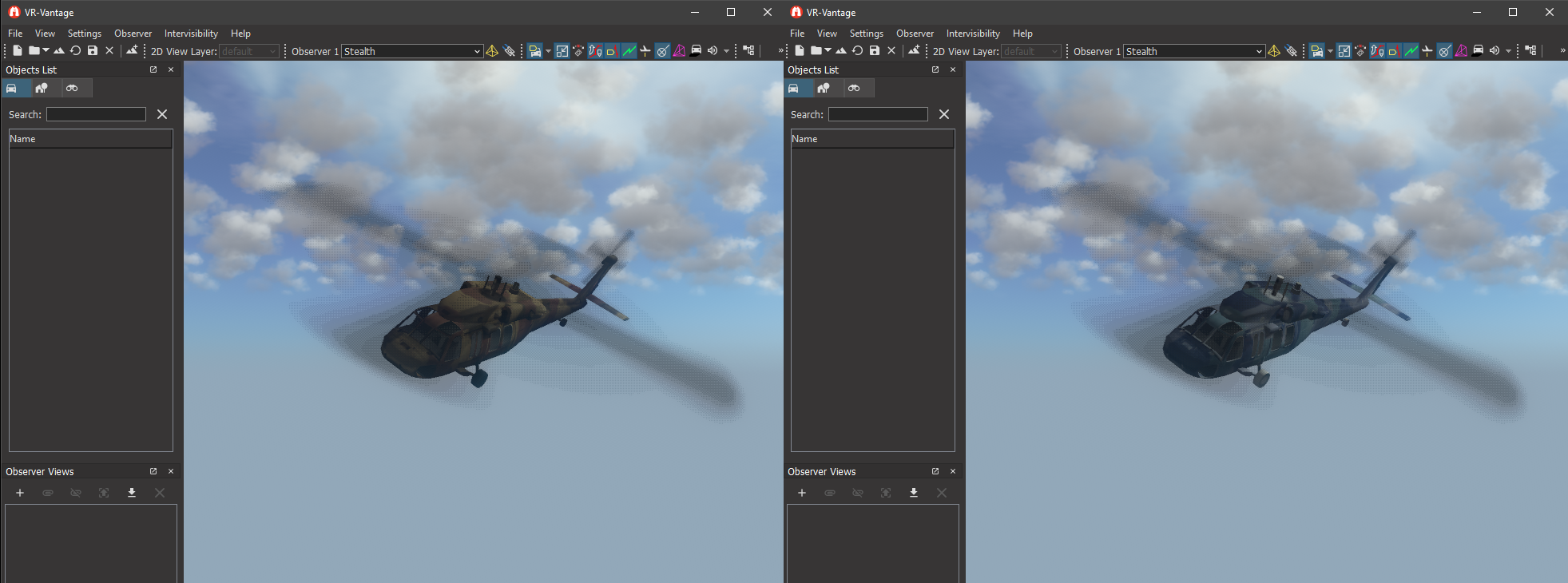
Effect Texure Plugin Result
Example details
VR-Vantage has a concept of Effect Textures. These effect textures allow you to have additional textures on a model without needing to edit the actual model file. This is how normal maps, emissivity maps, or any other secondary textures are configured in VR-Vantage. See section 24.7 of the VR-Vantage Users Guide for an explaination of the effect textures that are currently supported.
This example shows how to create a custom effect texture type and configure it to be applied to any model that has specially named textures.
The class DtExampleEffectTextureController is the main class to look at for this example. The constructor sets up the vertex and fragment shaders that will be used when an EET texture is loaded. The generateShaders() function sets up the final version of the shader text and loads the shaders as virtual program functions (see exampleCustomShader for an explaination about how virtual programs work). getEffectTypeCode() specifies which texture Postfix should be used to determine if this effect texture controller should be used.
Building the Example
VR-Vantage includes pre-built versions of the example plug-in. To build it yourself, follow the instructions at Building VR-Vantage Examples, Applications, and Plug-ins.
Running the Example
This example is a plug-in. You can run it by running ./bin64/exampleEffectTexturePlugin_stealth.bat (on Windows) or ./bin64/exampleEffectTexturePlugin_stealth.sh (on Linux). Please add your shared data dir to the script in order to allow it to work correctly. This example is intended to be run without a terrain. Use your mouse wheel to get closer to the helicopter. Press 't' to change the effect on the helicopter. For more information about running examples, please see Running Applications and Examples. Close the open Terrain dialog to see the Helicopter that is loaded by the example.
The script that runs the example will also create the EET texture used by the example. On windows you may have to run the script in admin mode.
When running the example push the T key to turn the effect on or off. Notice the camo on the helicopter switch from blue to brown when the effect texture is toggled.
Example Source Files
DtExampleEffectTextureController.cxx
#include <matrix/vlMath.h>
#include <osg/StateSet>
#include <osg/Texture>
#include <osg/Texture2DArray>
#include <osgEarth/VirtualProgram>
#include <osgEarth/StringUtils>
using namespace makArchives;
namespace makVrv
{
const std::string ExampleMapFragFunctionName = "example_effect_texture_frag";
const std::string ExampleMapVertFunctionName = "example_effect_texture_vert";
const std::string ExampleMapFragFilePath = "../../../examples/exampleEffectTexturePlugin/exampleEffect.frag.glsl";
const std::string ExampleMapVertFilePath = "../../../examples/exampleEffectTexturePlugin/exampleEffect.vert.glsl";
const std::string ExampleMapIndirectFragFilePath = "/../../examples/exampleEffectTexturePlugin/exampleEffect.frag.glsl";
const std::string ExampleMapEffectUnitName = "example_effect_texture_tex";
const std::string ExampleMapPostfix = "EET";
osg::ref_ptr< osg::Uniform > DtExampleEffectTextureController::effectEnabledUniform = NULL;
void DtExampleEffectTextureController::toggleEffectEnabled()
{
if(effectEnabledUniform != NULL)
{
bool curVal = false;
effectEnabledUniform->get(curVal);
effectEnabledUniform->set(!curVal);
}
}
DtExampleEffectTextureController::DtExampleEffectTextureController(
DtDe& de)
{
if(!effectEnabledUniform)
{
effectEnabledUniform = new osg::Uniform("vrv_exampleEffectTextureEnabled", true);
}
DtEffectTextureRegistry& registry = DtEffectTextureRegistry::instance(de);
registry.registerEffectTextureType(
ETT_CUSTOM_MAP,
"example map",
"ETT_CUSTOM_MAP",
"EET",
false);
DtIndirectEffectTextureShader(ExampleMapFragFunctionName, ExampleMapIndirectFragFilePath,
1.75, "example_effect_texture_tex64", "example_effect_texture_coord"));
}
DtExampleEffectTextureController::~DtExampleEffectTextureController()
{
}
bool DtExampleEffectTextureController::installShaders(int baseUnit, int effectUnit, const osg::Texture* tex, osg::StateSet* stateSet, const std::string& baseTextureName) const
{
DtVirtualProgramParams params;
params.vertShader = ExampleMapVertFilePath;
params.fragShader = ExampleMapFragFilePath;
params.vertFunction = ExampleMapVertFunctionName;
params.fragFunction = ExampleMapFragFunctionName;
params.vertFuncLoc = osgEarth::VirtualProgram::LOCATION_VERTEX_VIEW;
params.fragFuncLoc = osgEarth::VirtualProgram::LOCATION_FRAGMENT_LIGHTING;
params.fragExecPrio = 1.75;
params.unitWhoseCoordsToReplace = baseUnit;
params.effectUnitName = ExampleMapEffectUnitName;
osgEarth::VirtualProgram* vp = installVirtualProgram(baseUnit, effectUnit, tex, stateSet, baseTextureName, params);
stateSet->addUniform(effectEnabledUniform);
return vp != NULL;
}
DtOsgEffectTextureController* DtExampleEffectTextureControllerCreator::create(
DtDe& de)
{
return new DtExampleEffectTextureController(de);
}
}
DtExampleEffectTextureController.h
#pragma once
#include <osg/StateSet>
#include <osg/Texture>
using namespace makArchives;
namespace makVrv
{
{
public:
DtExampleEffectTextureController(
DtDe& de);
virtual ~DtExampleEffectTextureController();
virtual bool installShaders(int baseUnit, int effectUnit, const osg::Texture* tex, osg::StateSet* stateSet, const std::string& baseTextureName) const;
static void toggleEffectEnabled();
private:
static osg::ref_ptr< osg::Uniform > effectEnabledUniform;
static const std::string myVertSource;
static const std::string myFragSource;
};
{
public:
virtual DtOsgEffectTextureController* create(
DtDe& de);
};
}
exampleEffectTexturePlugin.h
#ifndef EXAMPLEEFFECTTEXTUREPlugin_H_
#define EXAMPLEEFFECTTEXTUREPlugin_H_
#ifdef _WIN32
#ifdef EXAMPLEEFFECTTEXTUREPLUGIN_EXPORTS
#define DT_DLL_EXAMPLEEFFECTTEXTUREPLUGIN __declspec ( dllexport )
#else
#define DT_DLL_EXAMPLEEFFECTTEXTUREPLUGIN __declspec ( dllimport )
#endif
#else
#define DT_DLL_EXAMPLEEFFECTTEXTUREPLUGIN
#endif
#endif
exampleEffectTexturePluginInit.cxx
#include <osg/PositionAttitudeTransform>
static const std::string dataFile =
"/ModelData/Vehicles/RotaryWing/UH-60L_BLACK_HAWK_DESERT_CAMO_V7.0/DB_UH-60L_DESERT_CAMO_V7.0.medf";
using namespace makVrv;
static vrvSignalsLib::connection postInitializeConnection;
void slot_postInitialize(
DtDe* de)
{
md.setParameter("filename", sharedDataPath+dataFile);
{
delete mi;
return;
}
osg::ref_ptr<osg::PositionAttitudeTransform> pat =
new osg::PositionAttitudeTransform();
pat->setPosition(osg::Vec3(0,100,0));
pat->setAttitude(osg::Quat(
osg::DegreesToRadians(-10.0f), osg::Vec3(1.0f, 0.0f, 0.0f),
osg::DegreesToRadians(-30.0f), osg::Vec3(0.0f, 1.0f, 0.0f),
osg::DegreesToRadians(150.0f), osg::Vec3(0.0f, 0.0f, 1.0f)));
if ( obsFrame )
{
"Toggle Example Effect Texture" );
}
postInitializeConnection.disconnect();
}
{
return true;
}
using namespace makArchives;
namespace makVrv
{
namespace vrvExampleEffectTexturePlugin
{
{
ecf.
registerCreator(
"DtExampleEffectTextureController",
new DtExampleEffectTextureControllerCreator());
&slot_postInitialize, &de));
}
}
}
exampleEffectTexturePluginInit.h
#pragma once
#define DT_DE_PLUGIN_EXPORT_MACRO DT_DLL_EXAMPLEEFFECTTEXTUREPLUGIN
namespace makVrv
{
class DtDe;
namespace vrvExampleEffectTexturePlugin
{
}
}
[<< Examples] [Home] [Top of Page]