 |
VR-Forces 4.0.4 Class Documentation
|
|
VR-Forces 4.0.4 Class Documentation
|
Note:
VR-Forces consists of several APIs that you can use together or separately to build computer generated forces (CGF) applications and other distributed simulation applications. The APIs are:
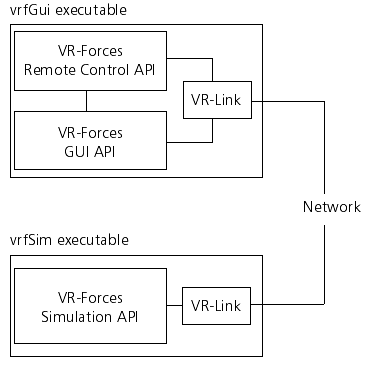
VR-Forces includes two executable programs, vrfSim and vrfGui, that use these APIs. The vrfGui executable is a graphical user interface that provides a two-dimensional plan view display and the ability to create and manage individual entities, aggregate entities, and control objects. The vrfSim executable is the simulation engine that responds to user actions in vrfGui and sends out the data that vrfGui displays. VR-Forces Users Guide explains how to use the VR-Forces executable programs.
The figure illustrates how the VR-Forces APIs are used in the VR-Forces programs.
The VR-Forces Simulation API, also known simply as the VR-Forces API, provides a wide variety of classes and functions needed to implement a CGF simulation engine. The API gives you access to libraries of code for the elements required to execute a simulation, such as:
Furthermore, it provides a simulation engine infrastructure that ties all of this functionality together. The vrfSim application that comes with VR-Forces uses the VR-Forces Simulation API.
You can use the VR-Forces Simulation API to embed the CGF simulation engine into custom applications. You can customize or extend the functionality of the simulation engine, whether you are creating a plug-in to extend vrfSim, building your own extended vrfSim application, or as part of a larger application. An application that uses the VR-Forces Simulation API is said to be a VR-Forces-based application, or a VR-Forces application.
The VR-Forces Simulation Engine provides an introduction to the VR-Forces API. It describes how to embed CGF functionality into a custom application, extend the vrfSim application through plug-ins, or rebuild the vrfSim application that is delivered with VR-Forces. The focus is on the DtCgf class - the top-level class in the VR-Forces API. Other chapters describe the other elements of the VR-Forces API - the classes that represent objects, simulation components, tasks, messages, and so on. The DtCgf class uses these classes to perform most of its work, and you will often need to subclass these classes if you want to extend or customize the behavior of the VR-Forces simulation engine.
The VR-Forces Graphical User Interface (GUI) API provides the code libraries that implement the VR-Forces GUI. You can use this API to customize or extend vrfGui, or to embed its functionality into an instructor/operator station or other application.
The VR-Forces front-end is built using the VR-Vantage SDK. For complete details, please see VR-Forces Front-End Developers Guide.
VR-Forces uses VR-inTerra to handle terrain management. VR-inTerra is a set of classes that enable applications to read, write, and query terrain databases. Using the VR-inTerra API you can:
The VR-Forces GUI uses the terrain API to access the geometry and vector data it needs to display the terrain data. The VR-Forces simulation engine uses the terrain API to perform terrain intersection tests for modeling ground vehicle movement, and line of sight in its sensor model.
The Terrain API describes the Terrain API.
The VR-Forces Remote Control API is a set of classes that allow an application to control one or more remote VR-Forces applications. The VR-Forces GUI (the vrfGui executable) uses the VR-Forces Remote Control API to control the vrfSim application or other VR-Forces applications. The Remote Control API can also be used in custom VR-Forces front-ends, simulation managers, or instructor/operator stations.
The Remote Control API contains no GUI-related code. You can use it as easily in an application that uses scripts or command-line input as you can in a GUI-based application. You can use it in any application that needs to control remote VR-Forces simulation engines.
The VR-Forces Remote Control API describes the VR-Forces Remote Control API.
Some classes and libraries are shared among two or more of the VR-Forces APIs. For example, both the GUI API and the Simulation API use the same set of classes to represent terrain, and both the Simulation API and the Remote Control API use the same classes to represent tasks and plans.
The VR-Forces APIs rely on VR-Link to handle DIS and HLA networking. For example, the Remote Control API uses VR-Link to send control messages to VR-Forces. The Simulation API uses VR-Link to send out information about the objects it is simulating, and to find out about other objects in the simulated world that it needs to interact with. The GUI API uses VR-Link to find out about all of the objects in the exercise so that it can depict them on the map. A VR-Forces developer’s license includes a license for VR-Link so that you can use VR-Link functions and classes directly from applications that use any of the VR-Forces APIs.
VR-Link provides a protocol-independent interface to DIS and HLA. If you use it, you do not need to know the lower level details of these protocols to build VR-Forces applications. VR-Forces applications can take advantage of VR-Link’s tools for managing objects and interactions, such as reflected entity lists.
If you are not already familiar with VR-Link, we recommend that you review the conceptual material in VR-Link Developer’s Guide and the description of the protocol independent interface.
[Home] [Top of Page] [Extending VR-Forces: Plug-ins or Stand-Alone Applications >>]