 |
VR-Forces 4.10 Class Documentation
|


All Classes Namespaces Files Functions Variables Typedefs Enumerations Enumerator Properties Friends Macros Groups Pages
|
VR-Forces 4.10 Class Documentation
|
A wrapper class for toolbar widgets. More...
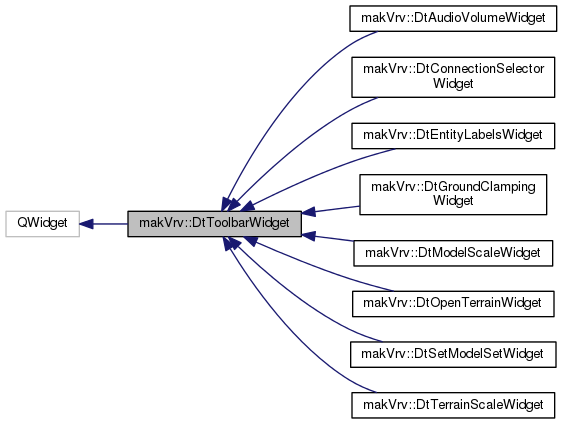
Public Member Functions | |
| DtToolbarWidget (QWidget *p=0, Qt::WindowFlags f=0) | |
| CTOR The parent widget should be a QToolBar so that we can connect to its toolButtonStyleChanged(Qt::ToolButtonStyle) signal. More... | |
| virtual | ~DtToolbarWidget () |
| DTOR. More... | |
| void | setToolButtonChecked (bool checked) |
| Set/Get whether or not the tool button is checked. More... | |
| bool | isToolButtonChecked () const |
| void | setToolButtonStyle (Qt::ToolButtonStyle style) |
| Set/Get the current toolbutton style If myToolButton is uninitialized, the getter defaults to returning Qt::ToolButtonFollowStyle. More... | |
| Qt::ToolButtonStyle | toolButtonStyle () const |
Protected Slots | |
| virtual void | on_toolButtonStyleChanged (Qt::ToolButtonStyle val) |
| Updates widget to match the new ToolButtonStyle. More... | |
| virtual void | on_toolButtonClicked (bool checked)=0 |
| Slot when this widget's toolbutton has been clicked. More... | |
| virtual void | on_aboutToShow () |
| Slot for when the menu for this widget is about to be shown The slot is only used if this toolbar widget is configured to have a menu. More... | |
Protected Member Functions | |
| virtual void | configureToolButton (const QString &text, const QString &tooltip, const QString &iconPath, bool checkable=false, bool hasMenu=false, QToolButton::ToolButtonPopupMode menuMode=QToolButton::DelayedPopup) |
| Configure the QToolButton for this toolbar widget. More... | |
| virtual void | setWidgetsVisible (bool visible) |
| Called whenever the ToolButtonStyle has changed. More... | |
Protected Attributes | |
| QToolButton * | myToolButton |
| QHBoxLayout * | myWidgetLayout |
A wrapper class for toolbar widgets.
A DtToolbarWidget is a widget that is a child to a QToolBar. A DtToolbarWidget is composed of a QHBoxLayout (myWidgetLayout).
The class is responsible for ensuring the toolbar widget appearance is consistent with the current tool button style of the parent toolbar. In order for this to work properly, inheriting tool button widget classes need to: 1) During setup of GUI, A) Use utility method configureToolButton(...) OR configure myToolButton directly. B) Use myWidgetLayout as the main layout, e.g. to add custom child widgets 2) Call setToolButtonChecked(bool checked) to update state when needed 3) Define abstract methods: on_toolButtonClicked 4) Define setWidgetsVisible to toggle the visibility of custom child widgets
| makVrv::DtToolbarWidget::DtToolbarWidget | ( | QWidget * | p = 0, |
| Qt::WindowFlags | f = 0 |
||
| ) |
CTOR The parent widget should be a QToolBar so that we can connect to its toolButtonStyleChanged(Qt::ToolButtonStyle) signal.
|
virtual |
DTOR.
| void makVrv::DtToolbarWidget::setToolButtonChecked | ( | bool | checked | ) |
Set/Get whether or not the tool button is checked.
| bool makVrv::DtToolbarWidget::isToolButtonChecked | ( | ) | const |
| void makVrv::DtToolbarWidget::setToolButtonStyle | ( | Qt::ToolButtonStyle | style | ) |
Set/Get the current toolbutton style If myToolButton is uninitialized, the getter defaults to returning Qt::ToolButtonFollowStyle.
| Qt::ToolButtonStyle makVrv::DtToolbarWidget::toolButtonStyle | ( | ) | const |
|
protectedvirtual |
Configure the QToolButton for this toolbar widget.
| text | The text the QToolButton will display |
| tooltip | The tooltip of the QToolButton |
| iconPath | The absolute path to use for the tool button's QIcon |
| checkable | Whether or not the created QToolButton is checkable |
| hasMenu | Whether or not the created QToolButton has a menu |
| menuMode | The mode that controls how the menu is shown (ignored if hasMenu is false) |
|
protectedvirtual |
Called whenever the ToolButtonStyle has changed.
| visible | Whether or not any custom widgets are visible This function should update the visibility of all widgets that are specific to the inheriting child class. |
Reimplemented in makVrv::DtAudioVolumeWidget, makVrv::DtModelScaleWidget, and makVrv::DtEntityLabelsWidget.
|
protectedvirtualslot |
Updates widget to match the new ToolButtonStyle.
| val | The current ToolButtonStyle of the parent QToolBar This function calls setWidgetsVisible(val != Qt::ToolButtonTextOnly) and does nothing when val is Qt::ToolButtonFollowStyle. |
|
protectedpure virtualslot |
Slot when this widget's toolbutton has been clicked.
| checked | Whether or not the QToolButton is checked or not |
|
protectedvirtualslot |
Slot for when the menu for this widget is about to be shown The slot is only used if this toolbar widget is configured to have a menu.
If so, the child class should override this definition to populate myToolButton->menu().
|
protected |
|
protected |