 |
VR-Forces 4.10 Class Documentation
|


All Classes Namespaces Files Functions Variables Typedefs Enumerations Enumerator Properties Friends Macros Groups Pages
|
VR-Forces 4.10 Class Documentation
|
All VR-Forces applications have an instance of a DtVrfObjectManager (vrfObjMgr.h).
It is one of the top-level managers maintained by the DtCgf class. The Object Manager creates and maintains local objects. It also instantiates local instances of remotely simulated objects. Generally speaking, a simulated object is an individual entity, a unit, or a control object. The Object Manager maintains lists of each object type. It provides a callback mechanism to notify applications when objects are added or deleted. If you need to know about an object, you go to the Object Manager.
The Object Manager reads the object parameter database and uses this information when objects are created. It is also responsible for reading and writing the order of battle file. The Object Manager registers with the Simulation Manager’s message executive to receive all DtDeliverRadioMessageType messages, and directs them to the appropriate radio channel.
The Object Manager monitors the network for state updates from remote objects in an exercise and for VR-Forces-specific state information. When it detects the presence of a new remote object, it creates a new remote DtVrfObject to represent it and adds it to list of objects to be managed.
The Object Manager is responsible for saving and restoring the state of locally simulated simulation objects as part of a scenario or checkpoint. It reads and writes the order of battle file. It uses the DtReaderWriter mechanism to save/restore itself to file. (For details, please see 16 - Reading and Writing Files.) Almost all of the data members in the state repositories can read and write their data, and therefore are saved as part of an object’s entry in the order of battle file.
The Object Manager is one of the manager objects created by the DtCgf object. The DtCgf object takes responsibility for deleting the Object Manager at the end of the simulation. You can create your own derived Object Manager. For a description of the process, please see 2.4.2 The VR-Forces Creator.
All simulated objects are instances of DtVrfObject (vrfObject.h). The different types of simulated objects (entities, units, and control objects) are not distinguished by the classes used to instantiate them. For example, there is no control object class or ground vehicle class. Instead, object types are distinguished by the managers, interfaces, and state repository that they have.
All objects have:
DtVrfObjects contain instances of the following items through a has-a relationship:
Component Manager (DtSimComponentManager).
All objects have a state repository and network interface. Control objects have only these two subcomponents. Only simulation objects (entities and units) use the other subcomponents. State repositories and network interfaces are described in this chapter. The other subcomponents are described in 4 - Simulation Objects.
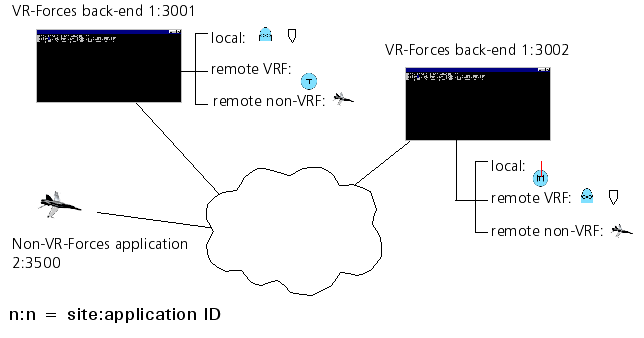
From the point of view of a particular VR-Forces application, a local object is any object that it simulates. A remote object is an object that is received over the network from another application. A VR-Forces application participating in an exercise may know about both local and remote objects.
There are two categories of remote objects - objects simulated by VR-Forces applications, and objects simulated by applications other than VR-Forces, such as the VR-Link F18. When VR-Forces learns about a non-VR-Forces remote object, it knows only what is transmitted in the standard DIS or HLA message. By contrast, VR-Forces objects share additional state information over the network, such as echelon ID and label.
The figure illustrates how objects simulated by different VR-Forces applications and a non-VR-Forces application appear to VR-Forces applications. In this figure, application 1:3001 simulates a waypoint and a fixed-wing entity. Application 1:3002 simulates a tracked entity. A non-VR-Forces application is also running on the network.
The DtVrfObjectManager class contains a DtSpatialVrfObjectManager, which it uses to spatially organize specified DtVrfObjects. A filter function predicate determines which DtVrfObjects are spatially sorted, to let you easily change the sorting in a derived class. Additionally, the creation, initialization, and use of the DtSpatialVrfObjectManager class is all performed in the appropriate functions, allowing for user modification.
A simple algorithm is used to determine the spatial organization configuration (number of subdivisions in each dimension). Also, all DtVrfObjects are stored in the Spatial Manager, including routes, waypoints, and so on.
To access the spatially sorted vrfObjects, the getVrfObjects() functions are provided to get all vrfObjects that may intersect the specified primitive (currently only DtChord or DtExtent). The resulting set contains all objects that may intersect the chord or extent. Not all are guaranteed to do so, but the set will not be missing any that actually do. If the exact intersection is required, as for line-of-sight testing in the vrfObjectStateRepository, then further refinement is required.
[Home] [Top of Page] [How the Object Manager Creates an Object >>]