 |
VR-Forces 4.2 Class Documentation
|
|
VR-Forces 4.2 Class Documentation
|
The Remote Draw API supports the display of groups of text:value pairs called Attributes.
The values can be displayed in a variety of ways. The attributes themselves are organized into Attribute Groups. Attribute Groups can be placed in the 3D scene using DtVdc3DAttachPoint objects. Attribute Group positions are projected onto the 2D overlay, where the text and value graphics are drawn. Therefore, they are not occluded by terrain.
An Attribute Group is created by referencing an Attribute Group Template. Attribute Group Templates, in turn, are groups of Attribute Templates. Attribute Templates determine the text for each attribute that will be displayed, and the member function used to display the associated value.
Attribute Templates, Attribute Group Templates, and Attribute Groups are all Draw Control objects. Attribute Group Templates are created using a constructor in the same way that other Draw Control objects are created. Attribute Templates are then created using member functions provided by the Attribute Group Templates.
Attribute Groups are then created by referencing an existing Attribute Group Template, and positioned.
The following figures illustrate a view of the Attribute Group Templates tab of the Remote Graphics Panel and the display of attributes for the entity and packet attributes groups.
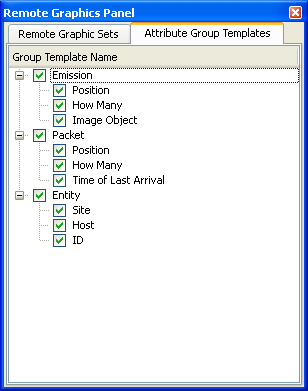
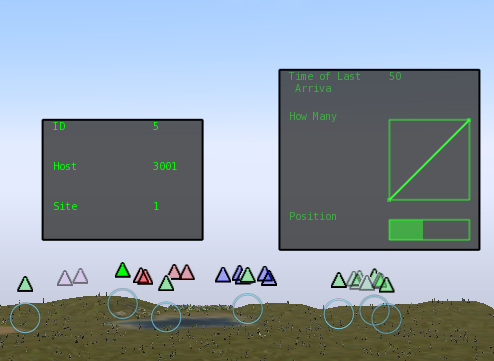
The DtAttributeGroupTemplateObject class represents Attribute Group Templates. The constructor takes an ID (like all Draw Control Objects), and a name.
To create an Attribute Template, use the DtAttributeGroupTemplateObject member function createAttributeTemplate(). It has two forms. Use the first form to create all Attribute Template types except for the Bar type Attribute Template, which requires two extra parameters. Attribute Template types are represented by the DtAttributeTemplateObject::DtVdcAttributeType enumeration. The follwoing table describes the DtAttributeTemplateObject templates.
| DtAttributeTemplateObject Templates | |
|---|---|
| Attribute Template Type | Description |
| DtVdcAttributeTypeNoValue | The NoValue Attribute Template type allows for attributes with no associated value (just the Attribute Template name is displayed.) |
| DtVdcAttributeValueNumeric | The ValueNumeric Attribute Template type displays a value in its numeric form. |
| DtVdcAttributeTypeValueBar | The ValueBar Attribute Template type displays a value using a bar that indicates where the value falls relative to a specified minimum and maximum value. |
| DtVdcAttributeTypeValueGraph | The ValueGraph Attribute Template type maintains the last 10 X,Y values sent and displays them as a line graph. |
| DtVdcAttributeTypeBitmap | The Bitmap Attribute Template type displays a bitmap (.bmp file) whose name is the attribute value (if given as a relative path, the filename is relative to the directory VR-Forces was run from.) |
The following example creates and tells VR-Forces about an Attribute Group Template named "Entity," which contains two Attribute Templates: a ValueNumeric named "Speed:" and a ValueBar named "Health:" that goes from a minimum value of 0.0 to a maximum value of 1.0.
DtAttributeGroupObject is used to represent an Attribute Group. An Attribute Group is an instance of an Attribute Group Template. It is positioned in 3-space using a DtVdc3DAttachPoint, and can be offset from that. A pointer to the referenced Attribute Group Template is provided to the Attribute Group's constructor. You can specify the color used to display Attribute Group's name and attributes and can set it to flash.
Attribute instances are only created by VR-Forces. Values for specific attributes are set through the Attribute Group object by referring to the ID of the Attribute Template that corresponds to the Attribute value you want to set.
The following example creates an Attribute Group attached to a DtReflectedEntity pointed to by pEntity, based on the Attribute Group Template created in 11.7.2 Attribute Templates. The example sets the Speed Attribute value to the speed of the reflected entity it is attached to, and sets the Health Attribute to one. It displays the Attribute Group.
To update the speed Attribute for the Attribute Group and inform VR-Forces, do the following:
To hide all speed attributes created by using the Attribute Group Template, do this:
[<< 3D Objects] [Home] [Top of Page] [Remote Graphic Sets >>]