VR-Forces 5.0.1 Developer's Guide
 All Classes Namespaces Files Functions Variables Typedefs Enumerations Enumerator Properties Friends Macros Groups Pages
exampleSimData

Table of Contents

Overview

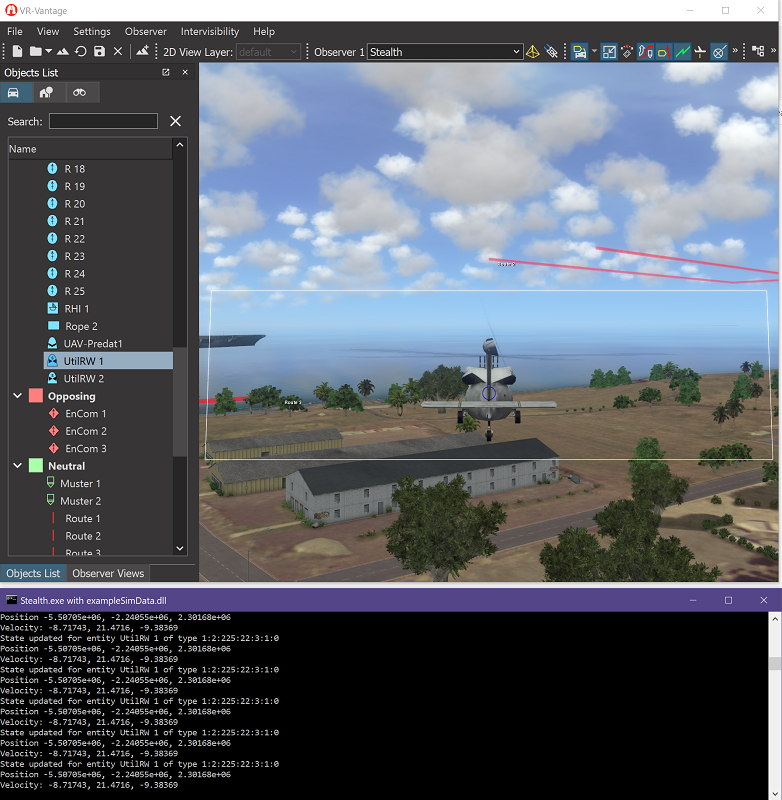
Shows how to access simulation data.

Expected Result

exampleSimData2.png
Sim Data Result

Example details

This example illustrates the use of simData collection and stateViews to access remote simulation data. In VR-Vantage, the network connection(s) (DIS, HLA13, etc.) runs in separate threads. As much of the data received by the connection as possible is processed in the connection itself; only the data needed for rendering or driving the VR-Vantage GUI is transmitted across the thread boundary(s). Given that an exercise may contain thousands of entities, and a fairly large amount of data may be transmitted about each entity, only moving the data that is necessary across the thread boundary can provide a substantial performance benefit. Each simulation object has an associated simEntry that manages this simulation data. The simData object is the collection of these simEntries (indexed by uniqueId).

VR-Vantage provides a mechanism for applications to request that this extra simulation data, or simData, be collected; and to request, at periodic intervals, snapshots or views of this data, called stateViews, on the simEntries associated with specific objects from the connection that it may need. For example, the DIS/RPR 7-digit entity type is not used outside the connections, but an application might need this for some reason (perhaps, to display in a GUI dialog). This example uses a standard pre-defined stateView that contains most of the information normally found in a DIS/RPR entity update; however, it is possible for users to create their own state view object types that contain only the simEntry data of interest to that subscriber.

In this example, a driver is created by a plugin which enables simData collection and then listens for signals that indicate that an observer has attached to or detached from an entity. On attachment, the driver requests a stateView on the simEntry for the attached-to entity at 1 second intervals and displays a few of the returned fields to the console; when the observer detaches, it cancels the stateView request.

Creating and Initializing the Driver

The first step is to create the driver. Since this must be done AFTER the display engine has been initialized, the plugin registers for the display engine's postInitialize signal.

// We only want to create the driver if we're running in master mode:
if (de.isInMasterMode())
{
// The driver must be created after the DE's initialization is
// finished, to make sure all the objects it uses exist.
}

When the display engine has been initialized, the method registered with the signal is invoked. The method disconnects itself from any further signals.

It then creates the driver and adds it to the driver manager.

de->agentManager(), "StateViewDriver1");
// After the driver is added to the display engine below, the DE will manage
// its memory. The driver will be started automatically when added since we
// set the autoStart property in its CTOR
de->driverManager().addDriver(driver);

The example StateView Driver initializes itself in its onStart() method. First, it registers a callback, handleAttachToChanged(), on the attachedTo signal so it will know when attachment changes occur.

DtAttachManager* attachManager = &(DtAttachManager::instance(myAgentManager.de()));
if (attachManager)
{
attachManager->signal_attachedToChanged.connect(
}

It also attaches to the simObjectEntryAboutToBeRemoved signal. This allows the driver to delete any cached stateView when the simEntry that stateView is associated with goes away.

//! Connect to the attachment changed signal
attachManager->signal_attachedToChanged.connect(

Finally, it requests that simData collection be enabled. This is a global setting that only needs to be set once in the application. By default, simData collection is disabled.

// enable sim data processing
DtWriteSettingsLock<DtSharedEntityDisplaySettings> settings(
DtSharedSettingsManager::instance(myAgentManager.de()));
settings->setEntitySimDataEnabled( true );

Requesting a StateView

When handleAttachToChanged() is called because the observer's attachment state has changed, it first checks to see if the observer's attachment list is empty. If it is, it deletes the current stateView (if any). Otherwise, it creates a stateView and requests updates for the attached-to entity. To do so, it must first find the DtSimEntry for the entity.

// elementId is the id of e.g. a simulation element
DtUniqueID elementId = *observer->primaryAttachments().begin();
disableCurrentStateView();
// First, get the sim ID corresponding to the element
DtSimEntry* entry = findSimEntry(elementId);
if (!entry)
{
DtTHROW_NEW(DtCorruptedState, "Unable to find sim entry for attached object");
}

It can then use the simEntry to create a stateView on that entry. Here, it creates the pre-defined state view which contains data from a VR-Link entity update.

// Create a new state view
myStateView = new DtVrlinkEntityStateView(*entry);

Finally, if the stateView is successfully created, it sets an update rate of 1Hz and connects to the signal that provides the update.

// Connect to the state view's update signal and set its update rate
myStateView->setUpdateRate(DtSimEntryUpdater::At1Hz);
myStateView->signal_stateViewUpdated.connect(

Processing a StateView

The method slot_StateViewUpdated() is connected to the stateView's update signal; the signal provides the actual state update as argument to this method. This is the same stateView object that was used to request the update - it's provided for convenience. slot_StateViewUpdated() just sends some of the data in the state vector to the console.

const DtVrlinkSimulatedEntityState& state = stateView->state();
std::cout << "State updated for entity " << state.myMarkingText
<< " of type " << state.myEntityType << std::endl
<< "Position " << state.myLocation.x() << ", " << state.myLocation.y()
<< ", " << state.myLocation.z() << std::endl
<< "Velocity: " << state.myVelocity.x() << ", " << state.myVelocity.y()
<< ", " << state.myVelocity.z() << std::endl;

Building the Example

VR-Vantage includes pre-built versions of the example plug-in. To build it yourself, follow the instructions at Building VR-Vantage Examples, Applications, and Plug-ins.

Running the Example

This example is a plug-in. You can run it by running ./bin64/exampleSimData_stealth.bat (on Windows) or ./bin64/exampleSimData_stealth.sh (on Linux). Load the Ala Moana terrain from the Load Terrain Dialog ('Ala Moana.mtf'); from the menu "Settings->Connections...", connect to 'DIS (7) localhost'. Then start the MAK Logger for DIS (loggerDIS.exe) and load 'Raid2021-DIS.lgr' and hit play. In Vantage select a moving entity, from the Object List window select the entity and right click and select "Attach Follow". If you now look in the console you will see the print out of the sim data. For more information about running examples, please see Running Applications and Examples.

Example Source Files


exampleSimData.h

/******************************************************************************
** Copyright (c) 2019 MAK Technologies, Inc.
** All rights reserved.
******************************************************************************/
#ifndef EXAMPLESIMDATA_H_
#define EXAMPLESIMDATA_H_
#ifdef _WIN32
#ifdef EXAMPLESIMDATA_EXPORTS
#define DT_DLL_EXAMPLESIMDATA __declspec ( dllexport )
#else
#define DT_DLL_EXAMPLESIMDATA __declspec ( dllimport )
#endif
#else
#define DT_DLL_EXAMPLESIMDATA
#endif
#endif

DtStateViewDriver.h

// /******************************************************************************
// ** Copyright (c) 2019 MAK Technologies, Inc.
// ** All rights reserved.
// ******************************************************************************/
#ifndef DtStateViewDriver_H_
#define DtStateViewDriver_H_
using namespace makVrv;
namespace makVrv
{
class DtObserver;
class DtSimEntry;
}
{
public:
const std::string& instanceName);
virtual ~DtStateViewDriver();
virtual const std::string& className() const;
protected:
virtual bool onStart();
virtual bool onStop();
virtual void slot_displayEngineAdded( const DtDeRecord& igRecord );
virtual bool onTick();
virtual void handleAttachToChanged(DtObserver* observer);
DtSimEntry* findSimEntry( DtUniqueID elementId );
void disableCurrentStateView();
virtual void slot_stateViewUpdated(DtVrlinkEntityStateView* stateView);
virtual void slot_simObjectRemoved(DtSimObjectEntry&);
};
#endif

DtStateViewDriver.cxx

/*****************************************************************************
* Copyright (c) 2019 MAK Technologies, Inc.
* All rights reserved.
*****************************************************************************/
#include <vrvCore/DtDe.h>
#include <stdlib.h>
#include <iostream>
DtStateViewDriver::DtStateViewDriver( DtAgentManager& agentManager,
const std::string& instanceName )
: DtDriver(agentManager, instanceName)
, myStateView(0)
{
std::cout << "Created state view driver" << std::endl;
// Tell the driver to start automatically when added to the DE
setAutoStart(true);
// This driver can't be started or stopped from the GUI; myUserControllableFlag sets this property
myUserControllableFlag = false;
}
{
onStop();
}
const std::string& DtStateViewDriver::className() const
{
// name must be static, since it's returned by reference
static std::string name("DtStateViewDriver");
return name;
}
{
DtAttachManager* attachManager = &(DtAttachManager::instance(myAgentManager.de()));
if (attachManager)
{
attachManager->signal_attachedToChanged.connect(
}
// enable sim data processing
DtWriteSettingsLock<DtSharedEntityDisplaySettings> settings(
DtSharedSettingsManager::instance(myAgentManager.de()));
settings->setEntitySimDataEnabled( true );
return true;
}
{
DtAttachManager* attachManager = &(DtAttachManager::instance(myAgentManager.de()));
if (attachManager)
{
attachManager->signal_attachedToChanged.disconnect(
}
return true;
}
{
// Does nothing
return true;
}
void DtStateViewDriver::slot_displayEngineAdded( const DtDeRecord& igRecord )
{
// When a new display engine is added, we need to restart the driver so that everything is
// correctly created on the new DE.
if (DtDriver::myStartedFlag)
{
stop();
start();
}
}
void DtStateViewDriver::handleAttachToChanged( DtObserver* observer )
{
// If the observer is attached to something, get a state view on it
// and start listening to the state view's updates
if (observer->primaryAttachments().begin()
!= observer->primaryAttachments().end())
{
// elementId is the id of e.g. a simulation element
DtUniqueID elementId = *observer->primaryAttachments().begin();
// First, get the sim ID corresponding to the element
DtSimEntry* entry = findSimEntry(elementId);
if (!entry)
{
DtTHROW_NEW(DtCorruptedState, "Unable to find sim entry for attached object");
}
// Create a new state view
{
// Connect to the state view's update signal and set its update rate
myStateView->setUpdateRate(DtSimEntryUpdater::At1Hz);
myStateView->signal_stateViewUpdated.connect(
}
}
else
{
// The observer isn't attached to anything, so just disable the state view
}
}
{
// Get the simulated entity's state and print out some of it
const DtVrlinkSimulatedEntityState& state = stateView->state();
std::cout << "State updated for entity " << state.myMarkingText
<< " of type " << state.myEntityType << std::endl
<< "Position " << state.myLocation.x() << ", " << state.myLocation.y()
<< ", " << state.myLocation.z() << std::endl
<< "Velocity: " << state.myVelocity.x() << ", " << state.myVelocity.y()
<< ", " << state.myVelocity.z() << std::endl;
}
{
delete myStateView;
}
{
// Now get the sim entry from which the state view will be created
DtSimData& simData = myAgentManager.de().dataBank().simData();
return simData.findSimEntry(elementId);
}
void DtStateViewDriver::slot_simObjectRemoved( DtSimObjectEntry& simObjectEntry)
{
// If the currently active state view's entry is getting removed,
// disable it & zero it out
if (myStateView && simObjectEntry.id() == myStateView->id())
{
}
}

exampleSimDataPlugin.cxx

/******************************************************************************
** Copyright (c) 2019 MAK Technologies, Inc.
** All rights reserved.
******************************************************************************/
#include <vrvCore/DtDe.h>
#include <boost/bind.hpp>
void createStateViewDriver(DtDe* de)
{
// We're done with the signal, so disconnect from it
de->signal_postInitialize.disconnect(boost::bind(
// Create the driver that will create state views
de->agentManager(), "StateViewDriver1");
// After the driver is added to the display engine below, the DE will manage
// its memory. The driver will be started automatically when added since we
// set the autoStart property in its CTOR
de->driverManager().addDriver(driver);
}
void init(DtDe& de)
{
// Ensure that init only gets called once
// (not strictly necessary here, but this is good practice in general)
// We only want to create the driver if we're running in master mode:
if (de.isInMasterMode())
{
// The driver must be created after the DE's initialization is
// finished, to make sure all the objects it uses exist.
de.signal_postInitialize.connect(boost::bind(
}
}
{
// Setup the plugin. Normally, the init function and functionality
// should be in its own library.
init(*de);
return true;
}

[<< Examples] [Home] [Top of Page]


Document ID: Generated on Mon Jun 20 00:38:30 EDT 2022 from SVN revision 244029
Copyright © 2005-2021 MAK Technologies. All Rights Reserved (www.mak.com)