 |
VR-Forces 5.0.3 Developer's Guide
|


All Classes Namespaces Files Functions Variables Typedefs Enumerations Enumerator Properties Friends Macros Groups Pages
|
VR-Forces 5.0.3 Developer's Guide
|
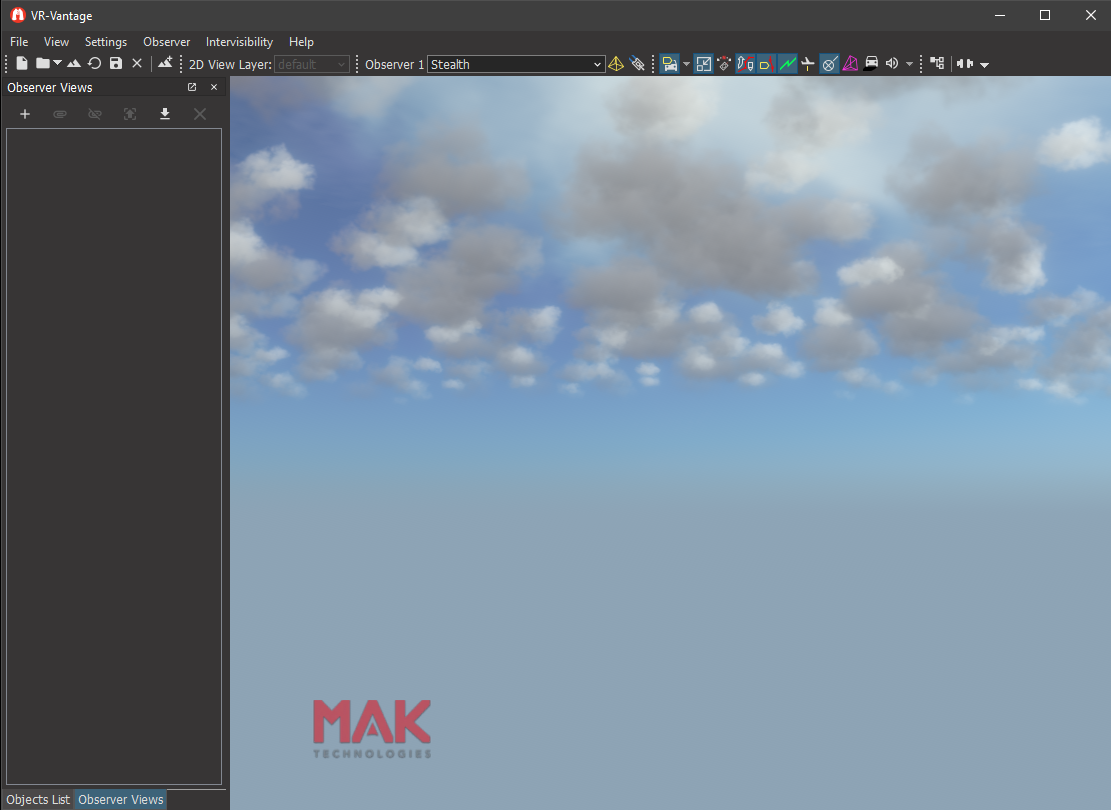
This example shows how to add a 2D Overlay to a channel. We will add a logo to the bottom left hand corner of the channel.
It is important to understand the concept of overlays in VR-Vantage. An overlay is a 2D scene that is drawn on top of a 3D scene. The 2D scene can contain any number of the 2D primitives which include: DtLineSegment, DtQuad, DtFilledPolygon and DtOutlinedPolygon. To draw an overlay we need to add something to the scene graph. In this case we add a DtOverlayDrawable to the scene graph. The DtOverlayDrawable is responsible for telling overlays to render themselves at the appropriate time. The class that implements the overlay concept is the DtOverlayRenderer. The DtOverlayRenderer does the actual drawing of the graphical primitives. The DtOverlayDrawable is told which DtOverlayRenderer it should draw. During the render phase, the DtOverlayDrawable tells the DtOverlayRenderer to render itself and the graphics primitives are then rendered.
So to draw our logo we create a DtOverlayDrawable, give it a DtOverlayRenderer to render, then add a DtQuad to the DtOverlayRenderer. However, since we would like to add a texture to the DtQuad, we will create a new class MyTexturedQuad, which has an osg::ref_ptr that will hold our texture reference.
Overlays can be created that are drawn on a specific channel, on all channels currently rendering a specific model set, or on all channels with the keyword "RemoteGraphics". For our example we will create a channel-specific overlay, in the function createUserOverlay.
Creating the DtOverlayDrawable requires a DtOsgOverlayManager and a DtChannel. Additionally, drawables need to be added to osg::Geodes and somehow added to the scene. Here we add the geode to the scene as a child of the channel's overlay camera. The overlay camera uses an orthographic projection matrix. This has the effect of drawing the graphical primitives in 2D on channel.
DtOverlayRenderers (commonly referred to as the overlay) can be "lazily created" by asking for one that doesn't yet exist. Here we also tell the DtOverlayDrawable to render that specific overlay via the setOverlayToRender call.
Our main routine, addQuad, will look up the first channel, create our user overlay (calling createUserOverlay), create the textured quad on the overlay, assign a texture to it, then position and size it.
VR-Vantage includes pre-built versions of the example plug-in. To build it yourself, follow the instructions at Building VR-Vantage Examples, Applications, and Plug-ins.
This example is a plug-in. You can run it by running ./bin64/exampleLogo_stealth.bat (on Windows from cmd.exe) or ./bin64/exampleLogo_stealth.sh (on Linux). The MAK logo is displayed on top of the scene. For more information about running examples, please see Running Applications and Examples.
[<< Examples] [Home] [Top of Page]