 |
VR-Forces 4.0.4 Class Documentation
|
|
VR-Forces 4.0.4 Class Documentation
|
The classes at Rendering System Layer associate some semantics with the geometry. Instead of just thinking of 3D geometry as generic "nodes", the Toolkit supports application-level concepts like terrain, props, the environment, models, and scene objects. Additionally, the Rendering System Layer contains a DtRenderer that does the actual rendering of pixels to the screen.
The component responsible for drawing 3D images in VR-Vantage is called the makVrv::DtOsgRenderer and each display engine owns one. The makVrv::DtOsgRenderer is derived from a makVrv::DtRenderer which is an abstract base class that provides an interface for updating the scene graph and rendering the scene. Its update() and render() functions are called each display engine tick. The renderer also starts the OSG update traversal for updating all nodes in the scene. After the update traversal is complete, the renderer starts the render traversal, which causes the scene to be rendered on all the available channels.
VR-Vantage organizes the scene graph is a specific way so that things like lighting work properly. The makVrv::DtOsgRenderer provides access to the various OSG nodes, such as the prop root node, and other nodes where various models are added. There are several "roots" under which to add nodes. These are defined in makVrv::DtOsgRenderer::RootDomain and examples include Environment, Terrain and Props.
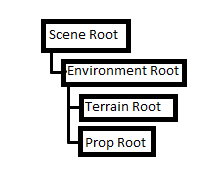
The simplest way to add a model to the scene is to just add nodes as children to one of these roots. In exampleSceneRoot, we load an OpenFlight model and add it to the props root. A prop a non moving object in the scene that lives under the environment. nodes that live under the environment get lit and shadowed.
Many aspects in VR-Vantage a configurable via the GUI such as what 3D model representation an entity is. Under the hood the GUI writes out a makVrv::DtModelDefinition for each piece of content that was specified. The makVrv::DtModelDefinition contains the details required to draw a model, such as geometry, filename, scale, and/or texture. During runtime a makVrv::DtModelInstance is created in a display engine and the makVrv::DtModelDefinition is realized, causing the content to be added to the scene. See exampleModelInstance to learn how to create a makVrv::DtOsgSimpleModelInstance and realize a makVrv::DtModelDefinition to add content to the scene. The makVrv::DtOsgSimpleModelInstance class will load and display any file format supported by OSG and will automatically cache, accelerate, compress, and instance the rendering resources.
A makVrv::DtModel is a managing container for a single makVrv::DtModelInstance, providing more attributes about how the DtModelInstance should be rendered. Initialization of a DtModel starts with giving it a model-definition. Unlike the DtModelInstance which can be handed a model-definition identifying the model to load, the DtModel retrieves a model-definition which has been pre-loaded into a definition-manager. Usually DtModelDefinition objects are automatically loaded from disk to populate the definition-manager.
Initializing a makVrv::DtModel only loads the geometry and prepares it for rendering. The makVrv::DtModel has to be place in the scene to be rendered. To add the model to the scene, a makVrv::DtSceneObject is used to manage the model. The makVrv::DtSceneObject is a container class that 'groups' multiple models into a single scene-object. A scene-object is an association of models that can be manipulated as a single unit. Among other features, the makVrv::DtSceneObject identifies a single position and attitude within the scene for all models associated with it. As such, models are added to (and removed from) the scene object to be inserted to (and removed from) the scene itself. Once constructed the makVrv::DtSceneObject can be positioned and oriented within the scene so that any models added to the object will also be positioned and oriented.
To see how a makVrv::DtModel and makVrv::DtSceneObject are created and used see exampleModelArticulation. This example also illustrates the use of a makVrv::DtOsgArticulatedModel and shows how to move the various pieces of an articulated 3D object.
In most cases it is not necessary to add new model classes. The makVrv::DtOsgSimpleModelInstance class can load and display any file format supported by OSG and will automatically cache, accelerate, compress, and instance the rendering resources. However, if you need custom visualization, it is easy to add new model classes, and add instances that use the model classes to objects in the scene. If you create custom model classes, you use them by creating a schema and model definition for the new model. Then you map it to an entity type for display.

| exampleSceneRoot - Shows how to create a very simple VR-Vantage application and add an OpenSceneGraph model directly to the scene. |

| exampleModelInstance - Shows how to load a Model Instance with a geometry file from disk and add it to a scene root in a DtOsgRenderer. |

| exampleModelArticulation - Shows how to load an articulated Model Instance, add it to a scene-root in a DtOsgRenderer and animate its articulated parts. |
[<< The OpenSceneGraph Layer] [Home] [Top of Page] [The Control Interface Layer >>]